


Skeletal Animation#
Skeletal Animation is an extension you can use in NVIDIA Omniverse™ to animate characters such as Digital Humans for Digital Twins, synthetic data, and other workflows. You can also use it to animate non-humans, such as robots or props. This page describes the skeletal prim family, how to create and find skeleton assets, key properties, and where to find samples.
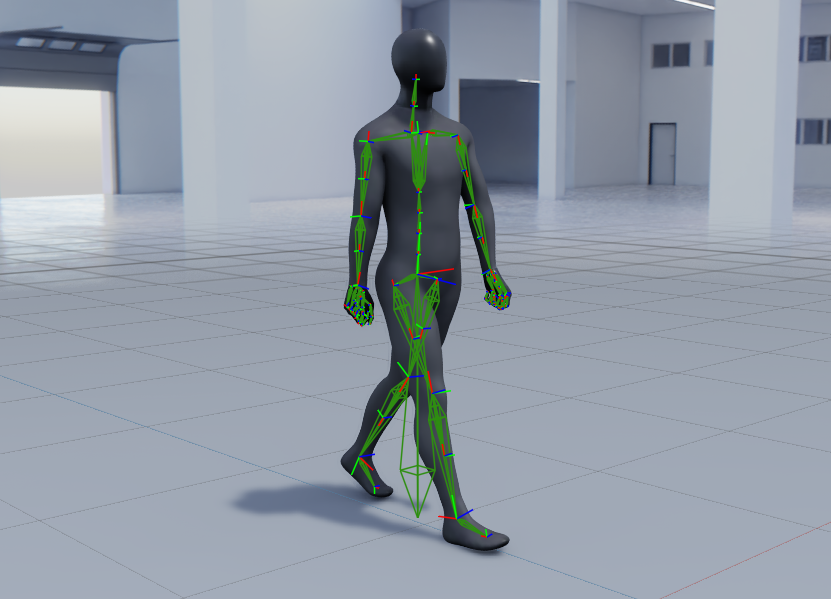
The Skeletal family of prims consists of:
SkelRoot: Usually the parent of a Skeleton. This prim typically also has the skinned mesh bound to the Skeleton and the materials.
Skeleton: The core Prim required for skeletal animation. All joints are children of this Prim.
OmniJoint: Native Omniverse prim type used to articulate joints within a Skeleton.
SkelAnimation: Prim that contains time-sampled transform data used to animate skeletons.
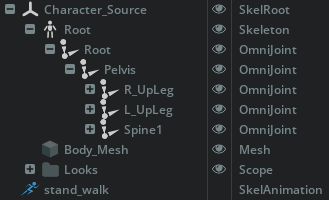
Stage hierarchy view of a Skeletal Animation#
Creating Skeletons and Animations#
Skeletons and animations can be authored in the DCC (Digital Content Creation) application of your choice. Omniverse supports Autodesk Maya and Blender skeletal animation pipelines using USD export from the DCC.
You can also convert skeletal data from popular formats, such as Autodesk FBX, using the Asset Converter.
Finding Skeletons and Animations#
Since Omniverse does not provide skeletons or skeletal animation, you must acquire these assets yourself. Your choices are:
Use digital content creation software capable of making characters, such as Blender, Maya, or 3ds Max, to create your own skeletons and animations. Refer to our catalog of OpenUSD Connections for options for your DCC.
Search online for “rigged characters” on popular 3D asset websites.
Working with Skeletons in Omniverse#
Omniverse includes several tools and extensions that use Skeletal Animation:
SkelJoint: Core capabilities for skeletal animation in Omniverse, layered on top of USD.
Animation Graph (Anim Graph): A runtime framework for skeletal animation blending, playback, and control. Refer to Animation Graph documentation.
Sequencer: A non-linear editor for timing animations and events for film making. Refer to Sequencer documentation.
Animation Retargeting: A tool for transferring animations from one biped to another at runtime. Refer to Animation Retargeting documentation.
Skeleton Visibility#
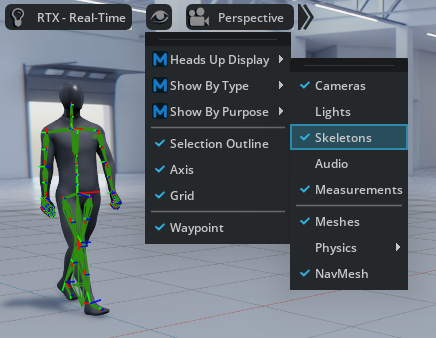
You can control skeleton visibility from the Stage listing on a per-prim basis, or from the viewport visibility toggle Visibility Icon (Eye) > Show By Type > Skeletons.
Skeleton Properties#
Skeleton prims have the following key properties:
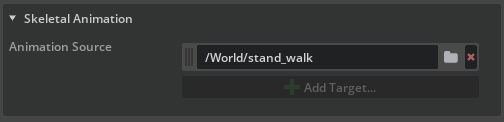
Animation Source#
Assigns a SkelAnimation prim from the scene or from Sequencer.
Note
If an Animation Graph is added to the SkelRoot, it overrides the SkelAnimation property.
Animation and Pose Modes#
This property section allows you to preview and edit a Skeleton’s various pose modes. You must load the SkelJoint extension (omni.anim.skelJoint) to view this section.
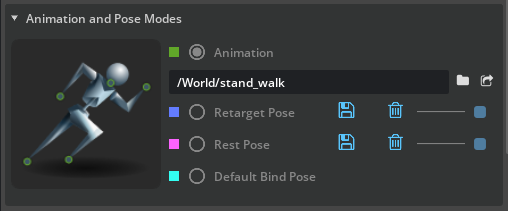
The skeleton color changes as you cycle the pose modes.
Animation: Uses the Animation Source property or Animation Graph input.
Retarget Pose: Preview the current pose set for Animation Retargeting. You can save the current pose as the Retarget Pose or delete it.
Note
Retarget Pose only appears when the character is set up for Retargeting or a Control Rig API is added to the skeleton.
Rest Pose: The default pose of a character if available.
Default Bind Pose: The pose in which the Skeleton and meshes were bound, usually in a DCC.
SkelAnimation Binding#
By default, SkelAnimations do not know which Skeleton they were derived from. Animation Retargeting requires this information to set the baseline for calculating offsets when applying the same animation to another skeleton.
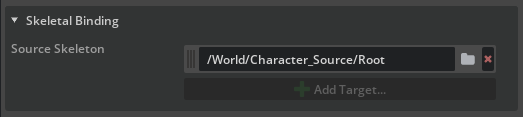
To set the Animation Skel Binding, right-click the SkelAnimation in the Stage and choose Add > Animation > Skeletal Binding. In the Skeletal Binding properties of the SkelAnimation, set Source Skeleton.
Origin Root#
Retargeting and Animation Graph require a root joint at the origin in the SkelRoot and animation content. The Omniverse Animation samples include this root joint.
The root joint helps systems determine where the ground is. The Animation Graph uses this joint to displace the SkelRoot and its children in the world.
Limitations#
While a root joint is not always required, create and include one to get the most from the Omniverse Animation tools.
Joints must have unique names within the skeleton in Omniverse.
Parenting prims to joints is not fully supported.
SkelRoots can only contain one Skeleton.
Animation Graph and Retargeting support joint scaling only fully on the root joint; non-root joint scale may not apply in those workflows.
Samples#
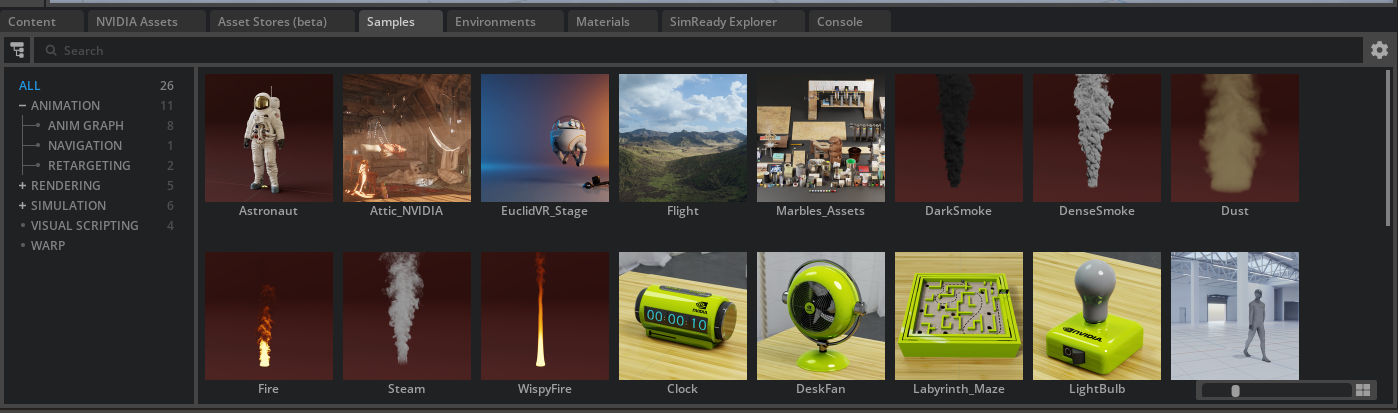
Sample scenes that use Skeletal Animation are available in the Examples panel. Open Window > Browsers > Examples Browser, then go to the Animation group. The Anim Graph, Navigation, and Retargeting sub-groups include Skeletal Animation examples.
Conclusion#
You have learned about the skeletal prim family (SkelRoot, Skeleton, OmniJoint, SkelAnimation), how to create and find skeleton content, key Skeleton properties, and where to find samples. For Animation Graph, refer to Animation Graph. For retargeting, refer to Animation Retargeting.