


Clash Detection Bake API#
The Clash Detection Bake extension (included in the Clash Detection Bundle extension) is an API that allows baking the resulting meshes of a clash detection to a time-sampled OpenUSD layer. The time-sampled OpenUSD layer containing the animated clash plays along with the existing animations.
The Clash Detection Viewport API extension depends on bake extension for both transient (temporary, selection-driven) and persistent (saved per query) visualization: the viewport drives the same bake pipeline to generate meshes and outlines in a session bake layer. Standalone or headless use of the bake API (e.g. for asset delivery or batch pipelines) is unchanged.
The bake API can be used in two ways: headless (e.g. batch pipelines or asset delivery) or interactive.
The Clash Detection UI implements interactive, UI-based on-the-fly baking: users select clashes and trigger “Generate Clash Meshes” from the context menu; baking runs in the background with progress updates, so headless is not the only integration option.
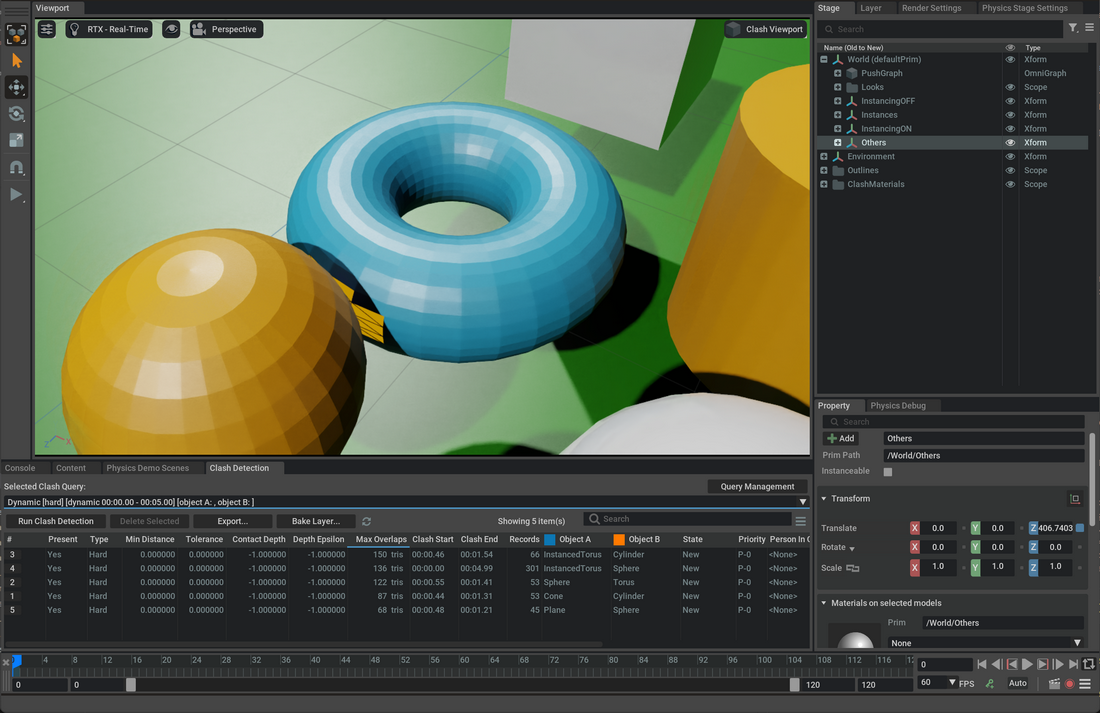
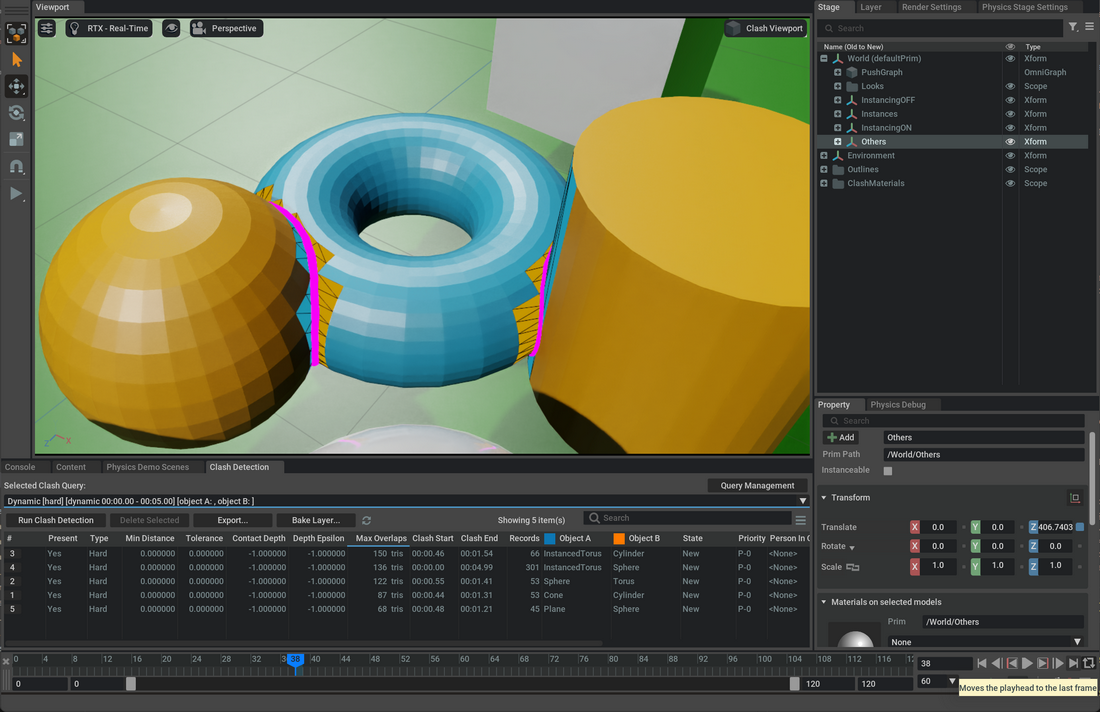
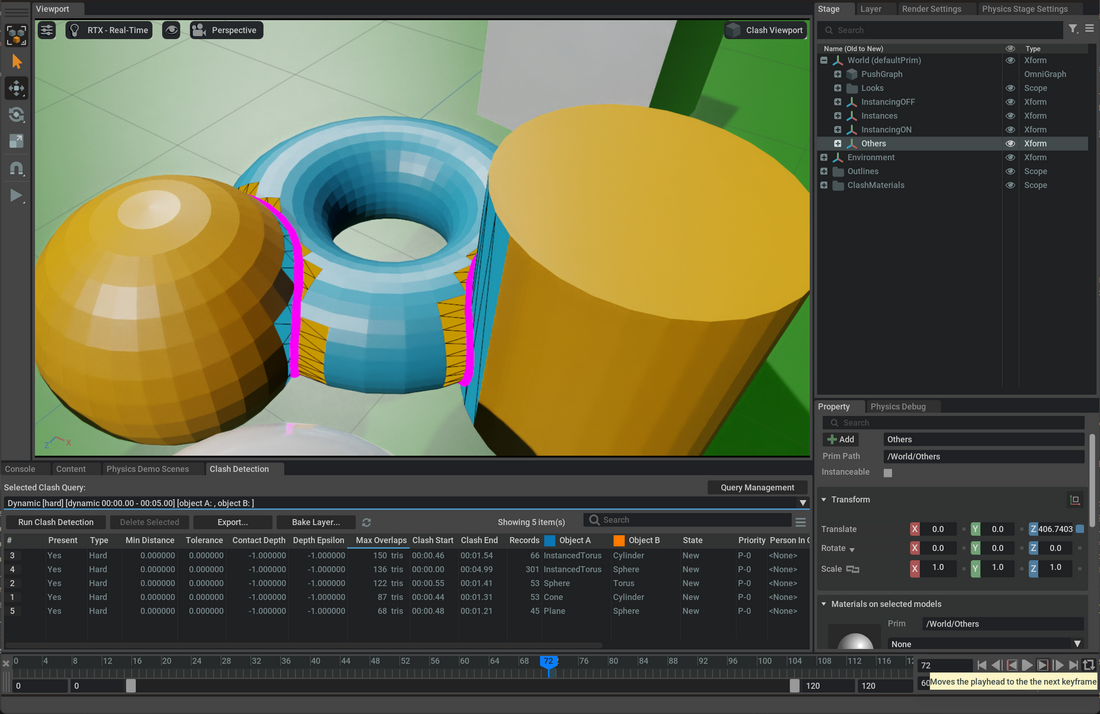
Reference Implementation UI (110.1)#
The Clash Detection UI uses the viewport extension’s bake API for interactive, on-the-fly baking.
There is no need to enable a clash bake layer explicitly: the bake layer is created and attached automatically.
Save, reload, clear, and bake-related settings are available in the Clash Detection Viewport API menu (top right of the main and clash viewports).
Typical Workflow#
Create or select a clash query (dynamic or static) and run clash detection.
In the clash detection results, select the clashes you want to bake.
Right-click and choose Generate Clash Meshes. The bake runs in the background; a progress bar appears in the Clash Detection Window.
When done, highlights appear in the main viewport. Scrubbing the timeline animates them.
Use Save Bake Layer, Reload Bake Layer, or Clear Bake Layer from the Clash Detection Viewport API menu to persist, restore, or clear the query’s persistent baked content.
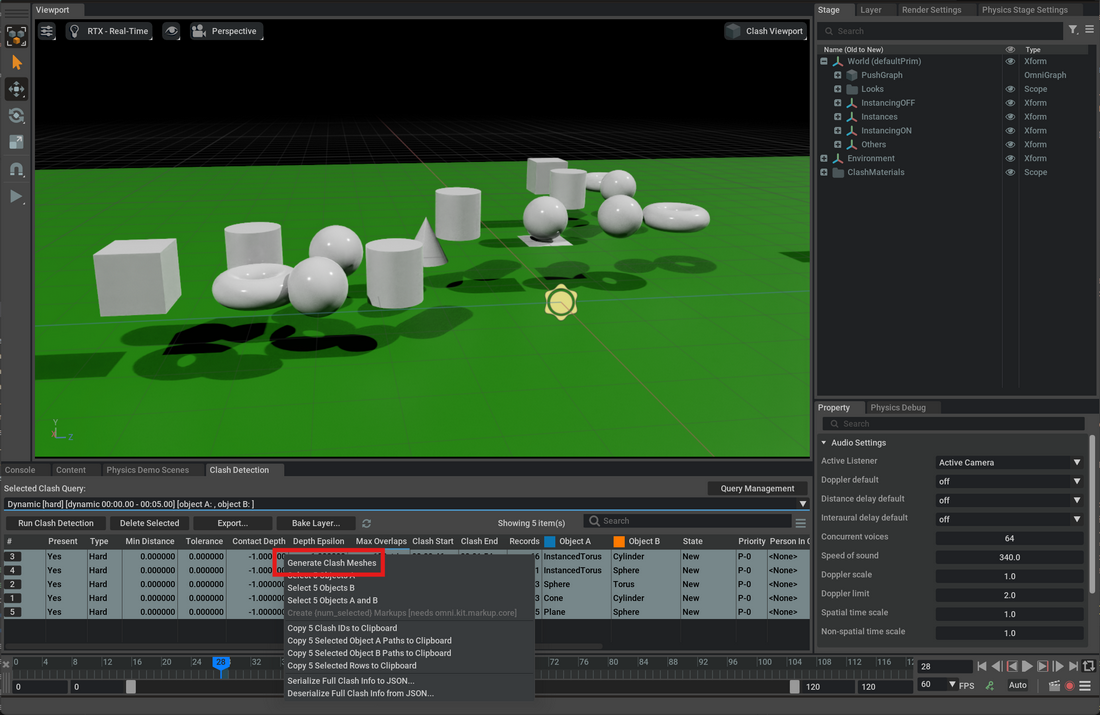
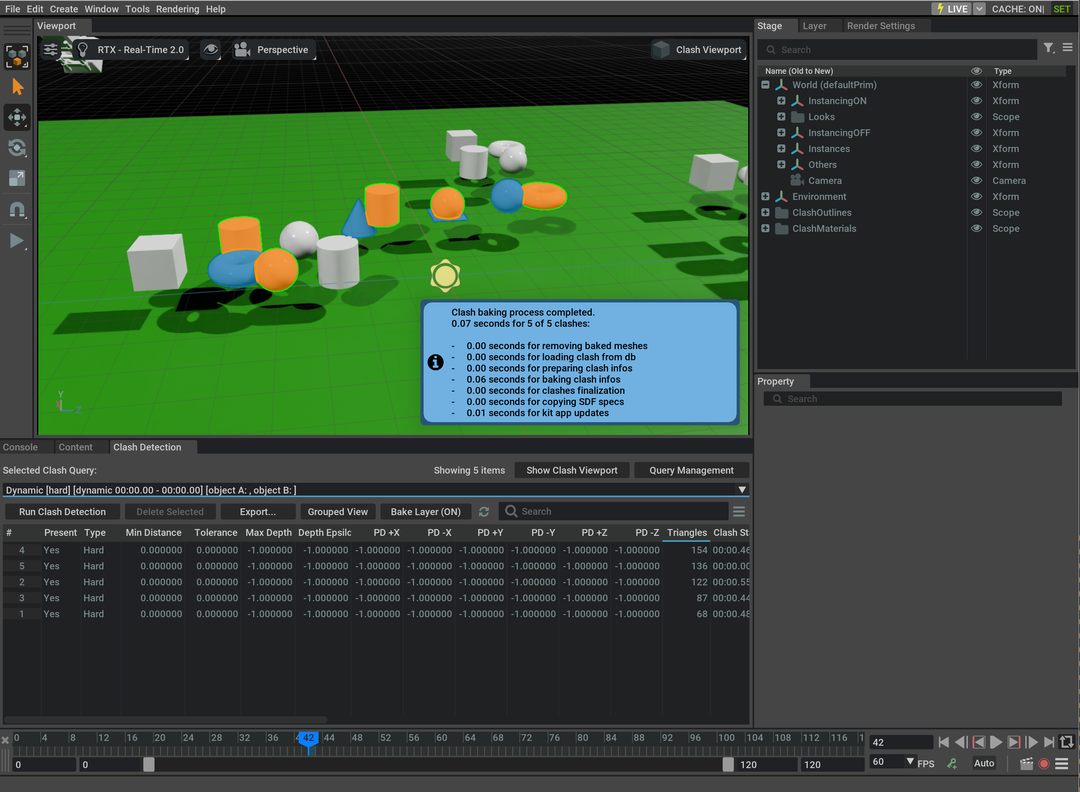
Generate Clash Meshes will:
Generate persistent clash visualization for the selected clashes in the main viewport bake layer (replacing any previously baked content for those records).
If the same mesh is involved in multiple clashes, the API produces a merged clash mesh with polygons highlighted at the correct timecodes.
The authored result follows the current Clash Detection Viewport API settings: main-viewport visibility toggles decide whether meshes, outlines, and point-cloud artifacts are generated; persistent-bake settings control the processing workflow; and Use Inline Mode controls whether generated mesh paths stay inline or go under
/ClashMeshes.
Note
Baking can be cancelled by clicking the progress bar.
Use Clear Clash Meshes from the context menu to remove the baked visualization for the selected clashes only.
Warning
When Run Clash Detection is clicked, the UI clears persistent baked content and hides transient clash visualization so that generated clash geometry is not included in detection.
The bake layer is not saved automatically. Use Save Bake Layer to persist it, and Reload Bake Layer to restore the saved file for the current query.
Integration with Clash Detection Viewport API (110.1)#
Since
110.1a bake layer is created automatically by Clash Detection Viewport API extension when needed. No separate “Enable Clash Bake Layer” step is required.The bake layer is associated with the current clash query (by query ID). When you switch queries, the viewport can auto-load the saved bake layer for the new query if Auto-load on query change is enabled in the Clash Detection Viewport API menu.
For file-backed stages, saving writes two files next to the stage’s root layer:
<stage>_CLASH_MATERIALS.usdand<stage>_CLASH_QUERY_{query_id}.usd. Support files such asClashMaterials.mdlare copied to the same directory.Reload Bake Layer clears the in-memory bake layer first, then loads
<stage>_CLASH_QUERY_{query_id}.usdif it exists.
Runtime Performance Costs#
The selected options can have a significant impact on the performance.
The performance cost of the features is the following:
Selection groups: LOWEnabled by default.
Clash Meshes: LOW to MEDIUMEnabled by default.
Highlights clashing objects from clash start to end.
It can be medium if a lot of instanced prims are clashing as highlights will happen on a reference to the instanced prims with the instancing flag disabled.
If a stage heavily relies on instancing for performance, then clash bake may be causing significant performance drops.
It will increase memory usage and file size, because an offset mesh must be generated to fully cover source clashing mesh.
Outlines: MEDIUM to HIGHDepends on how many intersection edges are detected for a given clash and how many points are in the outline.
Animated outlines are topology-changing meshes and they are computationally expensive for the renderer.
If the size of the outline is very large in screen space, the performance cost can be high. In that case lower the
Outline SizeorOutline Scalevalue.
Wireframe: HIGHComputationally expensive.
Only available with
Use Selection Groupsdisabled.They increase memory usage and file size because the over layer will contain the offset vertices for each highlighted mesh.
It will increase memory usage and file size, because an offset mesh must be generated to fully cover source clashing mesh.
Clashing polygons: HIGHVery computationally expensive.
Only available with
Use Selection Groupsdisabled.They increase memory usage and file size because the over layer will contain some time-sampled primvars to highlight each polygon that is clashing at a given timecode.
Note
It’s possible to bake any selection with different options (enabling or disabling wireframe, outlines, clash meshes, etc.) from whatever was already baked for all the other records. Users can take advantage of this to only highlight meshes with a different color and add the more expensive clash polygons and wireframes or outlines only for a subset of clashes of interest.
Bake Layers Standalone Usage#
When using the reference UI, a reasonable subset of bake options can be toggled using the Clash Detection Viewport API settings menu.
To accommodate more flexible scenarios, it’s possible to use the bake API directly and customize many options (see the API reference at the end of this document).
The clash bake layer can be composed like any other USD layer. Most of the clash-detection extensions are not required to view it, because the generated output is plain USD.
Note
The main exception is selection-group-based highlighting: viewing baked content authored with selection groups still requires omni.physx.clashdetection.viewport so those highlights can be interpreted.
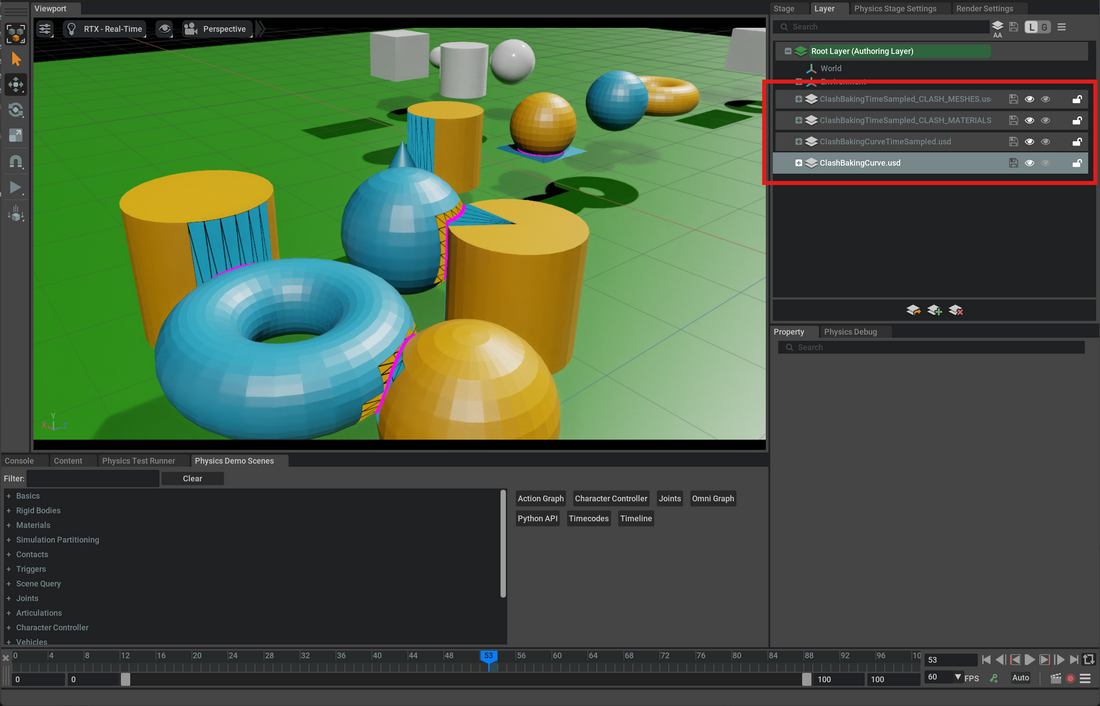
In the following example:
ClashBakingCurve.usdThe base layer containing original meshes with animation curves enabled
ClashBakingCurveTimeSampled.usdThe over layer containing time-sampled animation for all meshes and disabling the Animation Curves PushGraph
ClashBakingCurveTimeSampled_CLASH_MATERIALS.usdThe over layer containing clash materials (used by the clash meshes)
ClashBakingCurveTimeSampled_CLASH_MESHES.usdThe over layer containing clash meshes (highlights clashing objects from clash start to end)
Technical Notes#
The generated clash layers contain only the USD deltas needed for the visualization and are intended to be composed as over layers above the original stage data.
Efficient use of references keeps the layer much smaller than a fully time-sampled animated USD export. The API also supports instanced prims (including instance proxies) through referenced generated content with instancing disabled where needed along the generated path.
Material types: ClashBakeOptions supports per-mesh material types via ClashMaterialType (e.g. EMISSIVE, DIFFUSE, TRANSLUCENT) for clashing and non-clashing faces (do_clash_material_a/b, no_clash_material_a/b). The viewport uses these to style main vs dedicated viewport and to choose defaults for transient vs persistent bakes.
Inline mode: ClashBakeOptions.mesh.inline_mode (default False) controls which mesh reference path is used for non-selection-group mesh flows. With inline_mode=True, bake uses the legacy inline _CLASH sibling path. With inline_mode=False, bake authors generated references under /ClashMeshes and treats source meshes as read-only (no source visibility opinions, no source-path instanceable opinions). In /ClashMeshes mode, solid meshes are offset by wireframe_offset_epsilon and wireframes by an additional epsilon (effective 2 * wireframe_offset_epsilon from source). Normal computation is reused between solid and wireframe generation in the same bake pass.
Metadata and refcount-aware removal: The bake layer stores per-clash metadata (e.g. outline paths) in customLayerData["clashes"] for centering and persistence. ClashBakeLayer.remove_baked_meshes accepts an optional exclude_overlap_ids set; when clearing specific clashes, the API uses reference counting so meshes shared by multiple clashes are not removed until no longer referenced. Outline removal is per-clash (specific outline path), not the whole outlines scope.
Partial prim support: The bake pipeline supports clashes where only one of the two prims exists (e.g. one deleted or missing). ClashBakeInfo includes prim_prepared to indicate which prims were prepared; the generator skips or adapts outline/mesh creation accordingly.
Warning
The reference implementation centralizes the code handling live attachment / detachment of the bake layer to the session layer, and integrates the bake process with the UI to keep it responsive, through a helper class called
ClashBakeAsync.Stability and future availability of
ClashBakeAsyncis not guaranteed, it should be considered sample code part of the reference implementation and not part of the public API.The official API for clash bake is the
ClashBakeLayerclass and theClashBakeOptionsclass.
Known Issues#
Warning
RendererInstancing is an experimental feature. Setting
app.usdrt.population.utils.enableRendererInstancingtotruecan cause visualizations to be incorrect.Geometry Streaming is an experimental feature. Setting
UJITSO.enabledandUJITSO.geometrytotruecan cause visualizations to be incorrect.
API Usage#
The high-level clash baking API usage workflow is the following:
One time:
[Optional] Create and attach any additional layer to write clash meshes and clash materials.
Copy support files (mainly MDL shaders) to the folder that will receive the USD file containing clash materials (
ClashBakeLayer.get_support_files_paths)Bake Clash materials (
ClashBakeLayer.bake_clash_materials)
Whenever you need to bake an array of ClashInfo objects:
Collect all paths to be baked in the current run
Remove previously baked meshes to avoid merging new results with them (
ClashBakeLayer.remove_baked_meshes)Prepare meshes to be baked (
ClashBakeLayer.prepare_clash_bake_infos)Bake clash meshes (
ClashBakeLayer.bake_clash_meshes)Finalize clash meshes (
ClashBakeLayer.finalize_clash_meshes)
The following example shows how to generate a baked clashes layer offline from a non-interactive / headless command-line program:
Warning
Make sure that the layers have same timeCodesPerSecond of the root layer being baked.
Clash Bake Layer Example#
from omni.physxclashdetectionbake import ClashBakeLayer, ClashBakeOptions

# use clash detection core api to get ClashInfo objects from current stage

# clash_infos = ... # list of ClashInfo objects coming from clash detection core api

# ClashBakeOptions allows customizing the bake process via structured sub-options.
# Example: enable mesh highlights and outlines; leave wireframe and polygon baking off.
options = ClashBakeOptions()
options.mesh.generate = True        # highlights clashing objects from clash start to end
options.outlines.generate = True    # generates intersection outline meshes per frame

stage_path_name = self._test_data_dir + "ClashBaking/ClashBakingTimeSampled.usda"
carb.log_info(f"Opening stage '{stage_path_name}'...")
stage = Usd.Stage.Open(stage_path_name)
self.assertIsNotNone(stage)
UsdUtils.StageCache.Get().Insert(stage)

# Collect all a/b paths
paths = [(str(ci.object_a_path), str(ci.object_b_path)) for ci in clash_infos]

# Create two dedicated layers for clash baking, one for materials and one for meshes
# Using the ClashBakeLayer API, we don't need to insert these layers into the stage
root_layer = stage.GetRootLayer()
base_path, _ = os.path.splitext(root_layer.identifier)
extension = "usd"
layer_meshes_path = base_path + f"_CLASH_MESHES.{extension}"
layer_materials_path = base_path + f"_CLASH_MATERIALS.{extension}"

# It's possible also to open an existing layer before creating new ones
layer_meshes: Sdf.Layer = Sdf.Layer.CreateNew(layer_meshes_path)
layer_materials: Sdf.Layer = Sdf.Layer.CreateNew(layer_materials_path)

# NOTE: The layers must have same time codes per second as the original stage
layer_meshes.timeCodesPerSecond = root_layer.timeCodesPerSecond # type: ignore
layer_materials.timeCodesPerSecond = root_layer.timeCodesPerSecond # type: ignore

# Copy Support files (material shaders mainly) to same folder where layers live
support_paths = ClashBakeLayer.get_support_files_paths(options=options)
dest_folder = os.path.dirname(str(layer_materials.identifier))
for src in support_paths:
    dest = os.path.join(dest_folder, os.path.basename(src))
    await omni.client.copy_async(src, dest, omni.client.CopyBehavior.OVERWRITE)

# Generate materials before they're referenced by meshes
# Using ClashBakeLayer API, we directly bake to the layer without setting edit target
carb.log_info("Baking materials")
materials = ClashBakeLayer.bake_clash_materials(layer=layer_materials, options=options)

# Prepare bake infos
bake_infos = ClashBakeLayer.prepare_clash_bake_infos(stage=stage, clash_infos=clash_infos, options=options)

carb.log_info("Removing previously baked meshes")
# Remove previously baked meshes (useful when opening an existing layer with pre-baked clash meshes)
with Sdf.ChangeBlock():
    ClashBakeLayer.remove_baked_meshes(stage=stage, layer=layer_meshes, paths=paths, options=options)

# Bake clash meshes directly to the layer
# This can be taking some time so if needed just split the bake_infos in batches
# to give some time to user interfaces updates in order to display progress.
carb.log_info("Baking Meshes")
ClashBakeLayer.bake_clash_meshes(layer=layer_meshes, bake_infos=bake_infos, materials=materials, options=options)

# Finalize mesh baking (runs optimization / merge operations)
# Also this operation can be taking some time so if needed split bake_infos in batches
# and interleave with user interface updates in order to display progress.
carb.log_info("Finalizing Meshes")
with Sdf.ChangeBlock():
    ClashBakeLayer.finalize_clash_meshes(layer=layer_meshes, bake_infos=bake_infos, options=options)

carb.log_info("Clash baking finished")

# Save the layers
layer_materials.Save()
layer_meshes.Save()
API Reference#
ClashMaterialType#
- class ClashMaterialType#
Enum of material types used for clash visualization meshes.
- DIFFUSE#
Standard diffuse (lit) material.
- EMISSIVE#
Unlit emissive (light-independent) material. Default for non-selection-group modes.
- TRANSLUCENT#
Semi-transparent material that allows seeing through occluded geometry.
- SELECTION_GROUP#
Uses the viewport’s selection-group highlight instead of an authored mesh material. This is the default mode and avoids USD recomposition on large stages.
- UNCHANGED#
Leaves the mesh material untouched (no override applied).
Sub-Options Classes#
- class ClashBakeMeshOptions#
Options that control mesh highlight generation for clash pairs.
Created and owned by
ClashBakeOptionsasoptions.mesh.- generate: bool#
Generate clash highlight meshes (source objects highlighted from clash start to end). Default:
True.
- wireframe: bool#
Generate a wireframe overlay on top of clashing polygons. Not useful when using
SELECTION_GROUPmaterials. Default:False.
- polygons: bool#
Generate per-frame time-sampled primvars for the clashing polygon faces. Resource-intensive. Not useful with
SELECTION_GROUPmaterials. Default:False.
- inline_mode: bool#
When
Trueuse the legacy inline_CLASHsibling path for generated meshes. WhenFalse(default) meshes are generated under/ClashMeshesand source prims are treated as read-only. Default:False.
- wireframe_offset_epsilon: float#
World-space offset along normals applied to generated meshes to prevent z-fighting. Default:
0.001.
- do_clash_material: tuple[ClashMaterialType, ClashMaterialType]#
Material types for the clashing faces of object A and B respectively. Default:
(SELECTION_GROUP, SELECTION_GROUP).
- no_clash_material: tuple[ClashMaterialType, ClashMaterialType]#
Material types for the non-clashing faces of object A and B respectively. Default:
(SELECTION_GROUP, SELECTION_GROUP).
- group_name_do_clash: tuple[str, str]#
Selection-group names for the clashing-face highlights of object A and B. Default:
("ClashDetection:ObjectA", "ClashDetection:ObjectB").
- group_name_no_clash: tuple[str, str]#
Selection-group names for the non-clashing-face highlights of object A and B. Default:
("ClashDetection:ObjectA", "ClashDetection:ObjectB").
- class ClashBakeOutlinesOptions#
Options that control clash intersection outline generation.
Created and owned by
ClashBakeOptionsasoptions.outlines.- generate: bool#
Generate intersection outline meshes at every clashing frame. Default:
True.
- width_size: float#
Outline width in world-space units. Default:
0.5.
- width_scale: float#
Scale factor applied on top of
width_size. Default:1.0.
- group_name: str#
Selection-group name for the outlines. Default:
"ClashDetection:Outlines".
- material: ClashMaterialType#
Material type for the outlines. Default:
SELECTION_GROUP.
- class ClashBakeDuplicateOptions#
Options that control visualization for duplicate mesh clashes.
Created and owned by
ClashBakeOptionsasoptions.duplicate.- generate: bool#
Generate duplicate mesh highlights. Default:
True.
- material: ClashMaterialType#
Material type for the duplicate highlight. Default:
SELECTION_GROUP.
- group_name: str#
Selection-group name for duplicate highlights. Default:
"ClashDetection:Duplicate".
- class ClashBakeBoxOptions#
Options for the wireframe AABB box generated around clashing point-cloud points.
Created and owned by
ClashBakePointCloudOptionsasoptions.point_cloud.clashing_points_box.- group_name: str#
Selection-group name for the box. Default:
"ClashDetection:Outlines".
- material: ClashMaterialType#
Material type for the box. Default:
SELECTION_GROUP.
- world_space: bool#
When
Truethe box is authored in world space. Default:True.
- thickness_ratio: float#
Wireframe thickness as a fraction of the box diagonal. Default:
0.03.
- class ClashBakePointCloudOptions#
Options that control the visualization generated for point-cloud vs mesh clashes.
Created and owned by
ClashBakeOptionsasoptions.point_cloud.- generate_clashing_box: bool#
Generate a wireframe AABB box around the clashing point-cloud region. Default:
True.
- generate_clashing_points: bool#
Generate a
UsdGeom.Pointsprim containing only the clashing points. Default:True.
- group_name_clashing_points: str#
Selection-group name for the clashing-points prim. Default:
"ClashDetection:Outlines".
- clashing_points_material: ClashMaterialType#
Material type for the clashing-points prim. Default:
SELECTION_GROUP.
- clashing_points_width_scale: float#
Scale factor applied to the source point widths when authoring the generated clash-point visualization. Does not affect the AABB box or the source point cloud. Default:
2.0.
- clashing_points_normal_offset_epsilon: float#
World-space offset applied along authored source normals to the generated clash points. Leaves the source point cloud untouched. Default:
0.001.
- clashing_points_box: ClashBakeBoxOptions#
Box-specific options. See
ClashBakeBoxOptions.
ClashBakeOptions (Main Options Class)#
- class ClashBakeOptions#
Top-level container for all clash bake customization options.
Instantiate once and configure through its four structured sub-options before passing to any
ClashBakeLayerstatic method.- mesh: ClashBakeMeshOptions#
Options for clash mesh highlight generation. See
ClashBakeMeshOptions.
- outlines: ClashBakeOutlinesOptions#
Options for outline generation. See
ClashBakeOutlinesOptions.
- duplicate: ClashBakeDuplicateOptions#
Options for duplicate mesh visualization. See
ClashBakeDuplicateOptions.
- point_cloud: ClashBakePointCloudOptions#
Options for point-cloud clash visualization. See
ClashBakePointCloudOptions.
Deprecated flat properties (backward-compatible shims)
The following flat properties still work but delegate to the sub-options above. They will be removed in a future release - prefer the structured sub-options.
Deprecated property
Replacement
generate_clash_meshesoptions.mesh.generategenerate_outlinesoptions.outlines.generategenerate_wireframeoptions.mesh.wireframegenerate_clash_polygonsoptions.mesh.polygonsuse_selection_groupsset
options.mesh.do_clash_material,options.mesh.no_clash_material,options.outlines.material,options.duplicate.materialtoSELECTION_GROUPorEMISSIVEwireframe_offset_epsilonoptions.mesh.wireframe_offset_epsilonoutline_width_sizeoptions.outlines.width_sizeoutline_width_scaleoptions.outlines.width_scalegroup_name_clash_aoptions.mesh.group_name_do_clash[0]/options.mesh.group_name_no_clash[0]group_name_clash_boptions.mesh.group_name_do_clash[1]/options.mesh.group_name_no_clash[1]group_name_outlinesoptions.outlines.group_namegroup_name_duplicateoptions.duplicate.group_namedo_clash_material_a/boptions.mesh.do_clash_materialno_clash_material_a/boptions.mesh.no_clash_material
- class ClashBakeLayer#
A class to bake clash meshes directly to a USD layer without requiring stage composition or edit target manipulation. All methods of this class are
@staticmethodso this class doesn’t need to be instantiated.The API enables baking a list of
ClashInfoobjects from Clash Detection Core API extension to OpenUSD layers.The general usage workflow is:
- Setup (when a new stage is loaded):
ClashBakeLayer.get_support_files_pathsobtains support files that must be copied where the result of clash bake will beCreate separate layers for clash materials and meshes (not composed into the stage)
ClashBakeLayer.bake_clash_materialscreates materials directly in the material layer
- Runtime:
ClashBakeLayer.prepare_clash_bake_infostransforms a [ClashInfo] (withclash_frame_info_itemsfilled) in a [ClashBakeInfo]ClashBakeLayer.bake_clash_meshestakes a [ClashBakeInfo] and writes the meshes directly to the layerFinally
ClashBakeLayer.finalize_clash_mesheswill finalize meshes, doing merging and / or keyframe simplifications
- Update:
ClashBakeLayer.remove_baked_meshesremoves the baked meshes from a previous run when needing to update an existing layer
Static Methods#
- ClashBakeLayer.remove_baked_meshes(
- stage: Usd.Stage,
- layer: Sdf.Layer,
- paths: list[tuple[str, str]],
- options: ClashBakeOptions = ClashBakeOptions(),
- exclude_overlap_ids: set[str] | None = None,
Removes baked clash prims for the given (object_a, object_b) path pairs from the specified layer. Uses metadata reference counting when
exclude_overlap_idsis provided so that meshes shared by multiple clashes are only removed when no longer referenced by any remaining clash.- Parameters:
stage (Usd.Stage) – The USD Stage (used for prim path validation).
layer (Sdf.Layer) – The layer to remove the baked meshes from.
paths (list[tuple[str, str]]) – List of tuples containing the paths of the prims to remove.
options (ClashBakeOptions) – Options for the bake process.
exclude_overlap_ids (set[str] | None) – Optional set of overlap IDs to exclude from refcount when determining which meshes to remove (e.g. clashes being kept).
- Returns:
List of paths of the prims that failed to be removed.
- Return type:
list[str]
- ClashBakeLayer.prepare_clash_bake_infos(
- stage: Usd.Stage,
- clash_infos: list[ClashInfo],
- options: ClashBakeOptions = ClashBakeOptions(),
Prepare ClashBakeInfo objects that are needed to bake meshes for a given list of clashes.
- Parameters:
stage (Usd.Stage) – The USD Stage.
clash_infos (list[ClashInfo]) – List of ClashInfo objects from omni.physx.clashdetection.core.
options (ClashBakeOptions) – Options for the bake process.
- Returns:
List of ClashBakeInfo objects that can be used with bake_clash_meshes.
- Return type:
list[ClashBakeInfo]
- ClashBakeLayer.get_support_files_paths(
- options: ClashBakeOptions,
Obtain a list of paths to support files needed by bake_clash_meshes.
For example it contains the path to material file used by the baked meshes materials. Copy these files in the target directory where the clash layer is saved.
- Parameters:
options (ClashBakeOptions) – Options for the bake process.
- Returns:
List of file paths to support files needed by bake_clash_meshes.
- Return type:
list[str]
- ClashBakeLayer.bake_clash_materials(
- layer: Sdf.Layer,
- options: ClashBakeOptions = ClashBakeOptions(),
Write materials used by bake_clash_meshes directly to the specified layer.
Note: This method writes directly to the layer without requiring edit target manipulation.
- Parameters:
layer (Sdf.Layer) – The layer to write materials to.
options (ClashBakeOptions) – Options for the bake process.
- Returns:
The materials created (to be passed in to bake_clash_meshes)
- Return type:
ClashMaterialsPaths
- ClashBakeLayer.bake_clash_meshes(
- layer: Sdf.Layer,
- bake_infos: list[ClashBakeInfo],
- materials: ClashMaterialsPaths,
- options: ClashBakeOptions = ClashBakeOptions(),
Bakes meshes prepared with prepare_clash_bake_infos applying the materials created with bake_clash_materials directly to the specified layer.
Note: This method writes directly to the layer without requiring edit target manipulation or stage composition.
- Parameters:
layer (Sdf.Layer) – The layer to write clash meshes to.
bake_infos (list[ClashBakeInfo]) – List of ClashBakeInfo objects prepared with prepare_clash_bake_infos.
materials (ClashMaterialsPaths) – Materials created with bake_clash_materials.
options (ClashBakeOptions) – Options for the bake process.
- ClashBakeLayer.finalize_clash_meshes(
- layer: Sdf.Layer,
- bake_infos: list[ClashBakeInfo],
- options: ClashBakeOptions = ClashBakeOptions(),
Merges multiple clash pairs previously baked with bake_clash_meshes directly in the specified layer.
- Parameters:
layer (Sdf.Layer) – The layer containing the baked meshes to finalize.
bake_infos (list[ClashBakeInfo]) – List of ClashBakeInfo objects that were baked.
options (ClashBakeOptions) – Options for the bake process.