


Clash Detection Viewport API#
The Clash Detection Viewport extension implements an API to display meshes that are detected to be in clash (both soft and hard clash) and duplicate meshes in the main viewport and a dedicated viewport.
It depends on the Clash Detection Bake API extension for mesh and outline generation.
Visualization is available in two modes:
Transient (temporary): Selecting a clash calls
display_clashes(), which shows clashes on demand. This visualization is replaced when the selection changes and is not saved to disk.Persistent: Calling
bake_clashes()(e.g. via “Generate Clash Meshes” in the UI) bakes the selected clashes into a layer that survives selection changes and can be saved and reloaded per query.
The extension also provides camera centering in the main and dedicated clash viewport on the clash area, and the dedicated viewport can show timeline-synced polygon-level detail for dynamic clashes.
Visualization#
After selecting a clash, the main viewport updates its transient visualization for the selected records. If the Clash Detection Viewport is enabled, the same selection is also shown in isolation there on a dedicated stage. The exact appearance depends on the settings in the Clash Viewport menu.
Note
Deselecting a clash clears only the transient visualization. Persistent content created with Generate Clash Meshes remains until it is cleared explicitly.
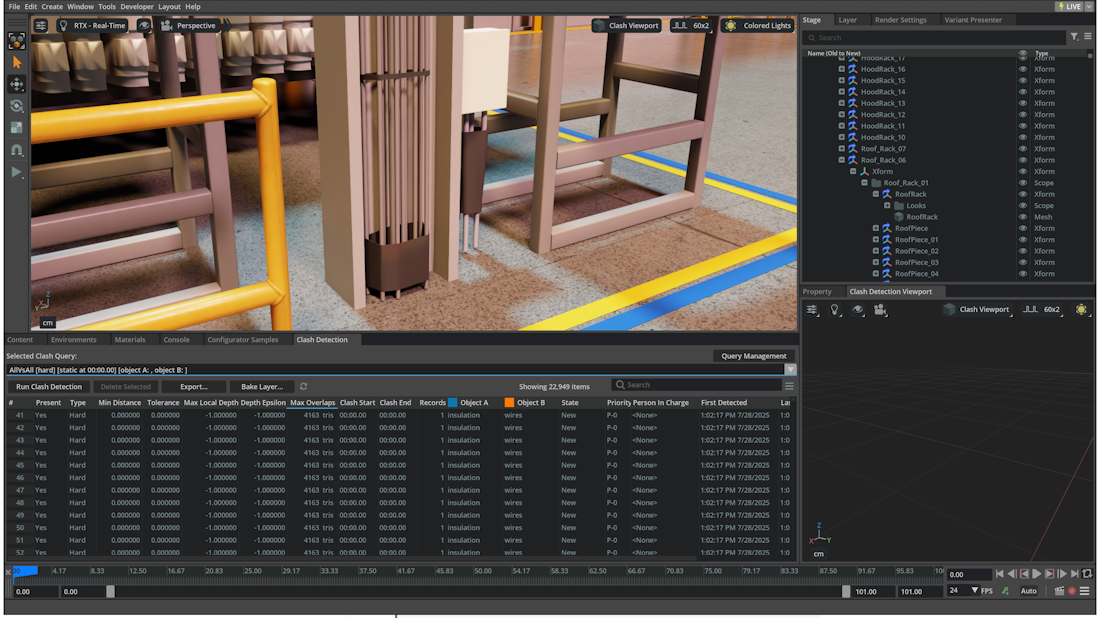
Enable Selection Groups ON (Default)#
When using selection groups:
The source meshes are highlighted through custom selection groups instead of cloned mesh overlays. This is useful to see through occluded objects.
Object A and Object B keep their dedicated highlight colors, hard-clash outlines use the outline selection group, and duplicates use the duplicate selection group.
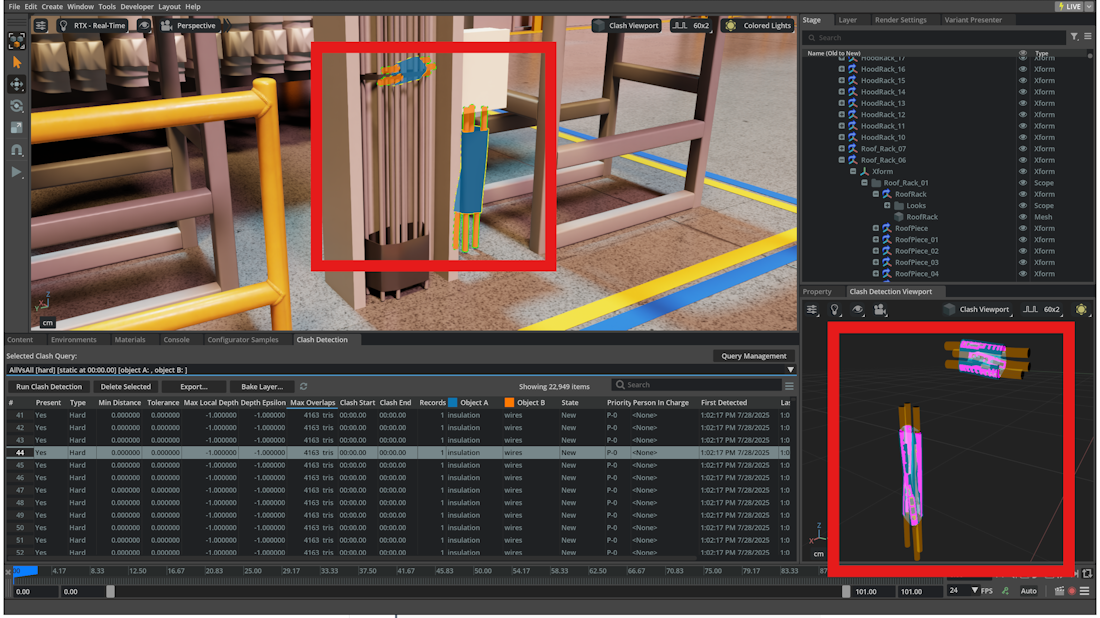
Enable Selection Groups OFF#
When Enable selection groups is off, the main viewport uses generated clash geometry instead of selection-group highlighting.
For mesh/mesh clashes:
Main Viewport: generated clash meshes are authored for the selected clashes. In the current main-viewport configuration, both the clashing and non-clashing generated meshes use emissive materials, while optional wireframes follow the Show wireframes setting.
Clash Viewport: the selected clashes are re-baked on the dedicated clash-viewport stage for per-polygon inspection. Clashing polygons use emissive materials; non-clashing polygons use translucent materials when Use translucent materials is enabled, otherwise diffuse materials.
Hard clashes only: clash outlines are shown in magenta.
For duplicates:
In non-selection-group mode, the visualization clones one mesh and applies the duplicate material (solid red diffuse).
Note
Generated mesh overlays are slightly offset along their normals so they sit on top of the source geometry.
The main-viewport bake marks generated emissive meshes as invisible to secondary rays for performance. The dedicated clash viewport does not use that optimization.
Clash Viewport Menu#
The Clash Viewport menu button is in the top right corner of the main and clash viewports. The menu holds all clash viewport and bake-related settings (as of 110.x the former bake-specific settings menu has been merged here).
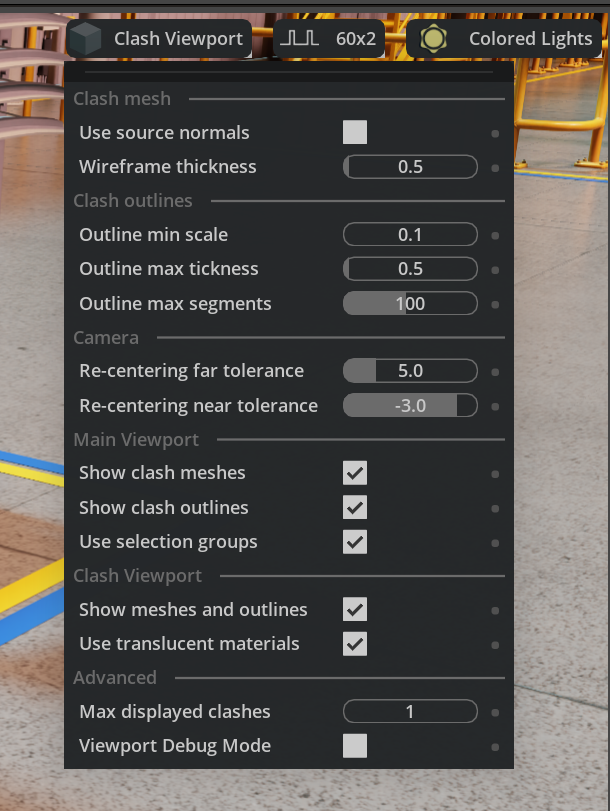
Camera#
Center main viewport: When enabled, the camera in the main viewport will be centered on the selected clash (
ClashViewportSettings.MAIN_VIEWPORT_CENTER_CAMERA).Center clash viewport: When enabled, the camera in the clash viewport will be centered on the selected clash (
ClashViewportSettings.CLASH_VIEWPORT_CENTER_CAMERA).Re-centering far tolerance: Positive zoom-out hysteresis factor. If re-centering would mostly move the camera away from the clash along camera Z by less than roughly
max_extent * tolerance, the re-center is undone to preserve the user’s current zoom fine-tuning (ClashViewportSettings.CAMERA_CENTERING_FAR_TOLERANCE).Re-centering near tolerance: Negative zoom-in hysteresis factor. If re-centering would mostly move the camera toward the clash along camera Z by less than roughly
reference_extent * abs(tolerance), the re-center is undone (ClashViewportSettings.CAMERA_CENTERING_NEAR_TOLERANCE).
Note
Set both tolerances to 0 to always re-center no matter the distance.
Main Viewport#
Enable selection groups: When enabled, the main viewport highlights source meshes through selection groups. When disabled, the main viewport uses generated clash geometry from the bake pipeline instead (
ClashViewportSettings.MAIN_VIEWPORT_USE_SELECTION_GROUPS).Fill selection groups: When enabled, fills selection groups with a semi-transparent solid color. Disable this option to improve depth perception of highlighted clashes (
ClashViewportSettings.CLASH_HIGHLIGHT_FILLED_MESHES).Show clash meshes: When enabled, the clash meshes will be displayed in the main viewport (
ClashViewportSettings.MAIN_VIEWPORT_SHOW_CLASH_MESHES).Show clash outlines: When enabled, the clash outlines will be displayed in the main viewport (
ClashViewportSettings.MAIN_VIEWPORT_SHOW_CLASH_OUTLINES).Show point cloud: When enabled, point-cloud clash results (highlighted clashing points and their axis-aligned bounding boxes) are shown in the main viewport (
ClashViewportSettings.MAIN_VIEWPORT_SHOW_POINT_CLOUD).
Clash Viewport#
Show in Clash Viewport: When enabled, meshes, outlines, and point clouds will be displayed in the clash viewport (
ClashViewportSettings.CLASH_VIEWPORT_SHOW_CLASHES).Show wireframes: When enabled, wireframes will be displayed for clash meshes in the clash viewport (
ClashViewportSettings.CLASH_VIEWPORT_SHOW_WIREFRAMES).Use translucent materials: When enabled, the meshes will be displayed with a transparent material to avoid occluding the clash profile (
ClashViewportSettings.CLASH_VIEWPORT_USE_TRANSLUCENT_MATERIALS).
Persistent Bake Options#
These options control the persistent bake process used by Generate Clash Meshes from the Clash Detection Window. The authored content itself still follows the current main-viewport visibility settings (mesh, outlines, point-cloud display) and the advanced inline-mode setting.
Batch Size: Number of clashes processed per batch between UI updates (
ClashViewportSettings.BAKE_BATCH_SIZE). Smaller batches update the UI more often; larger batches finish faster.Show Bake Notification: When enabled, a notification is shown when baking completes (
ClashViewportSettings.BAKE_SHOW_NOTIFICATION).Keep DB Data in Memory: When enabled, keeps baked record data in memory to avoid reloading (
ClashViewportSettings.BAKE_KEEP_DB_DATA). Uses more memory.Finalize When Cancelled: When enabled, meshes baked so far are finalized when the bake is cancelled (
ClashViewportSettings.BAKE_FINALIZE_WHEN_CANCELLED).Auto-load on query change: When enabled, saved bake layer content for the current query is loaded when switching clash queries; when disabled, the bake layer is cleared on query change (
ClashViewportSettings.BAKE_AUTO_LOAD_ON_QUERY_CHANGE).
Bake Layer Actions#
Save Bake Layer: Saves the current query’s persistent bake layer to disk. Transient selection-only visualization is cleared before the save and is not written.
Reload Bake Layer: Clears the in-memory main-viewport bake layer, then reloads the saved bake layer for the current query if a file exists.
Clear Bake Layer: Clears persistent baked content for the current query from the main viewport bake layer. If a transient selection is currently shown, it is re-baked afterwards.
Auto-load on query change: When enabled, loads the clash bake layer associated with a given query on query switching from the reference UI.
Advanced#
Log profile: When enabled, prints the timings of the clash viewport to the console (
ClashViewportSettings.LOG_PROFILE).Log highlight: When enabled, prints logs of clash viewport highlight process to the console (
ClashViewportSettings.LOG_HIGHLIGHT).Use Inline Mode: Controls the main-viewport bake path when generated clash meshes are authored. When disabled (default), non-selection-group mesh output is written under
/ClashMeshesand selection-group highlights use lightweight proxies under/ClashHighlights. When enabled, the legacy inline_CLASH/ highlight authoring is used next to the source prim (or its closest instancing root). The dedicated clash viewport continues to use its own inline per-polygon bake path (ClashViewportSettings.BAKE_INLINE_MODE).Max displayed clashes: Compatibility setting exposed by the menu. In the current bake-based implementation it should not be relied on as a strict cap for dedicated clash-viewport content (
ClashViewportSettings.CLASH_MESHES_DISPLAY_LIMIT).Outline size: Size of the outline in world space (
ClashViewportSettings.CLASH_OUTLINE_WIDTH_SIZE).Outline scale: Scale factor for the outline width (
ClashViewportSettings.CLASH_OUTLINE_WIDTH_SCALE).Outline min centering: Minimum diagonal length for clash outline to be considered for camera centering (
ClashViewportSettings.CLASH_OUTLINE_DIAGONAL_MIN_CENTERING).Wireframe thickness: Thickness of the wireframe in screen space (
ClashViewportSettings.CLASH_WIREFRAME_THICKNESS).
Settings Reference#
All options of the Clash Viewport menu are available as carb.settings constants.
The following table shows the mapping between ClashViewportSettings constants and their corresponding settings paths:
Setting Constant |
Settings Path |
|---|---|
|
|
|
|
|
|
|
|
|
|
|
|
|
|
|
|
|
|
|
|
|
|
|
|
|
|
|
|
|
|
|
|
|
|
|
|
|
|
|
|
|
|
|
|
|
|
|
|
|
|
|
|
|
|
|
|
|
|
These settings can be accessed programmatically using carb.settings.get_settings() as shown in the example code below.
Camera Centering#
Camera centering is handled by the bake-based viewport pipeline and uses the current timeline time when evaluating animated clashes.
The centering helper follows this order:
If a valid clash outline exists and its world-space bounding-box diagonal is at least Outline min centering, centering uses that outline path.
Otherwise, if a valid point-cloud clash AABB box exists, centering uses that box.
Otherwise, the helper falls back to the available source prim paths. If both fallback prims are valid, it compares the sum of squared bounding-box side lengths and centers on the smaller prim only when one is at least three times smaller than the other; otherwise it frames both.
The near/far re-centering tolerances are then applied as zoom-preserving hysteresis. If the re-center would mostly be a small move along camera Z, the operation is undone so minor manual zoom adjustments are preserved.
In the current async bake flow, post-bake centering is driven by authored outline / point-cloud metadata. If neither of those artifacts is generated for the selected clashes, automatic centering can be skipped.
Performance#
The performance of the clash detection viewport is affected by the following factors:
Stage size in number of meshes
Stage size in number of polygons
Complexity of the meshes (in terms of generated overdraw when using Translucent Materials)
Console warnings (and file logging)
Extended Blocking of the Main Loop#
Starting in version 110.1, Clash Viewport uses Clash Bake with the Use Inline Mode option set to False.
For the main viewport, this further limits the generation of USD recomposition events for large stages, making it less likely to block the main loop for extended periods of time.
Warning
Large stages can cause performance issues when Use Inline Mode is enabled.
Some stages that are incorrectly exported can print hundreds of thousands of warnings to the console (and in the log) that can affect performance.
Low FPS#
Warning
For some large meshes the translucent material can affect performance.
Consider disabling the corresponding option in the Clash Viewport menu if needed.
In some cases the size of the clash outline can be very big in screen space, causing to see large portions of purple color on top of the clashes.
Consider decreasing the Outline size or Outline scale to reduce the size of the outline in screen space to a reasonable level.
Warnings#
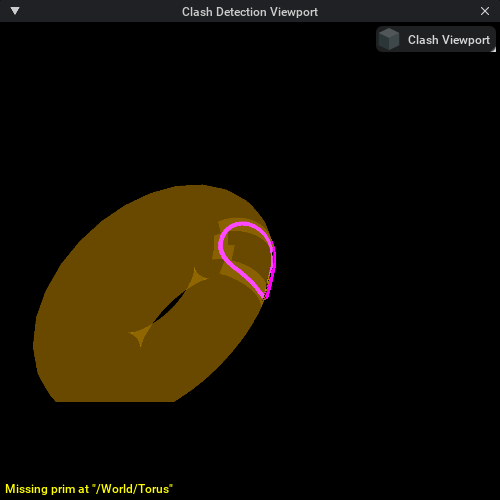
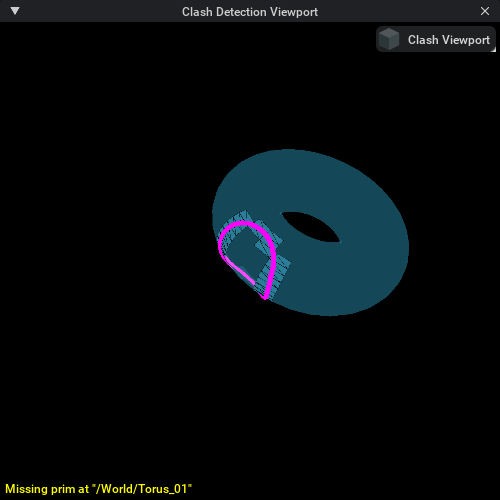
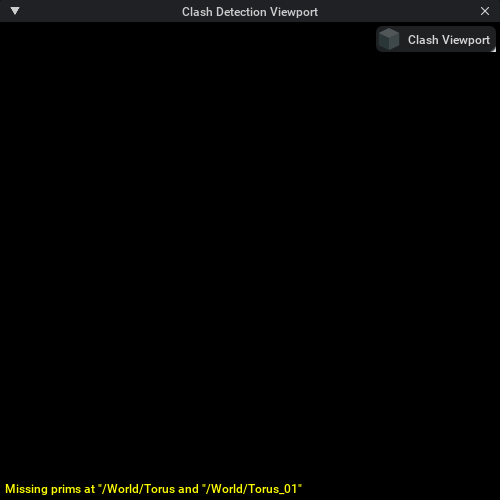
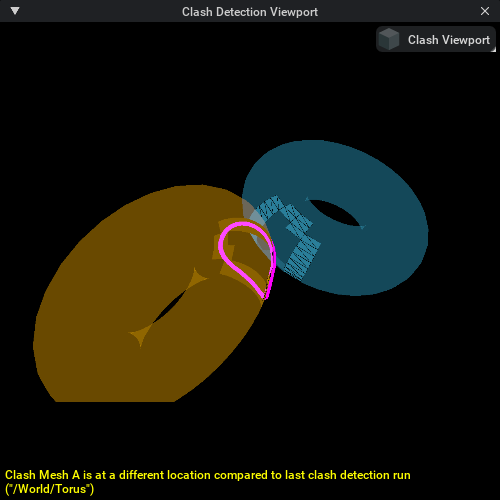
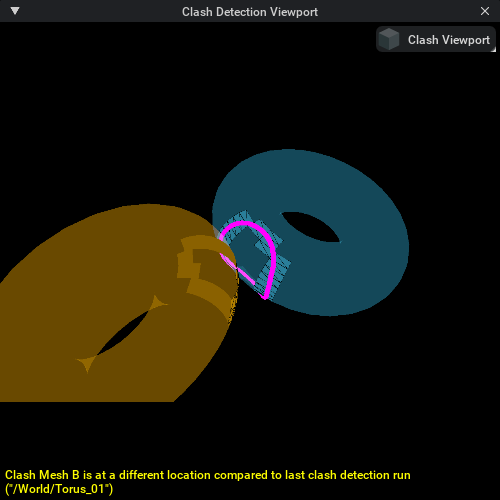
The Clash Viewport will display yellow warnings when the meshes have been modified since the last clash detection run. If needed, re-run the clash detection to refresh and update results to avoid these warnings.
The following conditions will cause warnings:
If one of the two (or both) original source meshes have been deleted from the stage or layer
If one of the two (or both) original source meshes have been moved from their original location
If both source meshes for a duplicate have been deleted from the stage or layer
If one of the two (or both) source duplicate meshes have been moved from their original location
Dynamic Clashes#
The viewport uses the bake extension to generate transient and persistent visualization for dynamic clashes.
Meshes and outlines are generated per-frame and are timeline-synced.
For this to work, the UI must provide frame data via set_load_data_callback() so that clash_frame_info_items are available when outlines are needed.
When
Enable selection groupsis enabled, source meshes are highlighted and bake-generated meshes/outlines are shown; they follow the animation of the original meshes.Dynamic highlights use authored highlight proxies and are enabled only during the clash time range.
Scrubbing the timeline updates the displayed clash geometry (polygon-level detail in the dedicated clash viewport, outlines and highlights in the main viewport).
For persistent playback of dynamic clashes, right-click clash records in the reference UI and select Generate Clash Meshes (or use bake_clashes() from the API) so the baked layer is saved and can be reloaded with the query.
Known Issues#
Warning
RendererInstancing is an experimental feature. Setting
app.usdrt.population.utils.enableRendererInstancingtotruecan cause visualizations to be incorrect.Geometry Streaming is an experimental feature. Setting
UJITSO.enabledandUJITSO.geometrytotruecan cause visualizations to be incorrect.
API Reference#
ClashDetectionViewportAPI Class#
- class ClashDetectionViewportAPI(clash_viewport: ClashDetectionViewport)#
A class to manage and control the clash detection viewport.
This class provides functionality to display and manage clash meshes in both the main viewport and a dedicated clash detection viewport.
- Parameters:
clash_viewport (ClashDetectionViewport) – An instance of ClashDetectionViewport to manage clashes.
Methods#
- hide_all_clash_meshes() None#
Removes all clash meshes from main viewport or clash viewport.
- display_clashes(
- clash_timecode: float,
- clash_info_items: Dict[str, Any],
Displays a set of transient (temporary) clashes at a specific timecode in main and/or dedicated clash viewport. A new selection replaces the previous transient visualization; nothing is persisted to the bake layer for transient visualization. Generation is done via the bake extension (meshes and outlines). For dynamic clashes, ensure
set_load_data_callback()is set so frame data is available for outlines.The display and camera centering behavior is controlled by the viewport settings (see Clash Viewport Menu section above):
Show clash meshesandShow clash outlinesin Main Viewport control visibility in the main viewport.Show meshes and outlinesin Clash Viewport controls visibility in the clash viewport.Center main viewportandCenter clash viewportcontrol camera centering behavior.Re-centering far toleranceandRe-centering near tolerancecontrol camera movement thresholds.
- Parameters:
clash_timecode (float) – Timecode at which the clash meshes should be displayed.
clash_info_items (Dict[str, Any]) – Dictionary of
ClashInfoto be displayed.
- bake_clashes(
- clash_infos: list,
- progress: omni.ui.AbstractValueModel | None,
Async. Bakes persistent clash visualization for the given clashes. The result survives selection changes and can be saved/reloaded with the current query. Use
clear_bake_layer()to clear all baked content orclear_clashes()to remove specific clashes.- Parameters:
clash_infos – List of
ClashInfoto bake.progress – Optional progress model for UI updates.
- clear_clashes(
- clash_infos: list,
- progress: omni.ui.AbstractValueModel | None,
Async. Clears previously baked clash visualization for the given clashes.
- Parameters:
clash_infos – List of
ClashInfoto clear.progress – Optional progress model for UI updates.
- clear_bake_layer() None#
Clears all content from the main viewport bake layer (both transient and persistent). The dedicated clash viewport is not affected.
- can_bake_clashes() bool#
Returns whether clash visualization generation is possible (no bake process currently running).
- change_bake_layer_identifier(identifier: str | None) None#
Sets the bake layer query identifier (e.g. when the selected clash query changes). This is used to load or clear the bake layer when switching queries; behavior depends on the
BAKE_AUTO_LOAD_ON_QUERY_CHANGEsetting.
Properties#
- property clash_viewport_window#
Gets the ViewportWindow handle to dedicated Clash Detection Viewport.
- Returns:
The handle to the dedicated Clash Detection Viewport window.
- Return type:
ViewportWindow | None
Getting the API Instance#
- get_api_instance() ClashDetectionViewportAPI#
Retrieve the singleton instance of ClashDetectionViewportAPI.
- Returns:
The singleton instance of the ClashDetectionViewportAPI.
- Return type:
Example#
The sample below shows a minimal end-to-end workflow that uses the clash viewport API to open a stage for export, configure screenshot settings, display clashes, capture one screenshot per clash, and write an HTML report that references the generated images.
clash_html_screenshot_export.py## SPDX-FileCopyrightText: Copyright (c) 2024-2026 NVIDIA CORPORATION & AFFILIATES. All rights reserved.
# SPDX-License-Identifier: LicenseRef-NvidiaProprietary
#
# NVIDIA CORPORATION, its affiliates and licensors retain all intellectual
# property and proprietary rights in and to this material, related
# documentation and any modifications thereto. Any use, reproduction,
# disclosure or distribution of this material and related documentation
# without an express license agreement from NVIDIA CORPORATION or
# its affiliates is strictly prohibited.
import asyncio
import pathlib
from dataclasses import dataclass
from typing import Any, Awaitable, Callable, cast
import carb.settings
import omni.kit.app
import omni.timeline
from omni.physxclashdetectioncore.clash_data import ClashData
from omni.physxclashdetectioncore.clash_data_serializer_sqlite import ClashDataSerializerSqlite
from omni.physxclashdetectioncore.clash_detect_export import ExportColumnDef, export_to_html
from omni.kit.viewport.utility import capture_viewport_to_file
from omni.physxclashdetectionviewport import ClashViewportSettings, get_api_instance
from pxr import Usd, UsdUtils
from .clash_detection_processor import ClashDetectionProcessor
@dataclass(frozen=True)
class ClashHtmlScreenshotExportConfig:
stage_path_name: str
output_prefix: str
query_name: str
comment: str
static_time: float
clear_frames: int = 2
render_frames: int = 30
open_output_dir: bool = True
class ClashHtmlScreenshotExporter:
"""Bare-bones sample that exports an HTML clash report with screenshots.
This keeps the flow intentionally short and uses minimal error handling compared to the
full UI implementation.
"""
def __init__(self,
config: ClashHtmlScreenshotExportConfig,
output_dir: pathlib.Path,
stage_copy_path: str,
open_path: Callable[[str], None],
open_stage_async: Callable[[str], Awaitable[Usd.Stage]],
) -> None:
self._config = config
self._output_dir = output_dir
self._stage_copy_path = stage_copy_path
self._open_path = open_path
self._open_stage_async = open_stage_async
self._html_path = self._output_dir.joinpath(f"{config.output_prefix}.html")
self._images_dir = self._output_dir.joinpath(f"{self._html_path.stem}_images")
self._images_dir.mkdir(parents=True, exist_ok=True)
async def _next_update_async(self, frames: int = 1) -> None:
app = cast(Any, omni.kit.app.get_app())
for _ in range(frames):
await app.next_update_async()
async def run(self) -> None:
cdp = ClashDetectionProcessor(
stage_path_name=self._stage_copy_path,
static_time=self._config.static_time,
logging=False,
query_name=self._config.query_name,
comment=self._config.comment,
)
screenshot_settings = None
clash_viewport_api = None
clash_data = None
stage: Usd.Stage | None = None
try:
if not cdp.run():
return
stage = await self._open_stage_async(self._stage_copy_path)
stage_id = UsdUtils.StageCache.Get().GetId(stage).ToLongInt()
if not stage_id:
raise RuntimeError("Opened export stage is not registered in the USD stage cache")
clash_data = ClashData(ClashDataSerializerSqlite())
clash_data.open(stage_id, True)
overlaps = list(clash_data.find_all_overlaps_by_query_id(cdp.query_id, True).values())
for clash_info in overlaps:
clash_info.clash_frame_info_items = clash_data.fetch_clash_frame_info_by_clash_info_id(clash_info.identifier)
screenshot_settings = self._setup_viewport_for_screenshot_export()
clash_viewport_api = get_api_instance()
rows = []
for clash_info in overlaps:
screenshot_path = self._images_dir.joinpath(f"{clash_info.overlap_id}.png")
await self._capture_clash_screenshot(
clash_info=clash_info,
timecode=self._config.static_time,
screenshot_path=screenshot_path,
clear_frames=self._config.clear_frames,
render_frames=self._config.render_frames,
)
rows.append([clash_info.overlap_id,
f"{clash_info.min_distance:.3f}",
str(clash_info.overlap_elements),
f"{self._config.static_time:.3f}",
str(clash_info.object_a_path),
str(clash_info.object_b_path),
f"{self._images_dir.name}/{screenshot_path.name}",
])
html_bytes = export_to_html("Clash Detection Results", self._stage_copy_path, self._get_export_columns(), rows)
self._html_path.write_bytes(html_bytes)
await self._next_update_async()
if self._config.open_output_dir:
self._open_path(str(self._output_dir))
except Exception as exc:
print(f"HTML screenshot export failed: {exc}")
finally:
if clash_viewport_api is not None:
clash_viewport_api.hide_all_clash_meshes()
carb.settings.get_settings().set_bool(ClashViewportSettings.SHOW_CLASH_VIEWPORT_WINDOW, False)
await self._next_update_async()
if screenshot_settings is not None:
self._restore_viewport_screenshot_settings(screenshot_settings)
if clash_data is not None:
clash_data.close()
clash_data.destroy()
@staticmethod
def _get_export_columns() -> list[ExportColumnDef]:
return [
ExportColumnDef(0, "Clash ID"),
ExportColumnDef(1, "Min Distance", True),
ExportColumnDef(2, "Clashing Elements", True),
ExportColumnDef(3, "Clash Time"),
ExportColumnDef(4, "Object A"),
ExportColumnDef(5, "Object B"),
ExportColumnDef(6, "Image"),
]
async def _wait_for_stage_loading_status(self, usd_context: Any, wait_frames: int = 15) -> None:
stable_frames = 0
while stable_frames < wait_frames:
_, files_loaded, total_files = usd_context.get_stage_loading_status()
await self._next_update_async()
if files_loaded or total_files:
stable_frames = 0
continue
stable_frames += 1
async def _wait_for_file(self, file_path: pathlib.Path, max_timeout: float = 2.0, poll_interval: float = 0.05) -> None:
elapsed = 0.0
while not file_path.exists() and elapsed < max_timeout:
await asyncio.sleep(poll_interval)
elapsed += poll_interval
if not file_path.exists():
raise RuntimeError(f"Timed out waiting for screenshot '{file_path}'")
def _setup_viewport_for_screenshot_export(self) -> dict[str, bool]:
settings = carb.settings.get_settings()
screenshot_settings = (
(ClashViewportSettings.MAIN_VIEWPORT_SHOW_CLASH_MESHES, False),
(ClashViewportSettings.CLASH_VIEWPORT_SHOW_CLASHES, True),
(ClashViewportSettings.MAIN_VIEWPORT_CENTER_CAMERA, False),
(ClashViewportSettings.CLASH_VIEWPORT_CENTER_CAMERA, True),
(ClashViewportSettings.MAIN_VIEWPORT_ENABLE_CAMERA_TOLERANCE, False),
(ClashViewportSettings.CLASH_VIEWPORT_ENABLE_CAMERA_TOLERANCE, False),
)
snapshot = {setting_name: settings.get_as_bool(setting_name) for setting_name, _ in screenshot_settings}
for setting_name, setting_value in screenshot_settings:
settings.set_bool(setting_name, setting_value)
return snapshot
def _restore_viewport_screenshot_settings(self, settings_snapshot: dict[str, bool]) -> None:
settings = carb.settings.get_settings()
for setting_name, setting_value in settings_snapshot.items():
settings.set_bool(setting_name, setting_value)
async def _capture_clash_screenshot(self, clash_info: Any, timecode: float, screenshot_path: pathlib.Path, clear_frames: int, render_frames: int) -> None:
clash_viewport = get_api_instance()
if clash_viewport.clash_viewport_window:
clash_viewport.clash_viewport_window.visible = True
else:
carb.settings.get_settings().set_bool(ClashViewportSettings.SHOW_CLASH_VIEWPORT_WINDOW, True)
await self._next_update_async(5)
clash_viewport_window = clash_viewport.clash_viewport_window
if not clash_viewport_window:
raise RuntimeError("Clash viewport window was not created")
clash_viewport_window = cast(Any, clash_viewport_window)
clashes = {clash_info.overlap_id: clash_info}
omni.timeline.get_timeline_interface().set_current_time(timecode)
await self._next_update_async(clear_frames)
clash_viewport.display_clashes(clash_timecode=timecode, clash_info_items=clashes)
await self._wait_for_stage_loading_status(clash_viewport_window.viewport_api.usd_context)
await self._next_update_async(render_frames)
capture = capture_viewport_to_file(clash_viewport_window.viewport_api, str(screenshot_path))
await capture.wait_for_result()
await self._wait_for_file(screenshot_path)
ClashViewportSettings Class#
- class ClashViewportSettings#
A dataclass of
carb.settingspath constants for all clash viewport settings. Use these constants instead of raw path strings when reading or writing settings viacarb.settings.get_settings().All attributes are class-level string constants - do not instantiate this class. See the Settings Reference table above for the full mapping to settings paths.
Imported from
omni.physxclashdetectionviewport.clash_viewport_settings.
ClashViewportSettingValues Class#
- class ClashViewportSettingValues#
A dataclass whose class-level attributes hold the runtime-effective values for all clash viewport settings. On extension startup
ClashDetectionViewportExtensionreads each setting fromcarb.settingsand writes it here; aSettingChangeSubscriptionkeeps these values up to date whenever a setting changes at runtime.Code inside the viewport pipeline reads directly from
ClashViewportSettingValuesattributes (e.g.ClashViewportSettingValues.MAIN_VIEWPORT_CENTER_CAMERA) rather than querying carb.settings on every call.Imported from
omni.physxclashdetectionviewport.clash_viewport_settings.The following table lists all public attributes and their default values:
Attribute
Type
Default / Description
CLASH_WIREFRAME_THICKNESSfloat0.5- Screen-space thickness of overlapping wireframes.USE_SOURCE_NORMALSboolFalse- Whether to use source normals for clash meshes.CAMERA_CENTERING_NEAR_TOLERANCEfloat-3- Negative tolerance (Z+); camera is not re-centered when movement is within this range.CAMERA_CENTERING_FAR_TOLERANCEfloat5- Positive tolerance (Z-); camera is not re-centered when movement is within this range.CLASH_OUTLINE_WIDTH_SIZEfloat0.5- Size of the outline in world-space units.CLASH_OUTLINE_WIDTH_SCALEfloat1.0- Scale factor for the outline width.CLASH_OUTLINE_DIAGONAL_MIN_CENTERINGfloat1.0- Minimum bounding-box diagonal for an outline to be used for camera centering.CLASH_MESHES_DISPLAY_LIMITint20- Maximum number of clash meshes shown at a time.MAIN_VIEWPORT_CENTER_CAMERAboolTrue- Whether to center the main viewport camera on the selected clash.MAIN_VIEWPORT_ENABLE_CAMERA_TOLERANCEboolTrue- Whether to apply hysteresis when centering the main viewport camera.MAIN_VIEWPORT_SHOW_CLASH_OUTLINESboolTrue- Whether to show clash outlines in the main viewport.MAIN_VIEWPORT_USE_SELECTION_GROUPSboolTrue- Whether to use selection groups in the main viewport.MAIN_VIEWPORT_SHOW_CLASH_MESHESboolTrue- Whether to show clash meshes in the main viewport.MAIN_VIEWPORT_SHOW_POINT_CLOUDboolTrue- Whether to show point-cloud clash points and AABB boxes in the main viewport.CLASH_VIEWPORT_CENTER_CAMERAboolTrue- Whether to center the dedicated clash viewport camera.CLASH_VIEWPORT_ENABLE_CAMERA_TOLERANCEboolTrue- Whether to apply hysteresis when centering the clash viewport camera.CLASH_VIEWPORT_SHOW_CLASHESboolTrue- Whether to display clash meshes in the dedicated clash viewport.CLASH_VIEWPORT_SHOW_WIREFRAMESboolTrue- Whether to display wireframes for clash meshes in the clash viewport.CLASH_VIEWPORT_USE_TRANSLUCENT_MATERIALSboolTrue- Whether to use translucent materials for clash meshes in the clash viewport.CLASH_HIGHLIGHT_FILLED_MESHESboolTrue- Whether to fill highlighted clash meshes with a semi-transparent solid color.BAKE_BATCH_SIZEint5- Number of clashes processed per batch during persistent baking.BAKE_SHOW_NOTIFICATIONboolTrue- Whether to show a notification when baking completes.BAKE_KEEP_DB_DATAboolTrue- Whether to keep baked record data in memory to avoid reloading.BAKE_FINALIZE_WHEN_CANCELLEDboolTrue- Whether to finalise already-baked meshes when a bake is cancelled.BAKE_AUTO_LOAD_ON_QUERY_CHANGEboolTrue- Whether to auto-load the saved bake layer when switching clash queries.BAKE_INLINE_MODEboolFalse- WhenFalse(default), clash meshes are placed under/ClashMeshes. WhenTrue, legacy_CLASH-suffix inline placement is used.
ClashViewportCenterPaths Class#
- class ClashViewportCenterPaths#
A frozen dataclass (from
omni.physxclashdetectionviewport.clash_viewport_types) holding the USD paths used to determine the camera centering target for a single clash.ClashViewportCameraconsults these paths in priority order:outlines_path- the intersection outline curve prim (preferred, most precise).box_path- the point-cloud AABB geometry prim (used for point-cloud clashes without hard outlines).fallback_paths- original source prim paths A and B (used when no outline or box is available).
- overlap_id: str = ""
The overlap identifier for this clash (matches
ClashInfo.overlap_id).
- outlines_path: str = ""
Path of the intersection-outline curve prim in the bake layer (e.g.
/ClashOutlines/<id>).
- box_path: str = ""
Path of the clash point-cloud AABB geometry prim (e.g.
/ClashBoxes/<id>).
- fallback_paths: tuple[str, str] = ("", "")
Ordered
(object_a_path, object_b_path)prim paths from the source stage, used as a last-resort centering fallback when neither outline nor box is available.
Example Usage#
from omni.physxclashdetectionviewport import get_api_instance
from omni.physxclashdetectionviewport.clash_viewport_settings import ClashViewportSettings
import carb.settings

def display_clash_by_clash_info(self, clash_infos: Sequence[ClashInfo], timecode: float):
    # Get the API instance
    viewport_api = get_api_instance()

    # Build clash info items dictionary
    clash_info_items = {}
    for item in clash_infos:
        clash_info_items[item.overlap_id] = item

    # Optional: Configure viewport settings before displaying clashes
    # Use ClashViewportSettings constants instead of raw paths for better maintainability
    # See the 'Settings Reference' section for all available settings
    settings = carb.settings.get_settings()
    settings.set_bool(ClashViewportSettings.MAIN_VIEWPORT_SHOW_CLASH_MESHES, True)
    settings.set_bool(ClashViewportSettings.CLASH_VIEWPORT_SHOW_CLASHES, True)
    settings.set_bool(ClashViewportSettings.MAIN_VIEWPORT_CENTER_CAMERA, True)
    settings.set_bool(ClashViewportSettings.CLASH_VIEWPORT_CENTER_CAMERA, True)

    # Display clashes at a specific timecode
    viewport_api.display_clashes(
        clash_timecode=timecode,
        clash_info_items=clash_info_items
    )

    # Hide all clash meshes
    viewport_api.hide_all_clash_meshes()

    # Access the clash viewport window
    clash_window = viewport_api.clash_viewport_window