
Ingest Tab#
Model Ingestion#
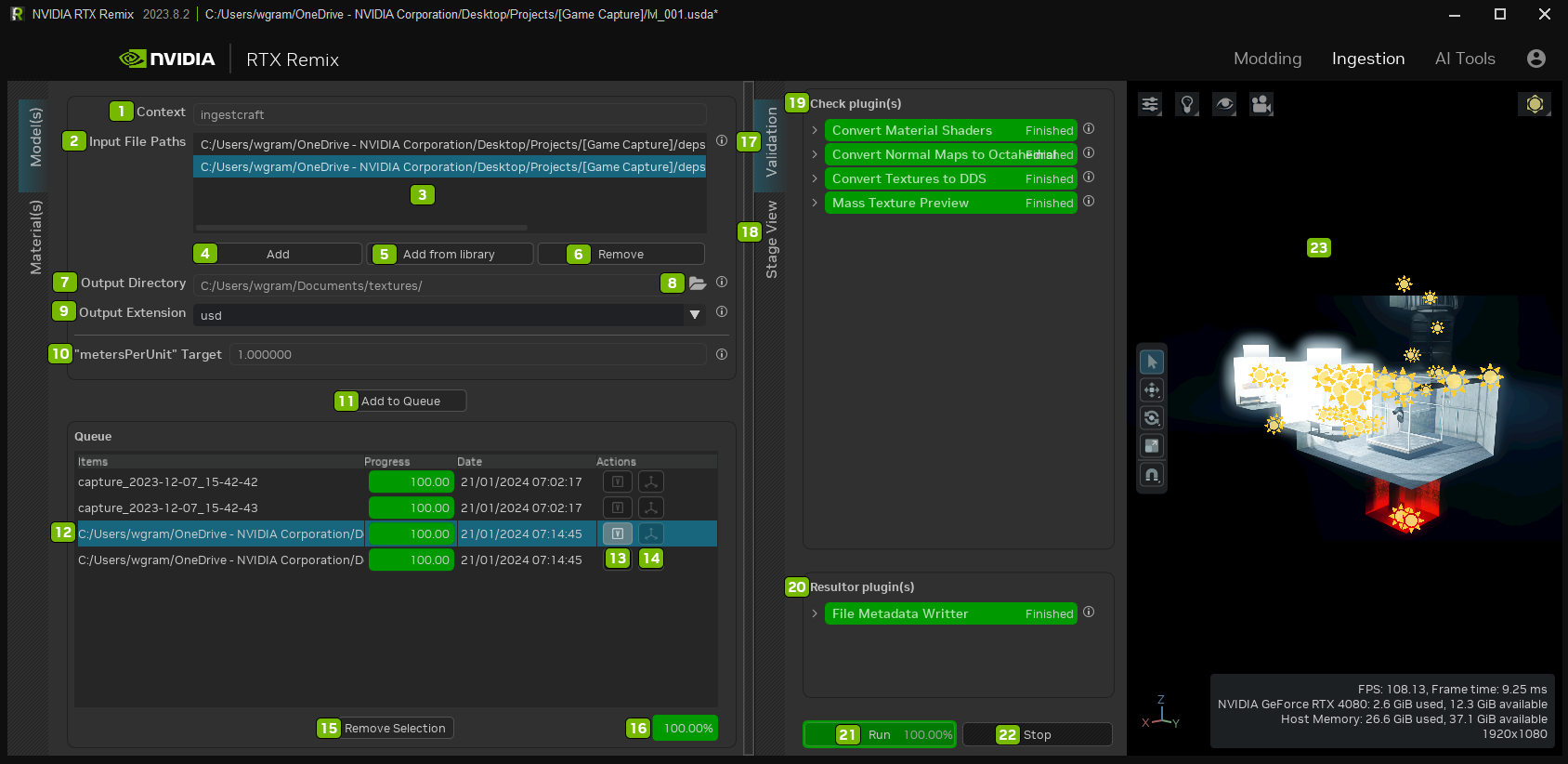
Ref |
Option |
Description |
|---|---|---|
1 |
Context |
Ingestcraft |
2 |
Input File Paths |
The list of files to import as USD files |
3 |
List of Path(s) Field(s) |
The list of files to import as USD files |
4 |
Add |
Add Files to the directory path field |
5 |
Add from Library |
Opens the directory of Library Assets |
6 |
Remove |
Remove Files from the directory path field |
7 |
Output Directory |
Directory to import the converted input files to |
8 |
Opens File Explorer |
|
9 |
Output Extension |
USD file extension to use for the converted input file |
10 |
Apply Unit Scale to Mesh |
Applies the “metersPerUnit” scaling to a mesh’s XForm scale |
11 |
Add to Queue |
Adds imported assets from the Input File Path and places them in the Output Directory |
12 |
Selected Asset |
|
13 |
Toggle Validation Tab |
Opens or Closes the Validation Tab |
14 |
Show in Viewport |
Opens or Closes the Viewport |
15 |
Remove Selection |
Remove selected asset from Queue |
16 |
Queue Ingestion Progress Bar |
Percentage of completion |
17 |
Validation Tab |
Validates the imported Assets |
18 |
Stage View Tab |
Lists the assets in the stage |
19 |
Check Plugin(s) |
Checks the Plugins used during Ingestion |
20 |
Resulter Plugin(s) |
Checks resulter plugins used during Ingestion |
21 |
Run |
Run the Model Ingestion |
22 |
Stop |
Stop the Model Ingestion |
23 |
Viewport |
View the Model Ingestion |
Material Ingestion#
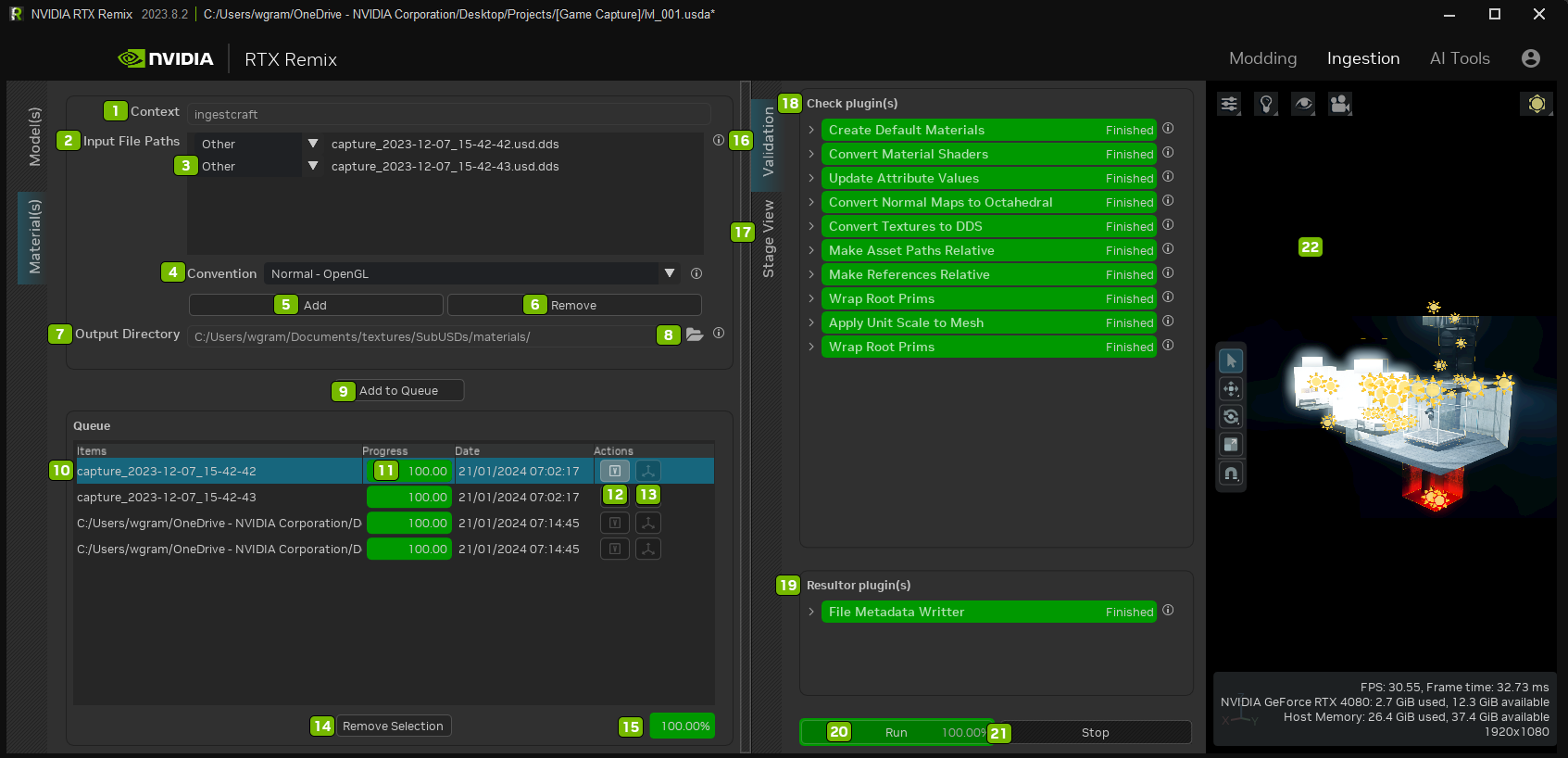
Ref |
Option |
Description |
|---|---|---|
1 |
Context |
Ingestcraft |
2 |
Input File Paths |
The list of files to import as USD files |
3 |
Material Type Dropdown |
Select the material type from the list. Options include: Other, Albedo, Emissive Mask, Metallic, Normal - OpenGL, Normal - DirectX, Normal - Octahedral, or Roughness |
4 |
Convention Dropdown |
Select the default convention type for Normals to use in batch: Normal - OpenGL, Normal - DirectX, or Normal - Octahedral |
5 |
Add |
Add Files to the directory path field |
6 |
Remove |
Remove Files from the directory path field |
7 |
Output Directory |
Directory to import the converted input files to |
8 |
Opens File Explorer |
|
9 |
Add to Queue |
Adds imported assets from the Input File Path and places them in the Output Directory |
10 |
Selected Asset |
|
11 |
Queue Asset Ingestion Progress Bar |
Percentage of completion |
12 |
Toggle Validation Tab |
Opens or Closes the Validation Tab |
13 |
Show in Viewport |
Opens or Closes the Viewport |
14 |
Remove Selection |
Remove selected asset from Queue |
15 |
Queue Ingestion Progress Bar |
Percentage of completion |
16 |
Validation Tab |
Validates the imported Assets |
17 |
Stage View Tab |
Lists the assets in the stage |
18 |
Check Plugin(s) |
Checks the Plugins used during Ingestion |
19 |
Resulter Plugin(s) |
Checks resulter plugins used during Ingestion |
20 |
Run |
Run the Model Ingestion |
21 |
Stop |
Stop the Model Ingestion |
22 |
Viewport |
View the Model Ingestion |
Need to leave feedback about the RTX Remix Documentation? Click here