

UV Projectors#
Overview#
UV Projectors provide a method for applying UV texture coordinates to primitives in Omniverse. You can use UV projectors to address issues with geometry that lacks proper UV texture coordinates, or override existing UV coordinates to achieve specific texture placements on objects.
UV Projectors are particularly valuable when working with imported assets that have poor or missing UV mapping, allowing you to quickly apply professional texture coordinates without returning to your 3D modeling software. In this guide, you will learn how to create projectors, configure their parameters, and select the appropriate projection type for your geometry.
Note
UV projectors differ from projector lights. Projector lights project textures onto the scene from rectangular lights (similar to slide projectors), while UV projectors apply texture coordinates directly to geometry.
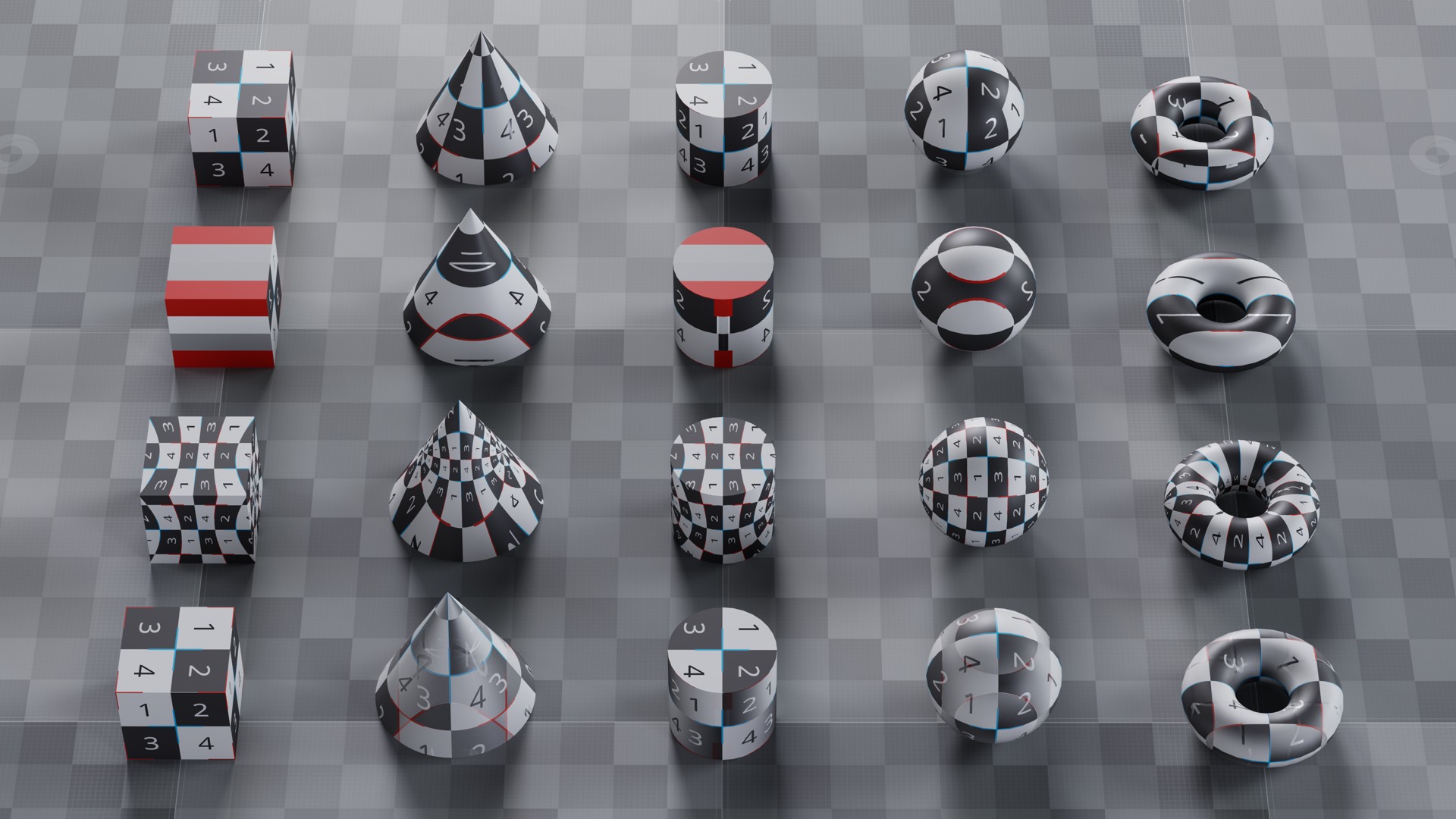
UV projectors applied to a variety of objects. From top to bottom: cubic, planar, sphericalNormalized and triplanar projections.#
Creating a UV Projector#
To create a UV projector in Omniverse Kit applications, right-click on a primitive that you wish to turn into a UV projector (an Xform, for example) and choose Add > Rendering > Add OmniProjectorAPI. This adds an OmniProjectorAPI to the primitive where you can edit the projection parameters, effectively turning it into a UV projector.
To make the UV projector generate UVs for a specific texture space of an object, bind the UV projector to that object via an OmniCoordSysAPI. To create this binding for texture space 0, right-click on that object and choose Add > Rendering > UV Projector Binding > Add st, to add information about the texture space the UV projector is going to output the UV coordinates into (st refers to texture space 0, but it is possible to also choose one of the other three texture spaces, st1, st2 and st3). This also adds an OmniCoordSysAPI to the object.
Finally, in the CoordSysAPI:st tab on the object you want to bind the UV projector to, click Add Target… and select the primitive that you added the OmniProjectorAPI to (the Xform, in our example).
You can also create projectors using Python:
# Get the Xform to use as a UV projector
xform = stage.GetPrimAtPath(xform_path)

# Apply the UV projector API to the Xform
xform.ApplyAPI("OmniProjectorAPI")

# Get the primitive to apply the UV projector to
prim = stage.GetPrimAtPath(prim_path)

# Apply the coordinate system API with "st" namespace
prim.ApplyAPI("OmniCoordSysAPI", "st")

# Bind the coordinate system to the Xform
rel = UsdShade.CoordSysAPI(prim, "st").GetBindingRel()
rel.SetTargets([xform])
In this example, prim_path represents the path to the primitive you want to apply the UV projector to and xform_path the path of the Xform you want to use as a UV projector.
In general it is possible to apply an OmniProjectorAPI to any transformable and bind the coordinate system to any other primitive(s), thus applying a UV projector to more than one primitive. For example, you could add an OmniProjectorAPI to an Xform and an OmniCoordSysAPI to a group that has several objects below it, then bind the whole group to the UV projector - you can do this in the CoordSysAPI:st tab on the group by clicking on Add Target… and selecting the Xform that was turned into a UV projector.
You can also add an OmniProjectorAPI and an OmniCoordSysAPI to the same primitive. This adds a UV projector to that primitive and binds it without requiring a separate entity in the scene like an Xform.
The UV projectors schemata are supplied by the omni.usd.schema.omni_projectors extension, which must be loaded to use the schemata described here and is loaded by default in Omniverse Kit applications.
Projection Parameters#
The parameters of an OmniProjectorAPI are the following:
Parameter |
Meaning |
|---|---|
Type |
Selects the type of projection using a coordinate system based around the origin of the primitive to which you apply this API (see Projector Types below). |
Space |
Selects the space in which the system calculates the projection. Selecting Object applies the projection in the local space of the primitive to which you apply this API; World applies the projection in world space; with Texture the system takes UV coordinates from one of the texture spaces, specified by the Input Space parameter (up to 4 spaces). Specifying a space with meters (Object meters or World meters) accounts for the scene units being in meters, so if a primitive is scaled up the texture will repeat rather than stretch. |
Input Space |
Selects the texture space to read from when the UV projector space above is set to Texture (up to 4 spaces). |
Translate |
Translates the projection frame in the selected UV projector space. |
Rotate |
Rotates the projection frame in the selected UV projector space. |
Scale |
Scales the projection frame in the selected UV projector space. |
UV Translate |
Translates the computed projected UVs. |
UV Rotate |
Rotates the computed projected UVs. |
UV Scale |
Scales the computed projected UVs. |
Projector Types#
You can apply the following types of UV projection to a primitive (the Up direction is the Z axis in object space):
Type |
Effect |
|---|---|
Cubic |
Projects UVs from six planes, similar to how a cube would surround the primitive. |
Cylindrical |
Projects UVs as if the primitive were wrapped by a capped cylinder. |
Cylindrical Normalized |
A variant of the Cylindrical projection where the U coordinate is scaled to always fit within the standard [0,1] range, regardless of the object’s size. |
Infinite Cylindrical |
A Cylindrical UV mapping method that treats the cylinder as having infinite height. |
Infinite Cylindrical Normalized |
A combination of the Cylindrical Normalized and Infinite Cylindrical projections. |
Planar |
Projects UVs onto the primitive from a single plane. |
Spherical |
Projects UVs as if the primitive were wrapped by a sphere. |
Spherical Normalized |
A variant of the Spherical projection where the calculated UV coordinates are always normalized to the [0,1] × [0,1] range, regardless of the object’s size. |
Tri-Planar |
A UV mapping technique that blends UVs projected from three orthogonal planes (XY, XZ, YZ), minimizing visible seams and distortion. |
UV projectors enable you to quickly add or override texture coordinates without modifying your source geometry. For information about applying materials to your textured geometry, see the Materials documentation.