

Migrating from Nucleus#
Goal: Migrate content, checkpoint history, permissions, metadata, and tags from an Enterprise Nucleus Server to an Omniverse Storage APIs deployment using the Nucleus Migration Tool.
This guide assumes a Full Deployment is running, with authentication enabled.
Overview#
The migration tool is a command-line program distributed as a Docker container. It reads Nucleus data read-only and writes to the Storage APIs. Nucleus can remain in service during the migration.
The tool is resumable and one-way. A progress database on the migration host records completed work, so an interrupted run continues where it stopped and repeated runs pick up new checkpoints. Deletions are not propagated.
A full migration is four commands run in order, all using the same configuration file:
Command |
What it does |
|---|---|
|
Walks the Nucleus metadata database and writes a manifest of what will be migrated. Local only; nothing is uploaded. |
|
Matches every user in the Nucleus ACLs to an identity in the Userinfo Service and writes a principal manifest. Nothing is uploaded. |
|
Uploads content, permissions, metadata, and tags. Resumable. |
|
Reads back everything uploaded and compares it to the Nucleus source. |
Nucleus Data Required#
The tool reads the following from the Nucleus DATA_ROOT directory (see the Enterprise Nucleus Server installation guide):
meta.1.1/– the metadata database.usergroups.1.0/– the user and group database.content.1.1/– the file content.tags-db/Tagging.db– the tagging service database. Optional, only needed to migrate tags.
The two databases are copied to the migration host. The content directory is mounted read-only from the running server and is not copied. Copy the Nucleus Databases covers the procedure.
Note
Nucleus accounts are not migrated. After migration, users authenticate against the identity provider configured for the Storage APIs deployment. The retrieve-principals step maps the email address stored in Nucleus to the identity issued by that provider.
Before You Begin#
Nucleus Server#
Nucleus 2023.x (supported version). The tool reads the
meta.1.1metadata database and refuses older database formats. If the server is older, upgrade it and start it once so it convertsmeta.1.1before copying.Root or Docker access to the Nucleus host, or to a host that can mount
content.1.1read-only.A short maintenance window (recommended) to copy the two databases while the Nucleus stack is stopped.
Migration Host#
The migration host is where the container runs. It can be the Nucleus host itself.
Docker Engine, with access to pull
nvcr.io/nvidia/omniverse/ov-nucleus-migrationfrom the NGC catalog.Disk space for a copy of
meta.1.1andusergroups.1.0plus a work directory for progress state, manifests, and logs. Reserve about 50 GB for the work directory on large servers.
Target Environment#
Storage Service, Permission Service, User Info Service, and Discovery Service deployed with Authentication enabled. Any released versions of these services are supported.
A destination address: a top-level address configured in the Storage Service, optionally with a folder prefix. All migrated paths are written beneath it. It must be empty before the first run.
Permission Service in Postgres mode. The tool writes policies through the API, and config-file mode is read-only.
Permit evaluation priority for the Storage Service’s
objectandfolderresource types, as set in Setting Up Service Metadata on the Permission Service page.A user account in the identity provider that can write to the destination address and manage policies in the Permission Service. The tool logs in as this account. Grant it
permissions:editto create and delete migrated policies, andpermissions:metato read service metadata for the evaluation-priority check. Grantpermissions:viewas well if this account will inspect policies manually after migration. See Granting Administrative Permissions for policy examples. The account also needs read access to migrated content and metadata forscrub.Optionally, the Omniverse URL of the Nucleus server (for example
omniverse://nucleus.example.com/) configured as an alias in the Storage Service, so existing links resolve to migrated content.scrubverifies this alias when configured.
Copy the Nucleus Databases#
Nucleus writes to meta.1.1 and usergroups.1.0 continuously, so a copy taken while it is running can be inconsistent. Stopping the Nucleus stack for the copy is recommended. If a stop is not possible, copy during low activity and review the scan summary. The tool refuses to open a copy it detects as corrupt.
Stop the Nucleus stack (recommended). Use the compose file that matches the installation.
cd /opt/ove/base_stack
sudo docker compose --env-file nucleus-stack.env -f nucleus-stack-ssl.yml down
Copy
meta.1.1andusergroups.1.0fromDATA_ROOTto the migration host. Replace/var/lib/omni/nucleus-datawith yourDATA_ROOT.SOURCE_DIR=/var/migration/source sudo mkdir -p "$SOURCE_DIR" sudo cp -a /var/lib/omni/nucleus-data/meta.1.1 "$SOURCE_DIR/" sudo cp -a /var/lib/omni/nucleus-data/usergroups.1.0 "$SOURCE_DIR/"
To migrate tags, copy the tagging database as well.
sudo mkdir -p "$SOURCE_DIR/tags"
sudo cp -a /var/lib/omni/nucleus-data/tags-db/Tagging.db "$SOURCE_DIR/tags/"
Start the Nucleus stack again.
sudo docker compose --env-file nucleus-stack.env -f nucleus-stack-ssl.yml up -d
Nucleus remains in service from this point. The tool reads content.1.1 directly from the running server. If a file is deleted while the tool is mid-run, that path is skipped and reported; it becomes consistent on the next run against a fresh snapshot.
Note
Changes made in Nucleus after this copy are not in the snapshot. Before cut-over, take a fresh snapshot and run the tool again; only new checkpoints are uploaded. See Catch Up and Cut Over.
Choose Host Directories#
The commands below use these shell variables. Adjust the paths to the environment.
SOURCE_DIR=/var/migration/source            # meta.1.1, usergroups.1.0, tags/, migration_config.toml
CONTENT_DIR=/var/lib/omni/nucleus-data/content.1.1   # live Nucleus content, mounted read-only
WORK_DIR=/var/migration/workdir             # progress, logs, manifests. MUST persist across runs.
METRICS_DIR=/var/migration/metrics          # Prometheus textfile output (optional)

PORT=10001                                  # host port for the dashboard
IMAGE=nvcr.io/nvidia/omniverse/ov-nucleus-migration:0.1.0   # migration tool container image
After copying the databases, SOURCE_DIR has this layout. The configuration file is created in the next section.
$SOURCE_DIR/
├── migration_config.toml
├── meta.1.1/
├── usergroups.1.0/
└── tags/Tagging.db          # only if migrating tags
Warning
Do not delete WORK_DIR between runs. The progress database inside it is the only record of what has already been uploaded.
Create the Configuration File#
All options live in one TOML file. Create $SOURCE_DIR/migration_config.toml with the contents below and replace the values marked <...>. Paths under /var/data/ and /var/metrics/ are container paths matching the mounts used below; leave them unchanged.
# --- Nucleus source (container paths, leave as-is) ---
metadb  = "/var/data/source/meta.1.1/"
userdb  = "/var/data/source/usergroups.1.0/"
tagsdb  = "/var/data/source/tags/Tagging.db"     # remove this line if not migrating tags
nucleus_content_dir = "/var/data/content/"       # the live content.1.1 directory

# --- Work directory (container paths, must persist across runs) ---
progress_dir = "/var/data/workdir/progress"
logs_dir     = "/var/data/workdir/logs"
manifest     = "/var/data/workdir/manifest.json"

# --- Destination ---
storage_api_url     = "https://<your-storage-apis-host>/"     # Discovery Service base URL; other endpoints are resolved from it
destination_address = "<top-level-address>/<folder>/"        # e.g. https://<account>.blob.core.windows.net/<container>/nucleus/
aliased_omniverse_url = "omniverse://<your-nucleus-host>/"   # optional; lets scrub verify legacy links

# --- What to migrate ---
skip_content     = false
skip_permissions = false
skip_metadata    = false
skip_tags        = false      # set true if you removed tagsdb above
include_thumbs   = false
include_system_dir = false

# --- Safety checks ---
check_permission_evaluation_priority = true

# --- Dashboard ---
dashboard_endpoint     = "0.0.0.0:10001"
keep_dashboard_running = true

# --- Metrics (optional; remove if you do not scrape Prometheus) ---
metrics_file_path            = "/var/metrics/metrics.<name>.prom"
metrics_prefix               = "nucleus2storageapi"
metrics_instance_label_name  = "source_server"
metrics_instance_label_value = "<name>"

# --- Authentication ---
auth_type = "device"          # interactive browser login
storage_api_urlThe Discovery Service base URL. The Storage Service, Permission Service, Userinfo Service, and login configuration are resolved from it.
destination_addressWhere migrated paths are written. A Nucleus path
/Projects/a.usdbecomes<destination_address>/Projects/a.usd.nucleus_content_dirThe live
content.1.1directory. Use this orbackup_content_dir(for a Nucleus backup export), never both. See Using a Nucleus Backup Export as the Content Source.auth_typedeviceprompts for a browser login (see Log In) and stores no secrets on disk. Non-interactive options are described in Non-Interactive Authentication.
To print an example configuration with every option and its environment variable:
docker run --rm "$IMAGE" generate-config
Settings can be overridden from the command line or with environment variables prefixed NUCLEUS2STORAGEAPI_.
Run the Migration#
Each command is the same docker run invocation with a different trailing subcommand. Run them in order and wait for each to finish.
run_migration() {
  docker run --rm \
    -v "$SOURCE_DIR":/var/data/source:ro \
    -v "$CONTENT_DIR":/var/data/content:ro \
    -v "$WORK_DIR":/var/data/workdir \
    -v "$METRICS_DIR":/var/metrics \
    -p "127.0.0.1:$PORT":10001 \
    --name nucleus-migration \
    "$IMAGE" \
    --config /var/data/source/migration_config.toml \
    "$@"
}
The commands run in the foreground so the login prompt is visible. To detach, add -d and read the prompt with docker logs -f nucleus-migration.
Scan#
run_migration scan
Scan needs no login. It walks the metadata database, counts paths, checkpoints, and bytes, checks that each referenced content blob exists in content.1.1, and writes the manifest. The summary lists paths that will be skipped (too long, missing content, system folders). By default, a path is skipped when its URL-encoded destination resource address exceeds 1,024 bytes, including the destination address and folder prefix. Percent-encoding can make this longer than the visible Nucleus path. The limit is controlled by maximum_path_length.
Far fewer paths than expected, or many missing-content warnings, indicate a problem with the snapshot or the content mount.
Retrieve Principals#
run_migration retrieve-principals
Logs in (see Log In), downloads the user list from the Userinfo Service, and matches each user’s email in the Nucleus ACLs to exactly one directory identity. Prints two counts:
Resolved: users found in the directory. Their permissions will be migrated.
Unresolved: users not found, without an email, matching more than one entry, or Nucleus service accounts such as
omniverse. Their permissions are skipped.
Review the unresolved list in $WORK_DIR/progress/userinfo/. Unresolved service accounts are normal. Unresolved real users usually have a Nucleus email that differs from the identity provider email. Fix individual cases in $WORK_DIR/progress/userinfo/principal-overrides.json and run retrieve-principals again.
Upload#
run_migration upload
Logs in, verifies the manifest against the source, and uploads content, permissions, metadata, and tags in parallel. Duration ranges from hours to days depending on data size, network bandwidth, and backend write throughput.
Interrupt with docker stop nucleus-migration (not docker kill) so in-flight uploads finish cleanly. Run the same command again to continue.
Scrub#
run_migration scrub
Reads back every migrated file and checkpoint and compares it to the Nucleus source. Writes nothing to the destination. See Validate the Result.
Log In#
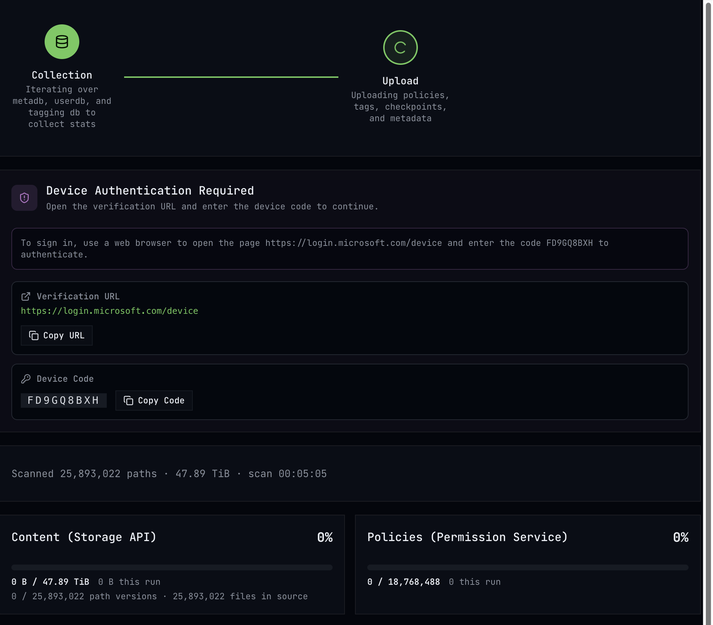
retrieve-principals, upload, and scrub need an authenticated session. With auth_type = "device" the tool prints a prompt shortly after starting:
OAuth device flow authorization is required.
Open: https://<your-identity-provider>/device
Code: XXXX-XXXX
The dashboard shows the same URL and code in a Device Authentication Required card. Open the URL, enter the code, and sign in with the migration account. On success the console prints Token refresh succeeded. and the phase starts. The token is refreshed automatically for the rest of the run.
Monitor the Dashboard#
Open http://127.0.0.1:<PORT>/ in a browser on the migration host. The dashboard has no authentication; the Docker command above publishes it only on the host loopback interface. Keep dashboard_endpoint = "0.0.0.0:10001" inside the container so Docker can forward connections to it.
For a remote migration host, open an SSH tunnel from your workstation (replace <PORT> with the host port, normally 10001):
ssh -N -L 10001:127.0.0.1:<PORT> <user>@<migration-host>
Then open http://127.0.0.1:10001/ on your workstation. Keep the tunnel running while using the dashboard.
The header shows the current stage: Collection, Upload, and during scrub Verification.
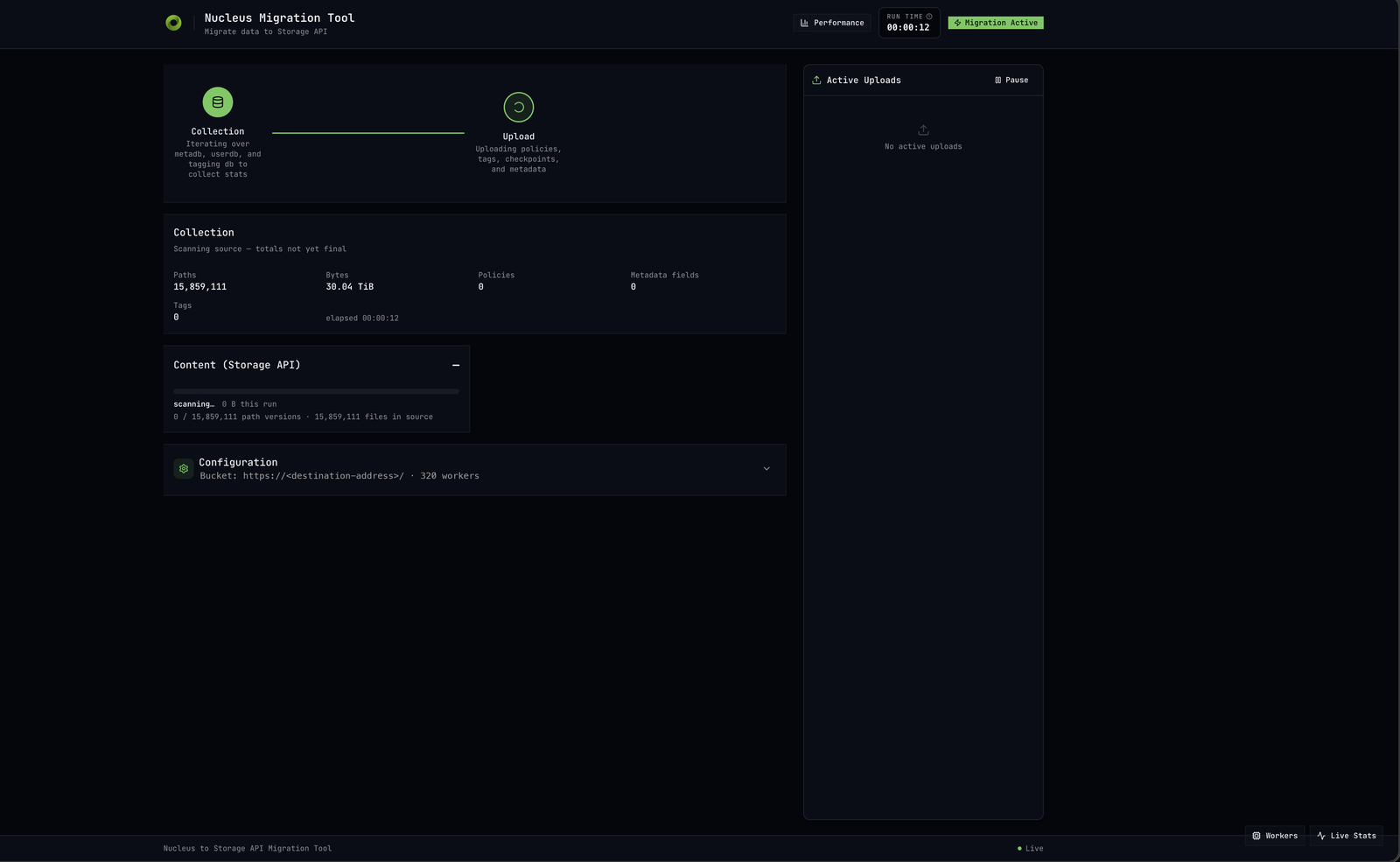
Collection. At start the tool re-reads the metadata database to compute totals. Counts of paths, bytes, policies, metadata fields, and tags update with the note totals not yet final. On servers with tens of millions of paths this takes several minutes.
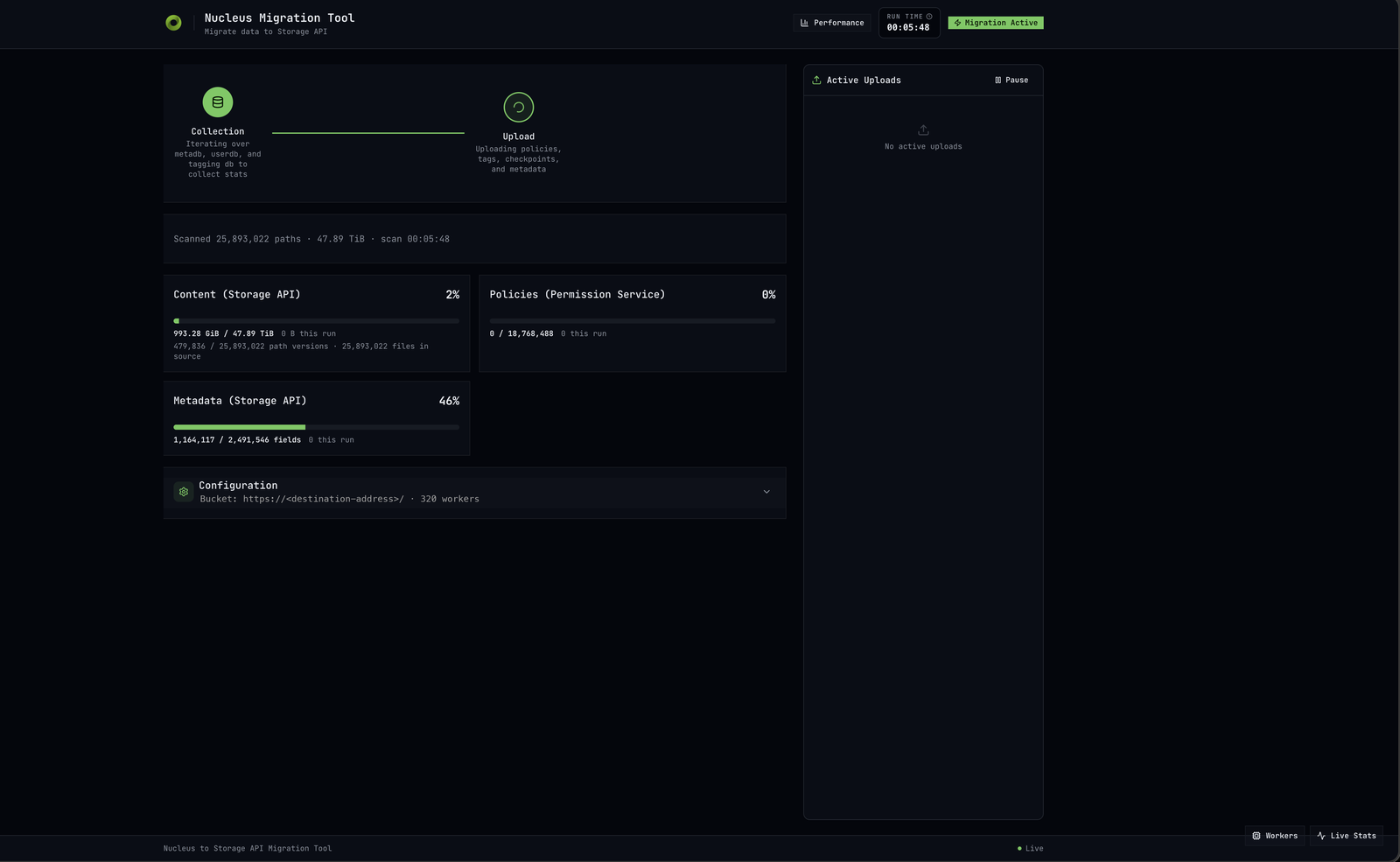
Upload. The summary line reads like Scanned 25,893,022 paths · 47.89 TiB · scan 00:05:48 and one progress card appears per task:
Content (Storage API): bytes and path versions uploaded out of total.
Policies (Permission Service): permission writes done out of total.
Metadata (Storage API): metadata fields written out of total.
Tags, if tags are being migrated.
Each card shows N this run to distinguish resumed from new progress. A bar that stops while others continue indicates a bottleneck in the service behind it.
Active Uploads lists files in flight. Pause stops scheduling new uploads without stopping the container. The Configuration panel shows the destination address, worker count, database paths, resolved API endpoints, enabled tasks, and the groups found in usergroups.1.0. Check it on the first run. Workers, Live Stats, and Performance open throughput and per-worker detail. Metrics are served at http://127.0.0.1:<PORT>/metrics on the migration host and written to $METRICS_DIR.
Completion. The console prints a summary with counts and failures. With keep_dashboard_running = true the container stays up for review; stop it with docker stop nucleus-migration. If the summary lists failures, run upload again. Failed items are retried; completed items are skipped.
Validate the Result#
During scrub the dashboard shows a Verification table with one row per check and pass and fail counts for files and checkpoints separately.
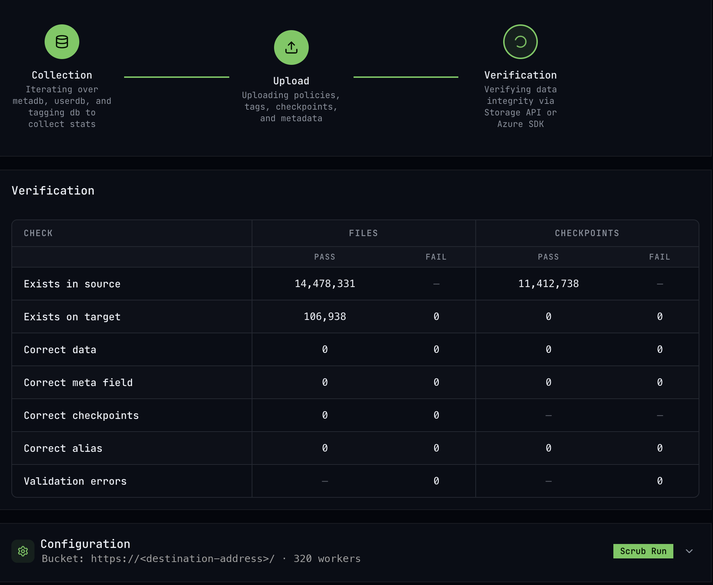
Check |
What it means |
|---|---|
Exists in source |
Files and checkpoints found in the Nucleus metadata. The denominator for everything else. |
Exists on target |
The resource is addressable in the Storage API. |
Correct data |
The content was downloaded and its hash matches the hash Nucleus recorded. |
Correct meta field |
Timestamps, authors, hash, and checkpoint messages are present on the migrated resource. |
Correct checkpoints |
The |
Correct alias |
Legacy |
Validation errors |
Checks that could not complete, for example because a request failed. |
A clean migration ends with the FAIL columns at zero and the pass counts equal to Exists in source.
Failed checks are written as JSON lines to $WORK_DIR/progress/scrub_reports/<timestamp>/scrub_report.jsonl. Each line names the path, the check, and the expected versus found value.
Scrub is resumable. Restarted with the same work directory, it skips checks that already passed. The scrub state is tied to the manifest and to the verification-affecting configuration. If the manifest changes (a new scan) or any of those settings change (destination address, filters, heads_only, skip_metadata, maximum_path_length, aliased_omniverse_url), scrub refuses to start and asks for reset-scrub-state. Run it and then scrub again:
run_migration reset-scrub-state
run_migration scrub
reset-scrub-state removes only the scrub progress database. Upload progress, scrub reports, and logs are kept.
Spot-check manually as well: open migrated files in Storage Navigator or Kit, open an old omniverse:// link with a checkpoint number, and sign in as a user with restricted access in Nucleus to confirm they see the same folders and no more.
Catch Up and Cut Over#
Changes made in Nucleus during the migration are not yet on the destination. Repeat the following cycle until cut-over:
Take a fresh snapshot of
meta.1.1andusergroups.1.0(see Copy the Nucleus Databases). Replace the old ones in$SOURCE_DIR.Run
scanagain. It writes a new manifest.Run
retrieve-principalsagain if users or groups changed.Run
uploadagain with the sameWORK_DIR. Only new checkpoints, changed metadata, changed ACLs, and changed tags are transferred.Run
reset-scrub-state. The new manifest does not match the one recorded in the scrub state, soscrubrefuses to resume until the state is discarded.Run
scrubagain. It re-verifies everything against the new snapshot.
For the final cut-over, make Nucleus read-only or stop it before taking the last snapshot, run the cycle once more, and switch clients to the new deployment. Keep WORK_DIR and the last snapshot until no further catch-up runs are needed.
Resuming, Resetting, and Other Commands#
Situation |
What to do |
|---|---|
Upload or scrub was interrupted |
Run the same command again. It resumes. |
Redo the upload from an empty local state |
|
Redo the scrub from scratch, or scrub after a new |
|
Remove every permission the tool wrote |
|
Preview which policies would be written |
|
List every unique content blob the migration will read |
|
Output Locations#
What |
Host path |
|---|---|
Progress database (resume state) |
|
Logs (gzip JSON, view with |
|
Scan manifest |
|
Principal manifest and unresolved report |
|
Upload run summaries and telemetry |
|
Scrub run summaries and telemetry |
|
Scrub failure reports |
|
Prometheus metrics textfile |
|
Variations#
Using a Nucleus Backup Export as the Content Source#
If the live server is unavailable or should not be read from, the tool can use a Nucleus backup export instead. A backup export stores content as hash-addressed blobs (for example ab/<hash>.sha256-flat) rather than omni.content.<id> files.
Replace nucleus_content_dir in the configuration with:
backup_content_dir = "/var/data/content/"
and mount the export directory at /var/data/content in place of content.1.1. Use exactly one of the two keys.
Non-Interactive Authentication#
For unattended runs, replace auth_type = "device" with one of:
client_credentialsA service account (OAuth client ID and secret). Add a
[client_credentials]section withclient_idand eitherclient_secretorclient_secret_file. The scope and issuer are resolved fromstorage_api_url.refresh_tokenA pre-issued OAuth refresh token. Add a
[refresh_token]section withrefresh_tokenorrefresh_token_file. Many identity providers rotate refresh tokens on use, so pass--save-authon the command line so a restarted run can continue with the rotated token.access_token_fileA bearer token that an external process keeps fresh in a file, for example a Kubernetes sidecar. Add
[access_token_file] path = "...". The tool re-reads the file shortly before the token expires.
Run generate-config to see every key for each section.
Migrating a Subset of the Server#
include_folder = ["/Projects", "/Library"]Migrate only these folders and their contents.
source_path = "/Projects/VFI/"Treat one Nucleus folder as the destination root, so
/Projects/VFI/A/B.usdlands at<destination_address>/A/B.usd. Useful for splitting one Nucleus server across several destinations.heads_only = trueMigrate only the current version of each file, dropping checkpoint history. Old checkpoint links will not resolve.
Changing any of these after a run has started requires a new scan and a compatible progress state. The tool reports when the manifest no longer matches. A new manifest also invalidates the scrub state; run reset-scrub-state before the next scrub.
Tuning#
workersNumber of parallel uploads. The default scales with the host’s CPU count. Raise it if the Storage Service and backend have headroom; lower it on throttling.
max_retriesRetries per item before it is marked failed (default 5). Transient network errors are retried indefinitely and do not count against this.
Known Limitations#
One-way only. Deletions, ACL removals not covered by a later run, and edits that do not create a checkpoint are not propagated.
Destination must start empty. Pre-existing content or policies under the destination address are not cleared and can collide with migrated data.
Orphaned versions. If a file is edited in Nucleus after its head was migrated, the next run uploads the new checkpoint and a new head. The previously uploaded head remains on the destination as an unreferenced version and is not garbage-collected.
Unresolved principals lose their permissions. Any Nucleus user whose email does not match exactly one directory entry is skipped. Check the unresolved report after
retrieve-principals.Progress state is per source and destination. Reusing a work directory for a different Nucleus server or destination address is not supported. Use a new work directory.
A permanently unreachable target does not fail fast. Transient connection errors are retried indefinitely so long runs survive brief outages. If the Storage Service is permanently unavailable, stop the container manually.
Troubleshooting#
- The tool exits immediately with “unsupported metadb schema version”
meta.1.1came from a Nucleus older than 111. Upgrade Nucleus, start it once so it converts the database, then take a new copy.- scan reports many paths with missing content
The metadata database references blobs that are not in
content.1.1. Confirm the right directory is mounted. Small counts are usually files deleted between the snapshot and the scan and are safe to ignore.- upload refuses to start: manifest does not match
The metadata snapshot or a scope setting changed since
scan. Runscanagain.- upload refuses to start: no principal manifest
Run
retrieve-principalsbeforeupload, or setskip_permissions = trueto skip permissions.- Many real users are unresolved
Their Nucleus email does not match the email in the identity provider. Add overrides in
$WORK_DIR/progress/userinfo/principal-overrides.jsonand rerunretrieve-principals.- The login prompt never appears
Check
docker logs nucleus-migration. Ifstorage_api_urlis wrong or unreachable the tool cannot discover the login configuration.- Progress is slow
Check network bandwidth between the migration host and the Storage Service, backend write throughput, and Storage Service rate limits. Lower
workersif the backend is throttling; raise it if everything is idle.- A progress bar is stuck while others move
The service behind that bar is the bottleneck: the Storage Service for content and metadata, the Permission Service for policies.
- scrub reports Correct alias failures but everything else passes
The Storage Service does not have
aliased_omniverse_urlconfigured as an alias for the destination address, or the alias points elsewhere. Fix the Storage Service configuration and rerunscrub.- scrub refuses to run: scrub state does not match current scrub configuration
The error lists the fields that differ, most often
manifest_hashafter a newscan. Runreset-scrub-stateand thenscrubagain.- upload refuses to write policies: evaluation priority is not permit
The Storage Service’s
objectandfolderresource types must haveevaluationPriority: permitin the Permission Service metadata. Nucleus grants access if any matching ACL entry allows it, and the Permission Service default (forbid) is the opposite. Set it as described in Setting Up Service Metadata and runuploadagain.
What Is Migrated#
For every file and folder on the Nucleus production branch:
Content: every numbered checkpoint and the current head of each file, uploaded in Nucleus history order with the head last.
Permissions: the ACL on each path, translated into Permission Service policies. Only the policies needed to reproduce Nucleus access decisions are written; the rest is covered by folder inheritance.
Metadata:
created_timestamp,created_by,modified_timestamp,modified_by, the Nucleus content hash, and per-checkpoint commit messages.Tags, if the tagging database is supplied.
Checkpoint link compatibility: a
checkpointsmetadata field on each file maps Nucleus checkpoint numbers to Storage API version identities, so existingomniverse://server/file.usd?&3links keep working.
Not migrated:
Anything outside the production branch: other branches, channels, live objects, and mounts.
Empty folders.
Nucleus user accounts and passwords.
Deletions. A file deleted in Nucleus after it was migrated stays on the destination.
Edits that overwrite a head in place without creating a new checkpoint. A head is uploaded once; only new numbered checkpoints are picked up on later runs.
Folders named .thumbs and the root /.system/ folder are skipped by default. Set include_thumbs and include_system_dir to include them.