


System Architecture#
Architecture Overview#
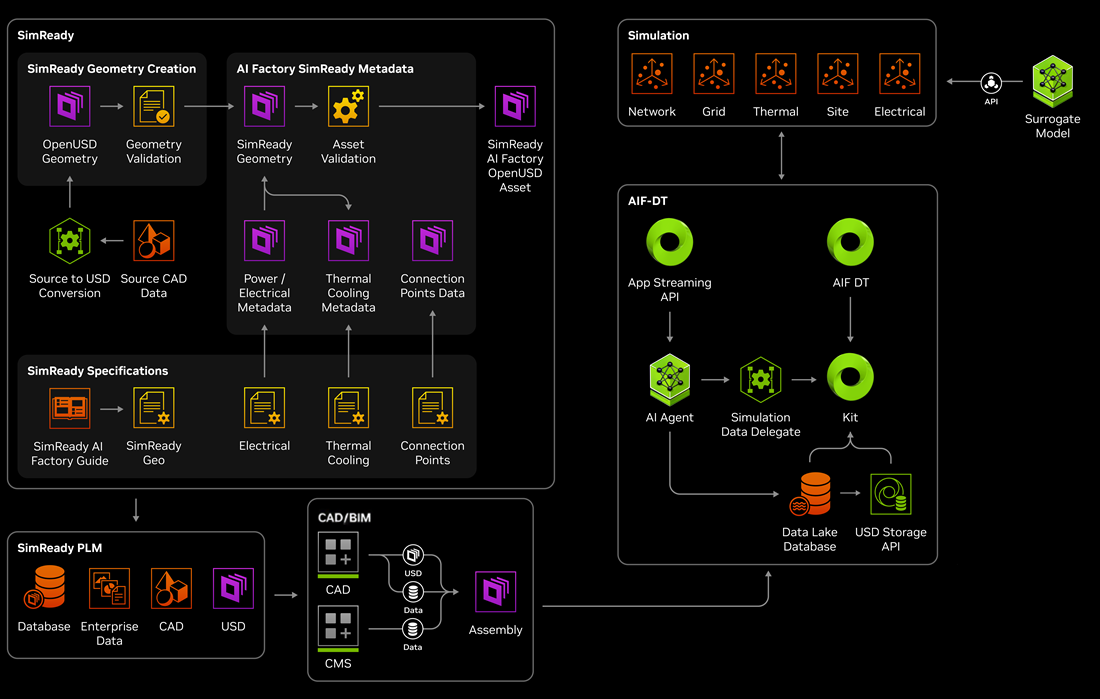
Figure 1: DSX system architecture showing the SimReady asset pipeline, simulation services, surrogate model, and the AIF-DT runtime for digital twin applications.#
Architecture Components#
The DSX architecture spans four major areas: asset creation, data management, simulation, and the runtime digital twin application.
- SimReady Asset Pipeline
Transforms vendor CAD source models into validated, simulation-ready OpenUSD assets. The pipeline has two stages:
SimReady Geometry Creation: Converts source CAD data to OpenUSD geometry and runs geometry validation to ensure topology, normals, and structural compliance.
AI Factory SimReady Metadata: Enriches validated geometry with SimReady metadata — power/electrical, thermal cooling, and connection point data — then runs asset validation to produce the final SimReady AI Factory OpenUSD Asset.
SimReady Specifications define the metadata schemas for each asset class, covering electrical, thermal cooling, connection points, and geometry standards. For details on the asset journey, see SimReady Assets.
- SimReady PLM and CAD/BIM
Upstream data sources that feed the asset pipeline:
SimReady PLM: Enterprise data stores (databases, enterprise data, CAD files, USD assets) that provide source material for the SimReady pipeline.
CAD/BIM: CAD and CMS tools that convert source models into USD and data outputs, producing assembled scenes that flow into the AIF-DT runtime.
- Simulation and Surrogate Model
Simulation services that run across the digital twin:
Simulation types: Network, Grid, Thermal, Site, and Electrical simulations that model facility behavior under different conditions.
Surrogate Model: Provides AI-accelerated inference via API, enabling fast approximate simulation results that complement full-fidelity solvers.
The Surrogate Model connects to the simulation layer via API, allowing the AIF-DT runtime to query predicted system responses for interactive what-if scenarios.
- AIF-DT (AI Factory Digital Twin)
The runtime application that brings the digital twin to life:
App Streaming API: Streams the 3D application to browser clients via WebRTC.
AIF DT: The core digital twin application logic.
Kit: The Omniverse Kit rendering engine that drives real-time 3D visualization.
Simulation Data Delegate: Routes simulation data between solvers, the Surrogate Model, and the Kit renderer.
AI Agent: Natural language interface for controlling the digital twin — switching configurations, running simulations, and adjusting parameters.
Data Lake Database: Stores simulation results, operational data, and scene state.
USD Storage API: Provides access to USD assets for the runtime application.
User Roles and Data Flow#
Engineering Disciplines:
Asset authors use their CAD and design tools to create OpenUSD geometry, which is validated and converted into SimReady geometry for the AI Factory. SimReady specifications for electrical, thermal-cooling, and connection points are applied so that every asset carries consistent, simulation-ready metadata.
Domain engineers then enrich these SimReady assets with AI Factory-specific metadata, including power and electrical properties, thermal and cooling data, and connection-point definitions. Validated assets are published as SimReady AI Factory OpenUSD assets that can flow into PLM systems and downstream simulation and digital-twin workflows.
PLM and CAD/BIM teams consume these SimReady assets inside their databases, enterprise systems, and CAD/CMS environments. From there, they assemble higher-level configurations and assemblies that are exported back into OpenUSD, maintaining the same SimReady standards for use in AIF-DT and simulation.
End Users:
AI Factory / AIF-DT users access the AI Digital Twin through applications built on Omniverse Kit and exposed via the App Streaming API. They can visualize the assembled AI factory, review performance metrics, and interact with simulation-backed scenarios in real time.
AI agents and analytics services run alongside these applications within AIF-DT, drawing on simulation outputs and data stored in the data lake and USD storage. These services provide higher-level insights, automation, and optimization recommendations to support planning and operations.
Data Flow:
SimReady geometry, specifications, and metadata are created and validated in the SimReady environment, then stored in PLM and enterprise systems as the authoritative definition of AI Factory assets. PLM and CAD/BIM tools assemble these assets into system-level configurations and export the resulting OpenUSD assemblies to AIF-DT.
Within AIF-DT, assemblies and configuration data are managed through the USD Storage API and backed by a data-lake database that captures simulation results and operational telemetry. The Simulation Data Delegate coordinates data exchange between simulations, AI agents, and Kit-based applications, ensuring that each component works from a consistent view of the AI Factory.
Simulation workloads across network, grid, thermal, site, and electrical domains produce rich datasets that are used both for direct analysis and to train surrogate models. These surrogate models are exposed through APIs so applications and AI agents can query predicted behavior, explore what-if scenarios, and respond in real time.
The overall flow allows SimReady assets, PLM assemblies, simulations, and surrogate models to stay aligned, giving stakeholders a coherent, up-to-date digital twin of the AI Factory that supports design, deployment, and operations.