
Input and Output Nodes#
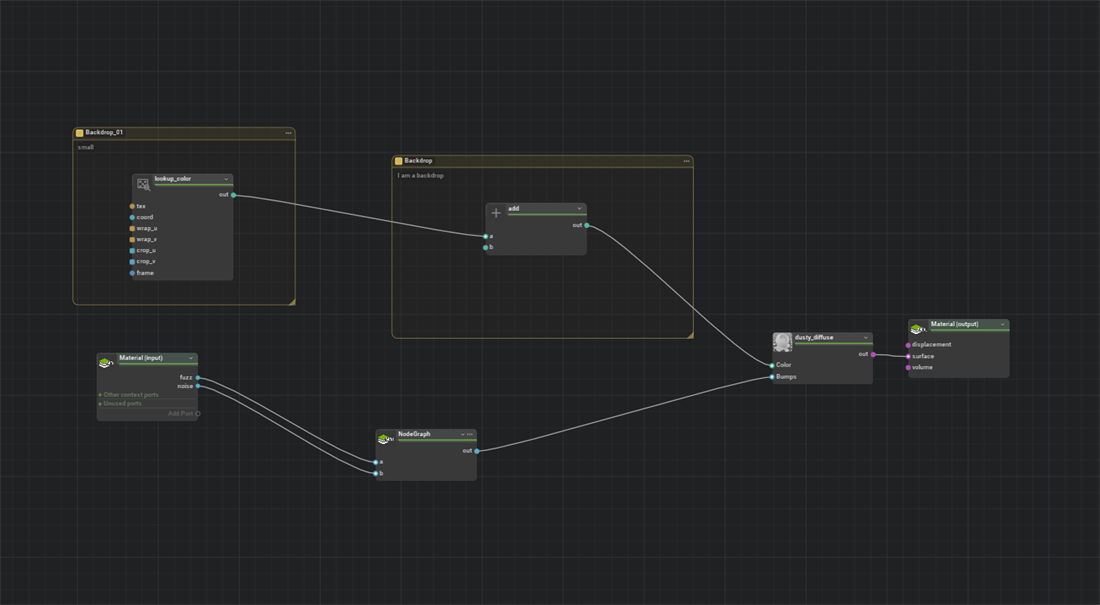
Material Graph uses two special virtual nodes, InputNode and OutputNode, to represent the public interface of the Material or NodeGraph at the current graph level. These nodes do not correspond to actual USD shader prims. Instead, they expose the current container’s input and output ports so you can wire them into the graph like any other node.
InputNode#
The InputNode displays all public input ports on the current Material or NodeGraph. These are the parameters that downstream consumers (renderers, parent graphs, other materials, and look-development tools) can override.
Port Categories#
Every port on the InputNode falls into one of three categories:
Category |
Meaning |
|---|---|
Active |
The port is used by a shader in the current render context. |
Used in other contexts |
The port is wired to a shader in another render context, such as MDL instead of UsdPreviewSurface. |
Unused |
The port exists on the material interface but is not connected to any shader in any context. |
Category Groups#
Ports are organized into collapsible groups from the USD displayGroup metadata on each input. Material Graph removes an Inputs: prefix when present and uses the top-level group name. Inputs without a display group appear under General. Large groups can be split into smaller pages.
Click a group header to collapse or expand it. This is especially useful for materials with dozens of exposed parameters.
Context and Usage Groups#
Ports used in the current render context appear directly on the InputNode. Material Graph keeps the remaining interface compact by placing other ports in summary rows:
Row |
Description |
|---|---|
Other context ports |
Ports used only by another render context. Expand the row to inspect them. |
Unused ports |
Ports that are not connected in any render context. Expand the row to inspect or reuse them. |
Each summary row can show the number of ports it contains. The Add Port row remains at the bottom of the node.
Add Port#
Use the Add Port row as a connection target or source; it is not a standalone dialog button:
To expose a new material input, drag from Add Port on the InputNode to a shader input. Material Graph creates a compatible material input and connects it.
To create a new material output, drag from a shader output to Add Port on the OutputNode. Material Graph creates a compatible material output and connects it.
The created interface port is authored on the Material or NodeGraph represented by the current graph level.
OutputNode#
The OutputNode displays output ports on the current Material or NodeGraph for the current render context. A typical UsdShade material has one output per context. For example, it can have outputs:mdl:surface for MDL and outputs:surface for UsdPreviewSurface.
When you switch render contexts, the OutputNode updates to show only the outputs relevant to that context. Connect the final shader’s output to the appropriate OutputNode port to complete the material graph.
Context-Specific Positions#
Both the InputNode and the OutputNode store their canvas positions per render context. This means you can arrange them in one context without disturbing the layout you set up in another. When you switch contexts, each node snaps to the position it was last placed in that context.