


How authorization requests are evaluated#
This page describes what happens inside Permission Service when a client submits an authorization request. It walks through each stage of the pipeline — from validating the caller’s bearer token to returning a final decision — and then explains the specifics of Cedar evaluation and of batch evaluation.
For the Cedar language itself, see Writing Cedar policies for Permission Service. For the metadata fields consumed at evaluation time, see Managing service metadata through the REST API. For inspecting which policies a concrete request would evaluate, see the Diagnostics API.
Overview#
A single authorization request is the tuple (principal, action, resource, context), usually shortened to PARC:
principal — the identity the request is being evaluated for; defaults to the caller when omitted.
action — a service-scoped operation (
<service>:<name>).resource — an optional typed entity the action targets.
context — an optional JSON object that Cedar conditions can read.
Permission Service processes each request through a fixed pipeline and returns one of three decisions:
allow— at least one matching policy permitted the request, and no higher-priority deny won.deny— no permit applied, or a forbid won under the configured evaluation priority.skip— returned only in batch requests where a short-circuit condition (see Batch conditions and skipped evaluation) has already decided the outcome.
Authorization flow#
The diagram below shows the pipeline a single authorization request travels through. Boxes on the right are caches and external systems each stage talks to.
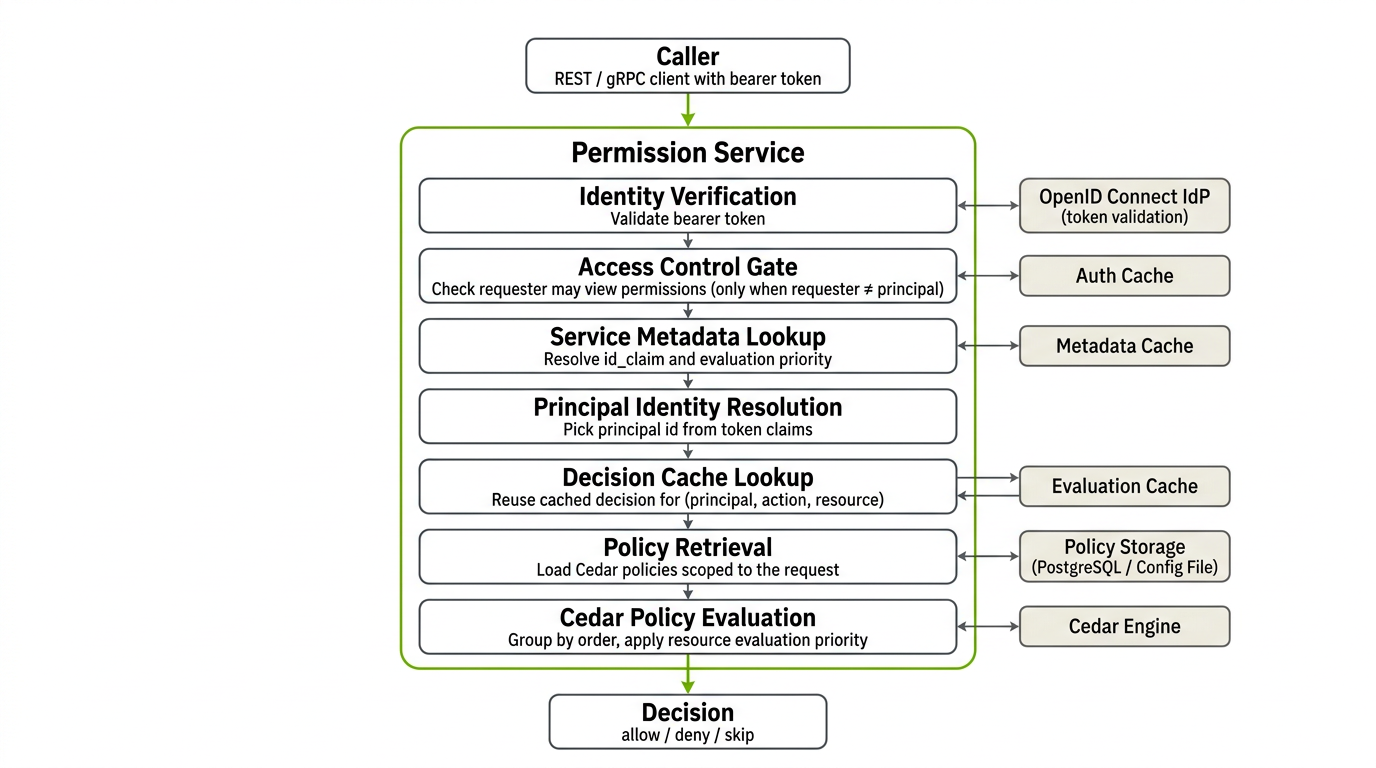
Every stage is described below in the same order.
1. Identity Verification#
When authentication is enabled, the service validates the caller’s bearer token before anything else.
Rejects the request with
401 Unauthorizedif the token is missing, malformed, expired, or fails signature verification.JWT access tokens are verified against the identity provider’s JWKS. Opaque tokens are accepted when the provider’s userinfo endpoint returns a successful response. A JWT may also be enriched with claims from userinfo when the deployment is configured that way. See OpenID Connect Identity Provider in the overview.
Successful validations, including the resolved claims, are stored in an auth cache so repeated calls from the same token do not hit the identity provider on every request.
On success the service builds a requester principal from the validated claims: its id is taken from the deployment-wide PRINCIPAL_ID_CLAIM (default sub) and every claim is exposed as an attribute for later Cedar conditions.
When authentication is disabled, this stage is skipped and the requester is treated as an anonymous principal.
2. Access Control Gate#
The request body may carry an explicit principal that is different from the caller — for example, a service evaluating “may user X read file Y?” on behalf of user X. When that happens the caller is effectively asking to see another principal’s permissions, which is itself a privileged operation.
Whenever the caller and the request’s principal differ, Permission Service evaluates an internal meta-request first:
action —
Action::"permissions:view".resource — a synthetic
AuthorizationRequest::"request"entity whose attributes mirror the pending PARC so policies can inspect what is being queried.
This gate runs through the same Cedar engine and the same policy store as a regular request. If it denies, the service returns deny for the authorization request without evaluating any service-owned policies. If the caller and the request’s principal match (the common case for self-checks), the gate is skipped.
Meta-permissions are only enforced when authentication is enabled. See Granting administrative permissions for how permissions:view is seeded.
3. Service Metadata Lookup#
The service resolves the metadata record that applies to this request. Metadata is keyed by (action.service, resource.type) and is cached in memory with its own TTL; on a miss the service reads from the configured storage backend (PostgreSQL or config-file) and repopulates the cache.
The record returned at this stage is a pair of structures:
Service metadata — the
ServiceMetaforaction.service:idClaim— the JWT claim to use as the principal id for requests targeting this service. When unset, the deployment-widePRINCIPAL_ID_CLAIMis used, falling back tosub. See idClaim for principals.
Resource type metadata — the
ResourceTypeMetaforresource.type:evaluationPriority— one ofpermitorforbid(default). Controls how competing Cedar decisions are combined for this resource type. See Evaluation priority for resources.
Unknown services and resource types are not rejected here: when no record is registered the service returns default metadata (empty idClaim, evaluationPriority = forbid), so unregistered surfaces still evaluate correctly.
Immediately after the lookup, the service performs principal identity resolution: it picks the first non-empty claim among the service’s idClaim, the deployment-wide PRINCIPAL_ID_CLAIM, and sub, and replaces the principal id with that claim’s value. All subsequent stages use this resolved id — including the evaluation cache key and the policy-retrieval filter — so a single user can be identified by different ids across services without breaking caching or policy matching.
4. Decision Cache Lookup#
Before touching the database or Cedar, the service checks the evaluation cache for an existing decision.
The cache key is the tuple
(principal, action, resource), using the principal id resolved in the previous stage.The cached value is the previously computed decision plus its optional reason string.
Entries expire after a configurable TTL and are evicted when the cache reaches its capacity limit.
Entries are invalidated explicitly whenever a policy that could affect them is created, updated, or deleted, and whenever metadata for the affected service changes. See Cache invalidation and events.
A cache hit returns the decision immediately and skips stages 5 and 6. A miss continues the pipeline and the computed decision is written back into the cache at the end.
5. Policy Retrieval#
On a cache miss, the service loads candidate Cedar policies from storage. Only policies that could match the request are returned; the filtering is driven by the optional scopes each policy carries (see Policy scopes).
A policy is retrieved when, for every scope dimension, one of the following holds:
The policy’s principal scope equals the resolved principal id, or the policy has no principal scope set (a global principal policy).
The policy’s action scope equals
<service>:<name>, or the policy has no action scope set.The policy’s resource scope equals the request’s
<type>::<id>(with the same URL-encoded id the service stores), or the policy has no resource scope set.
This is a purely retrieval-time filter: it reduces the working set, but the final allow or deny still comes from evaluating the full Cedar text (including when / unless) against the request.
Retrieved policies are returned pre-sorted by order ascending, then by id ascending. This ordering is observable through the Diagnostics API.
Example. For the request:
{
  "principal": { "sub": "alice" },
  "action":    { "service": "storage-service", "name": "read" },
  "resource":  { "type": "object", "id": "/Projects/Scene.usd" }
}
all of the following would be retrieved:
// Fully global — no scopes set
permit(principal, action, resource);

// Action-scoped only; principal and resource are global
permit(principal, action == Action::"storage-service:read", resource);

// Pinned to this principal and action; resource is global
permit(
  principal == Principal::"alice",
  action == Action::"storage-service:read",
  resource
);

// Pinned to exactly this (principal, action, resource)
permit(
  principal == Principal::"alice",
  action == Action::"storage-service:read",
  resource == object::"/Projects/Scene.usd"
);

// Deny that overrides permits for this user
forbid(
  principal == Principal::"alice",
  action == Action::"storage-service:read",
  resource
);
A policy pinned to a different principal (Principal::"bob"), to a different action (Action::"storage-service:write"), or to a different resource id would not be retrieved and cannot influence the decision.
6. Cedar Policy Evaluation#
The retrieved policies are evaluated by the embedded Cedar engine against the full request — principal attributes, action, resource attributes, and the optional context object. Two behaviors are layered on top of Cedar’s standard semantics: grouping by order and resolving conflicts by resource evaluation priority.
Grouping by order#
Every stored policy has an integer order field (configurable per policy; lower values are evaluated first). Policies are pre-sorted by order ascending, then by id ascending, and the engine processes them in order groups — all policies that share the same order value form one group, evaluated as a firewall-style chain:
Within a group, each policy is evaluated against the request.
The first group in which any policy matches decides the outcome. Once a group produces a matching decision, no later group is consulted, no matter what
orderit has.If no policy in a group matches (no
permitfires and noforbidfires with a diagnostic reason), the engine moves on to the next group.If the engine runs out of groups without a match, the default decision is deny.
This lets you use order as a priority layer — for example, placing break-glass forbids in group 0, tenant-wide permits in group 10, and a catch-all safety net in group 100. A matching decision in group 10 is final; the catch-all never runs.
Conflict resolution inside an order group#
When multiple policies in the same order group match the request, the decision depends on the resource type’s evaluationPriority from metadata (stage 3):
evaluationPriority = forbid(default) — as soon as anyforbidin the group matches, the group’s decision is deny and the rest of the group is skipped. If noforbidmatches but at least onepermitmatches, the group’s decision is allow. This is Cedar’s standard “deny overrides” behavior and is the safer default.evaluationPriority = permit— symmetric in the opposite direction: as soon as anypermitin the group matches, the group’s decision is allow and the rest of the group is skipped. If nopermitmatches but at least oneforbidmatches, the group’s decision is deny. Use this when permits in your model are additive exceptions that should win over competing forbids.
Requests with no resource use the default priority (forbid), because no resource-type metadata applies.
Example. Suppose object is registered with evaluationPriority: permit, and the following two policies are in the same order group (both order = 0):
// policy #1
forbid(
  principal,
  action == Action::"storage-service:read",
  resource
)
when { resource.classification == "secret" };
// policy #2
permit(
  principal == Principal::"alice",
  action == Action::"storage-service:read",
  resource
);
For a request where Alice reads a resource tagged classification = "secret", both policies match. With evaluationPriority = permit, the group decides allow. Changing the resource type’s priority to forbid flips the outcome to deny without touching the policies.
If policies #1 and #2 had different order values, order would win: the group with the lower order is evaluated first and its matching decision is final, regardless of priority.
Deny reasons#
When the final decision is a Cedar-driven deny and the --enable-deny-reason option is set for the service, the response includes the reason string Explicit deny. Denies that come from “no policy matched” do not carry a reason.
Response and decision caching#
After Cedar returns, the service:
Writes the computed decision back into the evaluation cache, keyed by
(principal, action, resource)using the resolved principal id.Records a metric labeled
allowordenyfor observability.Returns the decision to the caller together with
service,action, and an optionalreasonstring.
Batch conditions and skipped evaluation#
A batch request packs multiple PARC tuples into a single call. It reuses every stage of the pipeline above, but organizes the work so that shared inputs — metadata, principals, and policies — are resolved once per group instead of once per action.
Each batch can optionally carry a top-level condition that controls both short-circuiting and the summary field in the response:
none(default) — every action in every batch is evaluated. The response contains the full per-action decision map. No summary is produced.and— the batch is intended as an “all of these must be allowed” check. Evaluation stops at the first action that returnsdeny; the summary is set todeny, and every action not yet evaluated is reported asskip.or— the batch is intended as an “at least one of these must be allowed” check. Evaluation stops at the first action that returnsallow; the summary is set toallow, and every action not yet evaluated is reported asskip.
How batch evaluation reduces work#
The batch handler groups work in three layers so each external call happens at most once per group:
Metadata is pre-resolved per
(service, resourceType)across all actions in the batch, so stage 3 runs once for every distinct service-plus-resource-type pair rather than per action.Requests are grouped by principal, so the Access Control Gate (stage 2) and per-service policy retrieval are shared across all actions targeted at the same principal.
Policies are loaded per
(service, principal)in a single batched database query that asks for every(action, resource)pair needed by that group at once. Individual action decisions then filter that result set in memory.
The evaluation cache is consulted before the database in every batch. For each (principal, action, resource) tuple the handler checks the cache; cached hits are reused directly and do not contribute to the batched query.
When evaluation is skipped#
Within a batch, the service produces a skip decision — or avoids work entirely — in the following situations:
Short-circuit after a summary decision. Once an
andbatch has seen adenyor anorbatch has seen anallow, the summary is locked in. Every action that has not been evaluated yet — in the same batch and in every later batch — is returned withskip. The service does not invoke Cedar for those actions and does not load additional policies on their behalf.Cache-only short-circuit per principal-and-service group. When every tuple in a
(principal, service)group has a cached decision and at least one of those cached decisions already satisfies the condition (any cachedallowforor, any cacheddenyforand), the batched policy query for that group is skipped entirely. Cedar never runs for that group, because the cached decisions alone are enough to seal the summary.Access Control Gate deny (per action). In a batch, the gate runs per action rather than aborting the whole request. When the caller is not allowed to view permissions for a particular
(principal, action, resource)tuple, that tuple is recorded asdeny(with an optional reason when--enable-deny-reasonis set) and the rest of the batch continues; this deny participates in the summary exactly like a Cedar-driven deny.
skip decisions always carry the service and action they refer to, but no reason, so callers can distinguish “evaluated and denied” from “not evaluated because the summary was already decided”.
See also#
Writing Cedar policies for Permission Service — policy syntax, scope inference, and how
principal,action,resource, and context entities are built.Managing service metadata through the REST API —
idClaimandevaluationPriorityfields that feed the metadata lookup stage.Managing policies through the REST API — how policies and their
ordervalues are created and maintained.Diagnostics API — inspecting the ordered list of policies that would be evaluated for a request.
Official Cedar documentation — language reference and evaluation semantics.