

Install#
Description#
Given a package name and version, installs or updates the package’s file set at the given destination.
The install command is used to make a versioned package available without having the version explicitly in the paths,
making it possible to update to a new package version without updating references to the files in the package.
You can install packages on the same server, different servers, or even your local file system. You can even make multiple versions of packages available to be used at the same time if needed. The idea here is to not reference the package archive directly from within the USD files and materials, but rather to create a light-weight copy as a subfolder of the scenario or stage, and that subfolder to have no version in its path. The version dependency is then maintained with WRAPP.
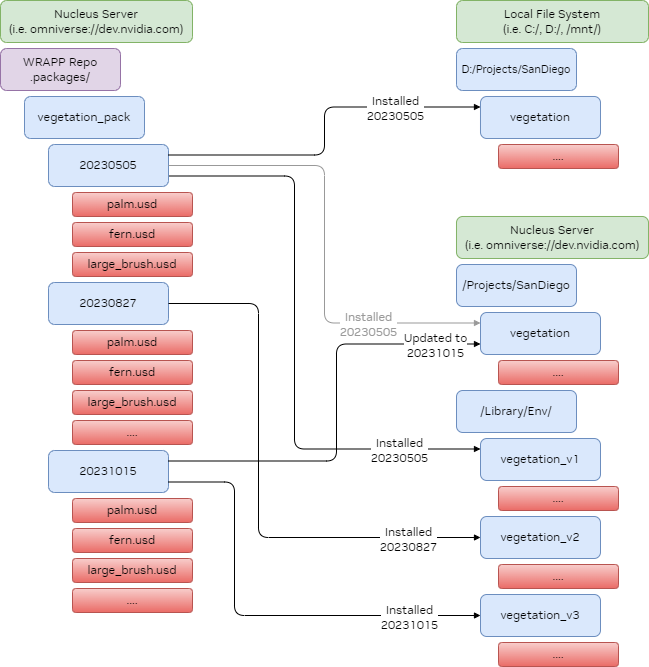
The install command can also be used to update or downgrade a package at the same location to a different version.
For that, just specify a different version number. This command will validate that the installed package is unmodified before installing,
else it will fail with conflicts (to override, just delete the package at the install location and run install again, or you can use the
create-patch/apply-patch commands).
WRAPP also detects package catalog paths that differ only by letter case, such
as textures/Foo.psd and textures/foo.psd. Installs to case-insensitive
destinations are refused to prevent one file from overwriting the other, while
installs are allowed when the destination storage reports case-sensitive
behavior. Search for Cross platform case insensitive path conflicts found in
the install output or logs when diagnosing this case-only path conflict.
Use --hash-cache-file (--hcf) to speed up repeated installs by caching file
hashes between runs. See Generic Parameters for details.
Legacy pickle cache files (WRAPP <=2.1.0) are rejected; see CLI for JSON format and
one-time migration guidance.
If the source package has SimReady package-standard sidecars, install carries
them to the installed .wrapp file verbatim, preserving package-standard
identity; it does not create or regenerate sidecars. See
WRAPP Metadata and SimReady Package-Standard Sidecars.
For usage examples, see the Tutorial. For CLI options, run wrapp install --help.
Python API Reference#
- async wrapp.install(
- package_name: str,
- version: str,
- destination: str,
- tags: bool = False,
- package: str | None = None,
- patch: bool = False,
- conflicts: List[Tuple[str, PatchOpBase]] | None = None,
- repo: str | None = None,
- ignore_version_conflicts: bool = False,
- ignores: str | IgnoreEvaluator | None = None,
- force: bool = False,
- extras: List[Tuple[str, PatchOpBase]] | None = None,
- *,
- ignore_file: str | None = None,
- context: CommandParameters = CommandParameters(debug=False, verbose=False, dry_run=False, log_file=None, hash_cache_file=None),
- scheduler: SchedulerContext | None = None,
Given a package name and version, installs or updates the package’s file set at the given destination.
Installs or updates a package described by package name and version string from the package cache. This looks in the package cache /.packages on the same server as the destination, and copies the package version found into the destination directory. If a package file is specified, the new dependency is recorded in there. If the repo is specified, the operations looks in that package cache instead of the default cache.
- Parameters:
package_name – Name of the package to install
version – Version to install
destination – URL to install the package to. Can be an omniverse://, a URL supported by S3 or a file: URL.
tags – Whether to also create the tags in the target. Only available when destination is a Nucleus server with Tagging Service
package – Optionally specify the URL of a package file to record the dependency created
patch – Specify False to fail installation on conflict, or True to install all non-conflicting files.
conflicts – Supply a list that gets extended by all conflicts install detected.
repo – Optionally specify a repository URL. If not given, assume it is the root of the destination server (same server install).
ignore_version_conflicts – Set this to ignore version inconsistencies should versions create a diamond pattern conflict of nested packages
ignores – Specify the name of a file with ignore rules, or an IgnoreEvaluator object, used when cataloging the existing destination.
force – Overwrite any files on the destination with the version from the package, even if they were modified in the destination since the last install.
extras – Supply a list that gets extended by all extra files detected in the destination.
ignore_file – Deprecated, use ignores instead. Specify the name of a file with ignore rules.
context – Global configuration parameters
scheduler – Optionally pre-constructed SchedulerContext. When calling many functions in a row make sure to pre-construct the scheduler.
- Raises:
FailedCommand – When prerequisites not matched
StorageOperationError – Raised when network or file operations fail