

Create#
Description#
Takes package name and version plus either a catalog or a root directory, creates a new package in the repository.
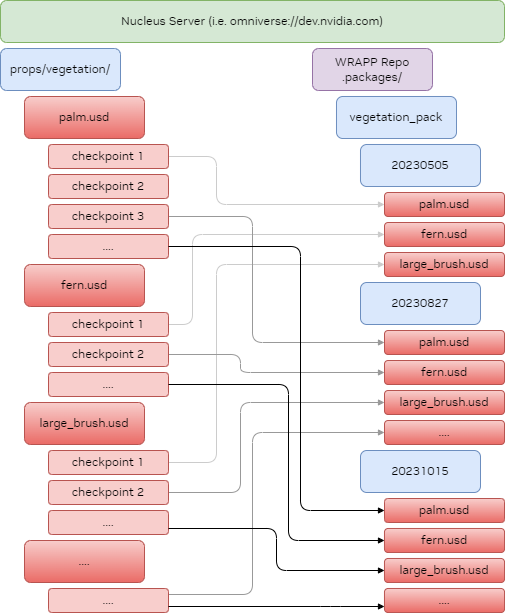
The create command creates a versioned package in a WRAPP repository. It will take a snapshot of the content within the supplied
directory or catalog and copy it to the version in your repository, so anybody installing the package will be certain to get the correct data.
By default, the package is created in the .packages folder at the server root.
WRAPP will only capture files, not folders. If your package requires an empty folder, please add a dummy file to the folder.
On creation, wrapp will scan the source tree for other wrapp files, and record all files found as subpackages, and store a dependency instead of the subpackage content itself. Those subpackages must not be “new” packages without an explicit catalog. Otherwise, it’s unclear which files belong to the subpackage versus the top-level package, since the top-level package collects all files not already claimed by a subpackage anywhere in the source tree. See Catalog for creating catalogs to define subpackage boundaries.
Use --create-package-standard <LICENSE> (or --cps <LICENSE>) to also
write SimReady package-standard sidecars next to the generated .wrapp file.
If the source directory already contains a package-standard definition seed
(for example one written by wrapp new --create-package-standard), create
picks up its license automatically, so --cps is not required; an explicit
--cps overrides the seed. If the created package records dependencies, WRAPP
logs an error and skips sidecar generation because the released package-standard
metadata does not model WRAPP dependencies yet.
See WRAPP Metadata and SimReady Package-Standard Sidecars for the compatibility model and sidecar
behavior.
For usage examples, see the Tutorial. For CLI options, run wrapp create --help.
Python API Reference#
- async wrapp.create(
- package_name: str,
- version: str,
- source: str,
- catalog: bool,
- tags: bool = False,
- ignores: str | IgnoreEvaluator | None = None,
- repo: str | None = None,
- check_subpackage: bool = False,
- skip_dirty_check: bool = False,
- publish_redirect: str | None = None,
- external_url: str | None = None,
- *,
- ignore_file: str | None = None,
- create_package_standard_license: str | None = None,
- context: CommandParameters = CommandParameters(debug=False, verbose=False, dry_run=False, log_file=None, hash_cache_file=None),
- scheduler: SchedulerContext | None = None,
Takes package name and version plus either a catalog or a root directory, creates a new package in the repository.
The create command catalogs a subtree and creates a frozen version. The destination directory for the freeze operation always is a package cache directory, which by default is in /.packages on the same network location as the source data. Change the location of this by specifying the repo option.
WRAPP does not capture folders in a package, only files. On creation, wrapp will scan the source tree for other wrapp files, and record all files found as subpackages, and store a dependency instead of the subpackage content itself. Those subpackages must not be “new” packages without a catalog, because then it would not be clear which files are part of the subpackage and which files are part of the top level package, as the top level package also will collect all files not already claimed by any subpackage regardless of their location in the source tree.
- Parameters:
package_name – Name of the package to create
version – Version of the package to create, can be any string identifier
source – Root directory of source that will be copied
catalog – Flag to indicate source points to a catalog file instead of a root directory
tags – Set this to additionally query the tagging service and make tags part of the catalog
ignores – Specify the name of an ignore file containing rules for ignoring items, or an IgnoreEvaluator object
repo – Specify the URL of the repository where to create the package. If not specified, will use the root of the server of the source directory
check_subpackage – Set this to true to add a final pass checking that all subpackages also exist in the target repository
skip_dirty_check – Set this to true to skip checking if the package is in dirty state. The check is default when there is a top level wrapp file. This allows creating a package even if subpackages are dirty (modified or removed files).
publish_redirect – Specify a redirect repository URL to also create a redirect package in that repository
external_url – External base URL for redirect package storage_map (used with publish_redirect). If specified, storage_map URLs will use this base instead of the source repo URL.
ignore_file – Deprecated, use ignores instead. Specify the name of an ignore file containing rules for ignoring items
context – Global configuration parameters
scheduler – Optionally pre-constructed SchedulerContext. When calling many functions in a row make sure to pre-construct the scheduler.
- Raises:
FailedCommand – When prerequisites not matched
StorageOperationError – Raised when network or file operations fail