

Preferences#
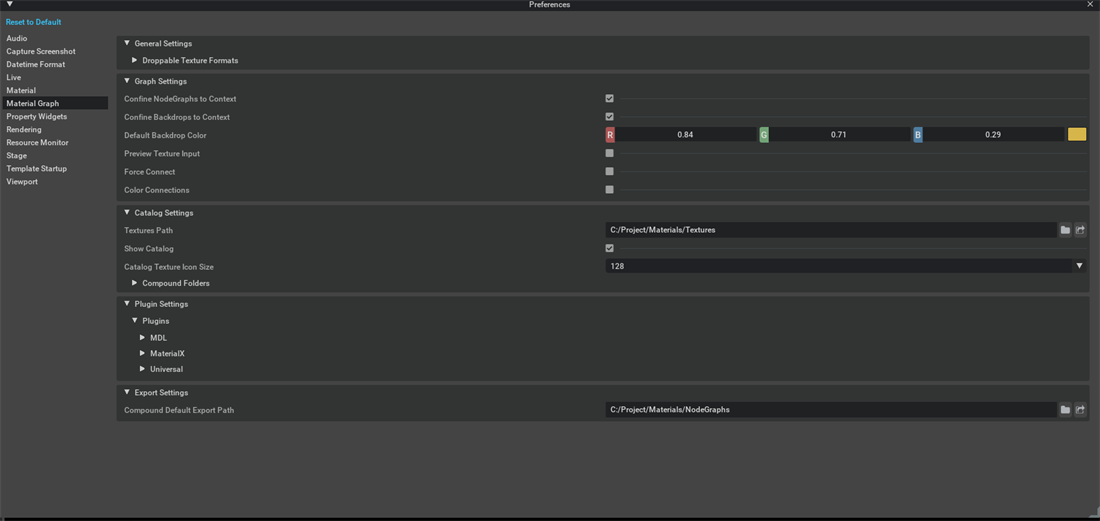
All Material Graph settings are available under Edit > Preferences > Material Graph. You can also open them from the Material Graph overflow menu by choosing Edit > Preferences…. Changes take effect immediately unless noted otherwise.
General Settings#
Setting |
Description |
Behavioral Effect |
Side Effects |
|---|---|---|---|
Droppable Texture Formats |
List of file extensions accepted when dragging textures onto the canvas (default: |
Files whose extension is not in this list are ignored on drop. |
Adding uncommon extensions can allow unsupported files to be referenced, which can produce rendering errors. |
Graph Settings#
Setting |
Description |
Behavioral Effect |
Side Effects |
|---|---|---|---|
Confine NodeGraphs to Context |
Restricts NodeGraph visibility to the render context they are assigned to. |
When enabled, NodeGraphs belonging to a different context are hidden in the canvas. When disabled, all NodeGraphs are visible regardless of context. |
Disabling can cause visual clutter if the stage contains materials with many render contexts. |
Confine Backdrops to Context |
Restricts Backdrop visibility to the render context they are assigned to. |
When enabled, Backdrops are shown only in their owning context. When disabled, Backdrops appear in every context. |
Useful for keeping context-specific annotations from leaking into other contexts. |
Default Backdrop Color |
Sets the fill color applied to newly created Backdrops. |
New Backdrops use this color. A Backdrop whose authored color is black also falls back to this value. |
Changing the default can therefore affect Backdrops that use the black fallback. |
Preview Texture Input |
Shows an inline texture preview below nodes connected to a texture input. |
When enabled, a thumbnail of the assigned texture file renders beneath the node body. When disabled, nodes display at their normal compact size. |
Enabling previews on very large graphs can increase layout computation time. |
Force Connect |
Allows connections between ports whose types would normally be incompatible. |
Bypasses type-compatibility checks so an output can be connected to an incompatible input. Cycle and same-prim checks still apply. |
Mismatched-type connections can cause shader compilation errors or runtime rendering artifacts. Use with caution. |
Color Connections |
Colors noodles (connection wires) by port type. |
When enabled, float, color, vector, and other data types receive distinct noodle colors. When disabled, all noodles use uniform gray. |
Colored noodles improve readability in dense graphs but can be distracting in smaller setups. |
Catalog Settings#
Setting |
Description |
Behavioral Effect |
Side Effects |
|---|---|---|---|
Textures Path |
Directory used to load and store texture metadata and icons for the Textures tab. The default resolves from |
Changing this path refreshes the Textures tab. |
An invalid or inaccessible path results in an empty Textures tab. |
Show Catalog | Toggles visibility of the Catalog panel (Nodes, NodeGraphs, and Textures tabs). | When disabled, the Catalog panel and drag-from-Catalog workflows are hidden. |
Re-enabling the panel restores access to the Catalog. |
||
Catalog Texture Icon Size |
Pixel size of texture thumbnails in the Textures tab (default: |
Larger values produce bigger, easier-to-identify thumbnails. Smaller values fit more entries on screen. |
Very large icon sizes can slow down panel rendering when many textures are present. |
Compound Folders |
List of folder paths scanned for reusable compound (NodeGraph) assets. The default resolves from |
Discovered compounds appear in the Catalog’s NodeGraphs tab. |
Adding folders with many nested assets increases initial scan time. |
Export Settings#
Setting |
Description |
Behavioral Effect |
Side Effects |
|---|---|---|---|
Compound Default Export Path |
Default destination directory when exporting a compound. The default resolves from |
The export dialog opens to this path. You can still navigate elsewhere before saving. |
If the path is invalid, you must select a valid destination. |
MDL Plugin Settings#
These settings control how MDL-based nodes and modules populate the Catalog and behave in the graph.
Setting |
Description |
Behavioral Effect |
Side Effects |
|---|---|---|---|
Enable Polymorphic Nodes |
Groups variant-capable MDL nodes into a single polymorphic entry in the Catalog. |
When enabled, nodes that share a polymorphic root appear as one expandable item instead of separate entries. When disabled, every variant is listed individually. |
Disabling can greatly increase the number of visible Catalog entries for modules with many variants. |
Modules |
List of MDL module paths used to populate the Catalog with shader nodes. |
Only modules in this list (and their dependencies) are scanned. Adding a module triggers a Catalog refresh. |
Listing very large or deeply nested modules increases Catalog load time. |
Catalog Excluded Annotations |
MDL annotations whose presence causes a node to be hidden from the Catalog. |
Nodes carrying any of the listed annotations are filtered out during Catalog population. |
Removing an annotation from this list exposes previously hidden nodes. |
Output Port Overrides |
Expected material output port names for the MDL render context. |
Defines which output ports Material Graph treats as valid material terminals. Connections to unlisted ports are not treated as material outputs. |
Incorrect overrides can prevent materials from compiling or rendering. |
Custom Icons and Thumbnails (MDL)#
MDL nodes can specify custom visuals in the Catalog and on the canvas through two annotations:
Annotation |
Syntax |
Purpose |
|---|---|---|
Thumbnail |
|
Provides a thumbnail image displayed in the Catalog and on the node header. |
Icon |
|
Provides a smaller icon displayed alongside the node name in the Catalog. |
The path is relative to the MDL file that defines the node.
Precedence:
anno::thumbnail>iconannotation > generic fallback icon.If neither annotation is present, the node uses a default icon based on its category.
MaterialX Plugin Settings#
These settings control which MaterialX definitions are exposed in the Catalog.
Setting |
Description |
Behavioral Effect |
Side Effects |
|---|---|---|---|
Ignored Contexts |
List of MaterialX render contexts to omit from the Catalog. |
Nodes belonging to any listed context are not shown. |
Useful for hiding contexts that are not relevant to the current pipeline. |
Ignored Families |
List of MaterialX node families to omit from the Catalog. |
All nodes in a listed family are hidden. |
Helps reduce Catalog noise for families not used in production. |
Ignored Name Patterns |
Regular-expression patterns applied to MaterialX node names. |
Any node whose name matches a pattern is excluded from the Catalog. |
Invalid regex patterns are skipped and reported in the application log. |
Output Port Overrides |
Expected material output port names for the MaterialX render context. |
Defines valid material terminal ports, similar to the MDL equivalent. |
Incorrect overrides can prevent MaterialX materials from rendering. |
Universal Plugin Settings#
Setting |
Description |
Behavioral Effect |
Side Effects |
|---|---|---|---|
Output Port Overrides |
Expected material output port names for the Universal render context. |
Defines valid material terminal ports for UsdPreviewSurface and related shaders. |
Incorrect overrides can prevent Universal materials from rendering correctly. |