


SimReady FAQ#
SimReady is a specification framework that defines what simulation-ready content looks like across domains, built on OpenUSD and governed by the Alliance for OpenUSD (AOUSD). It adds the named, typed, validated properties that transform USD assets from passive geometry into content that any simulation tool can interpret, validate, and use.
If you have seen a SimReady demo or read the NVIDIA glossary entry, you have a sense of the vision. What you may not yet have is a clear picture of what is defined and usable today, what is actively being built, and how you can participate in building it. That is what this FAQ provides.
This FAQ answers the following questions about SimReady:
What Is the Difference between OpenUSD, AOUSD, and SimReady?#
OpenUSD, AOUSD, and SimReady share a single mission: advancing USD as the standard for describing physical AI worlds. They form a pipeline where each layer builds on the one before it:
OpenUSD builds and proves the reference technology, specifically the open-source codebase originally developed by Pixar, where proposals originate and baseline implementations are proven in production.
AOUSD (Alliance for OpenUSD) standardizes the technology into implementation-agnostic specs: normative specifications under the Linux Foundation that do not reference the OpenUSD codebase. These specs live in AOUSD, not in OpenUSD.
SimReady layers industry-vertical simulation requirements into shared specs on top: physics properties, semantic labeling, real-world scale, and vertical-specific quality criteria. NVIDIA initiated SimReady, which will evolve under AOUSD governance.
Build it → standardize it → structure industry verticals on top. Each layer depends on the one before it.
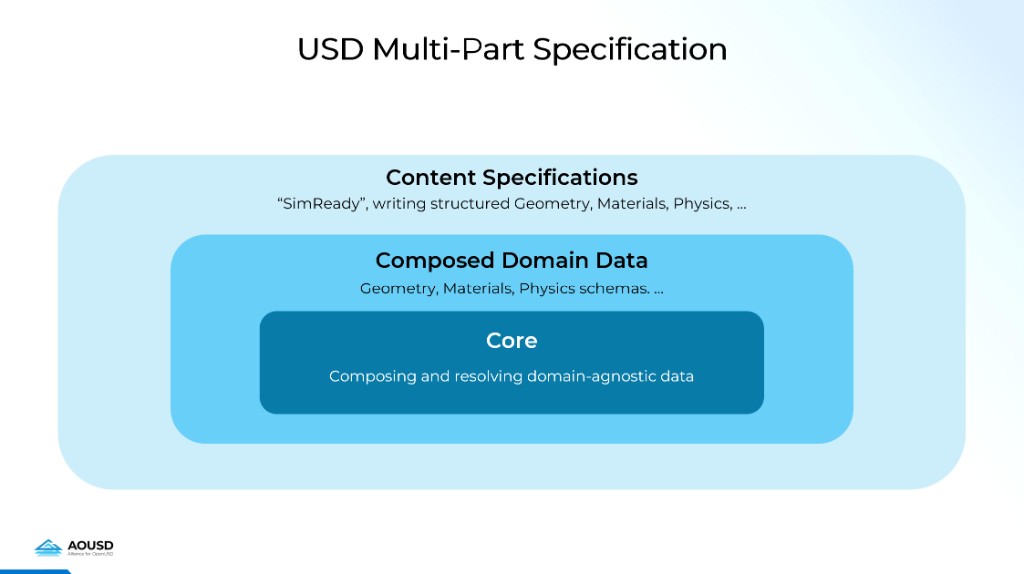
The destination: mature SimReady specifications become part of the USD Multi-Part Specification, the same AOUSD-governed specification family that includes the Core, Geometry, Materials, and other domain specs. SimReady is the outermost ring today. As its specifications are ratified, they join the standard alongside everything else.
Is Putting My Simulation Data in a USD File Enough?#
No. This is the most common misconception.
A partner is working on cable simulation and joined AOUSD to position themselves as part of the standards-defining community. They are investing real engineering effort, exactly the kind of participation the ecosystem needs. Their actual implementation contains:
A single USD attribute called
cable_paramsAn array of
float4valuesNo named properties, no types, no documented semantics
The partner is moving fast to fill a real gap. But without a model of what a shareable specification looks like, they cannot see that what they have is an implementation, not a standard with defined, shared semantics. The partner’s work is:
Opaque. No other tool can interpret the values without knowing this specific solver’s packing convention.
Unvalidatable. A validator sees “array of float4 values present” and passes, even if the data is nonsensical.
Unimplementable. An engineer at another company or an AI agent reading the spec sees
float4[]and has zero information about what to produce or consume.
“Cables” is not one thing. It is a domain:
Power cables, structural cables, fiber optics, control cables, hydraulic lines
Each with distinct simulation properties: stiffness, conductivity, bend radius, fatigue life
Across distinct use cases: factory routing, robot dynamics, structural analysis
One solver’s float4 array does not scale to the domain. It forecloses it.
SimReady is the layer that turns “I have cable data in a USD file” into “I have a cable described in a way any simulation tool can understand, validate, and use.” The difference is named, typed, structured properties that any tool can interpret, not opaque blobs that only the originating application can read.
What Is the Difference between the SimReady Specifications and SimReady Foundation?#
The specifications are the durable standard: Requirements, Capabilities, Features, and Profiles that define what simulation-ready content looks like for each domain. (Refer to Do I Need to Implement Every SimReady Requirement? for the full structure.) The specs are the bar.
SimReady Foundation is your tool for acting on those specifications:
Machine-checkable validation rules for verifying assets against Profiles
Feature Adapters for converting assets between Profiles
Sample assets demonstrating correct structure for each Profile
A runtime testing framework for verifying simulation behavior
The Foundation is how you clear the bar: validate your content, adapt it for different runtimes, and test that it behaves correctly in simulation.
If the Foundational USD Specs Are Deliberately Flexible, Why Does SimReady Add More Rules on Top?#
Because flexibility is a feature at the foundation layer and a liability at the content layer.
To illustrate, the foundational geometry spec defines what a valid mesh looks like. An overly tessellated mesh, one with millions of triangles where thousands would suffice, is perfectly valid. The same geometry spec is designed to serve VFX, games, architectural visualization, and simulation, each with radically different mesh requirements.
But for simulation, an overly tessellated mesh is a performance liability. SimReady Foundation’s Visual Geometry (VG) capability layers simulation-specific quality requirements on top of the flexible foundation, each with a Requirement ID and a machine-checkable rule:
Tessellation density (
VG.013): Use appropriate tessellation density. Excessive polygons degrade rendering and simulation performance.Manifold topology (
VG.007): Mesh geometry must be manifold. Non-manifold edges and vertices cause simulation instability and visual artifacts.Triangulation (
VG.021): Meshes must be triangulated for consistent rendering and predictable collider creation (convex hull, convex decomposition).No internal geometry (
VG.003): Only include geometry that contributes to visualization or simulation. Enclosed, never-visible geometry wastes memory and slows ray tracing.Normals (
VG.027): All non-subdivided meshes must have normals for correct shading.Origin positioning (
VG.025): Geometry shall be positioned and oriented correctly at the origin.
The lower specs define what is valid. SimReady defines what is good for simulation.
This maps to a pattern proven over 30 years in the construction industry (buildingSMART’s IFC validation model):
Layer |
What it checks |
|---|---|
Syntax |
Can the file be parsed? |
Schema |
Does the data match the schema? |
Normative rules |
Does the content meet industry-vertical requirements? |
Best practices |
Is the content good for its intended use? |
The foundational specs handle the first two layers. SimReady adds the latter two, specifically for simulation. All are part of the same AOUSD-governed specification family.
Is SimReady an NVIDIA Proprietary Standard or an Open Standard?#
SimReady is NVIDIA-initiated but openly governed.
NVIDIA develops and validates SimReady specifications with partners, and the Alliance for OpenUSD (AOUSD) governs the standard’s evolution to ensure cross-industry adoption.
SimReady is built entirely on OpenUSD, which is itself open-source and maintained by AOUSD under the Linux Foundation.
The SimReady Standardization Workflow is designed for cross-industry collaboration, where domain experts and partners participate directly in defining specifications, not just consuming them.
NVIDIA and cross-industry partners, including buildingSMART, are harmonizing compliance mechanisms (Profiles, Capabilities, Features) with broader OpenUSD standardization efforts, ensuring the framework is not tied to any single vendor.
The direction: a vendor extension model, following the same governance pattern proven by organizations like Khronos (OpenGL, Vulkan), the IETF, and the W3C. A formal vendor extension model is forthcoming:
Vendor-specific: You will be able to define your own Requirements, Features, or Profiles for your domain and ship them without waiting for cross-industry consensus.
Multi-vendor: When multiple vendors adopt common conventions, the Standardization Workflow refines them into shared specifications tested against real simulation runtimes.
Core standard: Mature specifications are ratified through AOUSD governance: implementation-agnostic and binding on the ecosystem.
The intent: Every partner’s domain expertise has a clear path from private convention to shared standard, without blocking adoption at any tier.
How Does SimReady Relate to Other 3D Asset Standards?#
SimReady is not intended to replace existing 3D asset standards. It functions as a standard of standards that unifies and augments them.
Augments rather than replaces: Assets from glTF, FBX, OBJ, URDF, and other formats can be brought into OpenUSD through conceptual data mapping. SimReady then layers simulation-specific metadata (physics, semantics, sensor attributes) on top of that foundation.
Preserves existing investments: You do not need to abandon your current asset pipelines. SimReady enriches assets with simulation capabilities while maintaining compatibility with source formats through documented mappings.
Addresses the simulation gap: Traditional formats excel at visual representation and tool interchange but lack standardized metadata for simulation and machine learning (ML). SimReady fills this gap without requiring a wholesale format migration.
Enables round-trip workflows: Through conceptual data mapping, assets can flow between SimReady and other ecosystems, supporting collaborative pipelines across different toolchains.
Industry-governed interoperability: AOUSD governance ensures SimReady evolves with cross-industry input; conceptual data mapping documents are maintained as living specifications for each format mapping.
What SimReady Specifications Exist Today and What Is Coming?#
This question directly addresses the gap between the SimReady vision (as presented in demos and the glossary) and the current state of the specification. Partners need a clear picture of what is defined and usable now compared to what is actively being developed.
SimReady specifications mature through the same governance tiers described in Is SimReady an NVIDIA Proprietary Standard or an Open Standard?: vendor-specific → multi-vendor → core standard. Here is where things stand today:
Multi-vendor (validated, converging toward AOUSD ratification): SimReady Foundation for robotics.
The first specifications to reach this tier: defined Profiles, Features, Requirements, validation rules, Feature Adapters, sample assets, and a runtime testing framework; tested against real simulation runtimes by multiple stakeholders.
Prop Profiles
Prop-Robotics-Neutral,Prop-Robotics-PhysX,Prop-Robotics-IsaacVisualization geometry, rigid body physics, collision shapes, grasp-ready colliders, semantic labels, materials
Robot Profiles
Robot-Body-Neutral,Robot-Body-Runnable,Robot-Body-IsaacArticulation, driven joints, base hierarchy, runtime-specific composition
Capabilities covered Core (atomic assets, units, naming), Visualization (geometry, materials), Physics Bodies (rigid bodies, colliders, joints, grasping, articulation), Hierarchy, Omniverse Isaac Sim composition, Semantic Labels
Tooling Rules framework, Feature Adapters, sample assets, runtime testing (Omniverse Isaac Sim, physics, robot, gripper, grasp, visual tests)
Vendor-specific (operational, converging toward multi-vendor): CAD-to-SimReady workflows for AI Factory.
Practical workflows for converting CAD facility equipment (racks, CDUs, chillers) to SimReady USD assets
Validation, optimization, metadata, and connection point tooling
Documented in the VFI Guide
Electrical and thermal metadata for data center engineering is in incubation, driven by AI Factory Digital Twin layout and planning workflows
SimReady Foundation will align these workflows with the Profile-based framework in a forthcoming milestone
Actively being developed (governance infrastructure):
The SimReady Standardization Workflow is the mechanism for promoting vendor-specific conventions to multi-vendor specifications and onward to AOUSD ratification.
NVIDIA and cross-industry stakeholders are harmonizing the SimReady Profiles framework with the broader OpenUSD Profiles system.
On the horizon (new domains entering at the vendor tier):
More simulation domains: autonomous vehicles, manufacturing, deformable bodies, sensor models
FMI/FMU (Functional Mock-up Interface/Functional Mock-up Unit) behavioral modeling for complex dynamic behavior (electrical, thermal, fluid systems) and co-simulation
Each will follow the same path: vendor-specific conventions → validated multi-vendor specs → AOUSD core
What this means for partners:
For robotics, SimReady Foundation provides the full stack: specs, validation, adaptation, testing, and sample assets.
For digital twin and AI Factory, CAD-to-SimReady pipelines and validation are operational.
For new domains, the vendor extension model (when formalized) will let you define your own Requirements, Features, and Profiles; bring them into the Standardization Workflow when ready.
How Do I Make a SimReady Asset?#
There are currently two paths, depending on your starting point, and they are converging:
SimReady’s biggest challenge is getting all stakeholders and contributors, across a rapidly growing ecosystem, working together within the same specification framework.
The goal is one set of Profiles, validation rules, and conventions; not parallel tracks.
A forthcoming milestone will conform both paths to a single Profile-based framework.
The guiding principle is already shared: a SimReady asset conforms to a specific Profile by implementing its required Features, each backed by concrete, validatable Requirements on USD properties. The difference between CollisionAPI on every rigid shape and cable_params: float4[] comes down to whether any tool can validate and simulate with the data (refer to Is Putting My Simulation Data in a USD File Enough?).
Path 1: Robotics assets (props, robots, articulated agents)
Start with your source content (URDF [Unified Robot Description Format], MJCF [MuJoCo XML Format], CAD, or directly-authored USD) and target one of the existing robotics Profiles (refer to Do I Need to Implement Every SimReady Requirement? for the full list). The workflow:
Convert to USD: Import from URDF (using the URDF Importer Extension), MJCF, or CAD (using the CAD Converter Extension or application connectors). Each format has a documented conversion path.
Choose a target Profile: For example,
Prop-Robotics-Neutralfor physics-ready props,Robot-Body-Neutralfor articulated robots. Your Profile determines which Features your asset must satisfy.Validate against the Profile: Run SimReady Foundation’s rules framework to check every Requirement in the Profile. Each failure traces to the exact USD property at fault (for example, “missing
CollisionAPIon rigid shape,” “joint hierarchy incorrect”).Fix and iterate: Address validation failures in the source content, converter settings, or post-conversion tools (Scene Optimizer). Re-validate until clean.
Adapt for specific runtimes: If you need a runtime-specific variant (such as PhysX SDK SDF colliders for Omniverse Isaac Sim), use Feature Adapters to convert from a base (Neutral) Profile to a runtime Profile. Only the delta is applied.
Path 2: CAD-to-SimReady for digital twin and AI Factory assets
For facility equipment (racks, coolant distribution units [CDUs], chillers, building infrastructure), the workflow is a multi-stage content iteration cycle:
CAD Conversion: Transform CAD files (STEP, JT, Creo, DGN, and so on) to USD using the GUI or CLI tools. Key decisions: instancing, UV generation, unit handling.
Validation: Run the Asset Validator to identify quality and compliance issues (standalone or inside Omniverse Kit).
Optimization: Apply Scene Optimizer presets: stage metrics normalization (meters, Z-up), mesh cleanup, decimation, material optimization, hierarchy deduplication.
Metadata: Add vertical-specific simulation properties (semantic labels, equipment specs, thermal/electrical parameters) as structured USD layers composed into the main asset.
Connection Points: Define facility connection interfaces (piping, electrical, airflow) using named geometry prims.
Final Validation: Re-validate the complete, composed asset against the target Profile’s requirements.
Key insight across both paths: Source conversion rarely produces a perfect USD representation. Plan to iterate across source fixes, converter settings, and post-conversion tooling.
Resources:
SimReady Foundation documentation covers the specification framework, validation rules, Feature Adapters, and sample assets for robotics Profiles.
The VFI Guide documents the CAD content iteration cycle (conversion, validation, optimization, assembly).
The SimReady Standardization Workflow is the process for contributing new domain specifications. It is relevant if your domain’s Profile does not yet exist.
What Tools Do I Need to Create SimReady Assets?#
You likely already have most of the tools you need. The question is whether their output meets SimReady specifications. The tooling that helps you produce or verify spec-conformant output exists today across several projects, organized below by what they do.
Specifications and validation (SimReady Foundation):
Rules framework: Machine-checkable validation rules that verify whether a USD asset satisfies each Requirement in a Profile. Every failure traces to the exact USD property at fault. Runs standalone (no GPU required) or inside a Omniverse Kit application.
Feature Adapters: Transform an asset from one Profile to another (for example,
Prop-Robotics-Neutral→Prop-Robotics-PhysX) by applying only the mutations needed for Features that differ between the two Profiles.Runtime testing framework: Verifies simulation behavior (physics, robot, gripper, grasp, visual tests) beyond static validation.
Sample assets: Reference USD assets (robotics props, robot bodies) that demonstrate correct structure for each Profile.
Conversion (format-dependent):
URDF Importer: For robotics assets described in URDF.
CAD Converter: Transforms CAD (STEP, JT, Creo, DGN, and so on) to USD. Available as a GUI extension in USD Composer, as application connectors, or as a CLI for batch processing.
Optimization and enrichment:
Scene Optimizer: Multi-step optimization presets (mesh cleanup, decimation, material deduplication, hierarchy pruning, stage metrics normalization) stored as composable JSON files. You can test them interactively in USD Composer or run them in batch using the CLI.
Asset Validator: Checks USD assets against quality and compliance rules. Runs inside Omniverse Kit (GUI or CLI) or standalone without a GPU. Shares the same rule-authoring API as the Foundation rules framework.
Metadata and connection point tools: For digital twin workflows, adds structured USD property layers (domain-specific attributes) and connection point layers (facility interfaces for thermal, electrical, and airflow simulation).
The VFI Guide documents the CAD content iteration cycle end to end.
Do I Need to Implement Every SimReady Requirement for All Supported Simulation Runtimes in Order for My Asset to Be Considered an Official SimReady Asset?#
No. SimReady is modular, not monolithic. The specification is organized into four layers:
Requirements: Atomic, testable rules (for example, “every rigid shape must carry a
CollisionAPI,” “upAxis shall be Z”). Each Requirement has a unique ID and a machine-checkable validation rule.Capabilities: Categories that organize related Requirements by domain (for example, Visualization/Geometry, Core/Units, Physics Bodies). Capabilities let you navigate the specification by topic area and browse the Requirements relevant to your domain without sifting through unrelated ones.
Features: Use-case-oriented collections of Requirements drawn from across Capabilities (for example, “Rigid Body Physics,” “Minimal Placeable Visual,” “Driven Joints”). A Feature represents a specific simulation behavior and lists exactly which Requirements it needs. A single Feature can pull from multiple Capabilities.
Profiles: Named, versioned bundles of Features that represent a complete simulation scenario. Your asset conforms to a Profile, not to “all of SimReady.”
Where Profiles stand today: The Profiles concept is nascent, currently proven for robotics, and actively expanding to other domains. The first defined Profiles target robotics simulation:
Profile |
What it covers |
|---|---|
|
Rigid-body physics, multi-body simulation, grasp-ready colliders (runtime-agnostic) |
|
Same as Neutral but with PhysX-specific collision geometry |
|
Omniverse Isaac Sim composition plus PhysX SDK |
|
Articulation, driven joints, base hierarchy (runtime-agnostic) |
|
PhysX SDK robot body, runnable core |
|
Omniverse Isaac Sim robot core plus PhysX SDK |
Profiles share Features where they overlap and differ only where needed, so a Prop-Robotics-PhysX asset satisfies most of the same Requirements as Prop-Robotics-Neutral, with PhysX-specific Features swapped in. Feature Adapters can convert between Profiles by applying only the deltas.
Where Profiles are headed: NVIDIA and cross-industry stakeholders are harmonizing the Profile system with the broader OpenUSD Profiles proposal:
Formal compliance model: Profiles as tagged nodes in a DAG (directed acyclic graph) of capabilities, composable and independently versioned.
Cross-industry collaboration: Working with organizations like buildingSMART (the body behind IFC/BIM standards for construction), drawing on paradigms from ISO 19650 for declaring specific compliance levels.
Shared mechanism: The compliance system will not be SimReady-specific. It will be an OpenUSD-level system, with SimReady contributing domain-specific requirements.
In governance terms, the robotics Profiles above are at the multi-vendor tier: validated against real runtimes, used by multiple stakeholders. The OpenUSD Profiles harmonization is the path to the core tier: AOUSD-ratified, implementation-agnostic. A forthcoming vendor extension model will formalize how partners define Profiles for new domains and promote them through the same tiers (refer to Is SimReady an NVIDIA Proprietary Standard or an Open Standard?).
How Do I Join or Contribute to the SimReady Ecosystem?#
Start with hands-on validation:
The fastest onboarding path: take a USD asset, pick a target Profile (refer to How Do I Make a SimReady Asset?), and run SimReady Foundation’s validation rules against it. Every failure traces to a specific Requirement and USD property. This is the fastest way to understand concretely what “SimReady” means for your content. Sample assets for each robotics Profile are included for reference.
For CAD-origin workflows, the VFI Guide walks through the content iteration cycle (conversion, validation, optimization, assembly). This is the practical starting point for digital twin and AI Factory asset creation.
Follow the Standardization Workflow. The SimReady Standardization Workflow defines a phased process for contributing new specifications:
Phase 1 (Definition and Alignment) scopes an MVP use case with domain experts.
Phase 2 (Development and Iteration) prototypes and tests specifications in simulation runtimes.
Phase 3 (Package Deliveries) produces validated candidate specifications with end-to-end pipelines.
Bring your domain expertise. The workflow is designed for domain experts (not just USD experts) to collaborate with NVIDIA and OpenUSD specialists. Partners with deep knowledge of their industry’s standards, workflows, and simulation needs are the primary contributors. The Foundation is extensible: new domains can plug in as additional Features without breaking existing Profiles.
A vendor extension model is coming. If your domain does not yet have a shared Profile, a forthcoming formal extension model will let you define your own Requirements, Features, and Profiles, validate against them, and ship without waiting for cross-industry consensus. When those conventions are validated across multiple vendors, the Standardization Workflow is how they become shared specifications and eventually AOUSD-ratified standards.
Engage with AOUSD. For longer-term influence on standardization, participate in the Alliance for OpenUSD and its working groups and interest groups to ensure your domain’s needs are represented in the evolving specifications.
How Do I Specify Behavior as Well as Structure with SimReady?#
Sub-questions:
If my dynamic behavior depends on attribute data, how does SimReady allow me to model the attribute data and the dynamic behavior, and provide that as a single package?
Another way to consider this: SimReady appears to provide the “.h” file for an object (and really just the attributes part of an object). How do I get the declaration and definition of the behaviors (the functions)?
The answer depends on the type of behavior:
For foundational physics (rigid body dynamics, collisions, mass properties):
The simulation runtime itself provides the behavior.
SimReady defines the structural properties (mass, collision shapes, materials, friction) as USD schema attributes.
A physics engine like PhysX SDK in Omniverse Isaac Sim consumes them directly.
There is no separate behavioral package to author. The “function” is the physics engine, and the SimReady asset provides the “arguments.”
For domain-specific dynamic behavior (electrical systems, thermal models, fluid dynamics):
This is where FMI/FMU enters the picture.
FMI (Functional Mock-up Interface) concepts are mapped to USD as schema properties declaring simulation inputs and outputs: the “.h file.”
The FMU (Functional Mock-up Unit) implements the runtime behavior: the “.cpp.”
A SimReady asset could eventually package both together, delivering structure and behavior as a single unit.
Current state
Foundational physics capabilities are the immediate focus and do not require FMI.
NVIDIA and partners are actively prototyping FMI/FMU-based behavioral modeling (for example, co-simulation for robotics with FMI serving multiple physics engines).
This is not yet part of the standard SimReady specifications.
What Is the Role of FMI in SimReady?#
FMI (Functional Mock-up Interface) is a standard for exchanging dynamic simulation models between tools.
In the SimReady vision, FMI concepts are mapped to USD using conceptual data mapping, producing schema properties that declare simulation inputs and outputs.
SimReady assets can then embed FMUs (Functional Mock-up Units) that implement the runtime behavior corresponding to those declared interfaces, packaging both structure and behavior in a single asset.
NVIDIA and partners are already prototyping with FMI, including co-simulation for robotics with FMI serving multiple physics engines in Omniverse Isaac Sim.
However, many foundational SimReady capabilities (visualization, rigid body physics, semantic labeling) do not require FMI, so it is not a prerequisite for initial adoption.
How Do I Exchange My SimReady Assets with Other USD-Based Systems?#
Sub-question:
USD, by its nature, allows additional metadata to “ride along” without end systems needing to be aware of it. USD schemas provide the structure for exchanging that data. Would official schemas (electrical, thermal, fluid, and so on) be the way to exchange SimReady assets between systems?
USD’s composition model is the foundation
Metadata and schema properties ride along with assets without requiring consuming systems to understand all of them.
A system that does not know about SimReady schemas can still load and render the geometry. A system that does can consume the simulation metadata.
This is precisely why structured schemas matter: a
cable_params: float4[]blob rides along too, but no consuming system can do anything with it. Named, typed properties (liketensileStrength: double) are what make interchange meaningful.
Conceptual data mapping enables the bridge
When exchanging assets between USD and other ecosystems (glTF, FBX, URDF, IFC, and so on), conceptual data mapping documents how data translates between formats.
This is what makes SimReady a “standard of standards” rather than a replacement.
Official schemas are the intended mechanism
As domain-specific schemas (electrical, thermal, fluid, and so on) are developed through the SimReady Standardization Workflow, they become the standardized way to exchange simulation data between USD-based systems.
Systems that share the same schema can interoperate on that domain’s data with full fidelity.
Current state
Foundational schemas (physics, semantic labeling) are established.
Domain-specific schemas (electrical, thermal, and so on) are what the standardization workflow produces in collaboration with domain experts who understand the interchange requirements for their industry.
Would Schemas Allow for Primary and Secondary Validation?#
Context:
Primary: range checks, regular expression validation, and so on.
Secondary: constraint checks, co-dependent variables, and so on.
Yes. This is how SimReady Foundation works today. Every Requirement has a unique ID and a machine-checkable validation rule: a Python BaseRuleChecker that inspects USD prims, attributes, and APIs. Validating an asset against a Profile runs every rule for every Requirement in every Feature of that Profile, in one pass.
Primary validation (range checks, type checks, presence checks):
Handled directly by rules.
Examples: “every rigid shape must carry a
CollisionAPI” (RB.COL.001), “upAxis shall be Z” (UN.006), “meshes shall have normals” (VG.027).Each failure traces to the exact USD property at fault.
Secondary validation (constraint checks, co-dependent variables):
Also handled by rules: the rule framework is arbitrary Python, not limited to single-property checks.
Example: “if property A is set, property B must also be present and within a compatible range.”
The SimReady Standardization Workflow (Phase 3) requires producing validators alongside each specification.
Profiles organize validation
Profiles scope validation. An asset is checked against the specific Features and Requirements of its target Profile (such as
Prop-Robotics-Neutral), not against all of SimReady.Different Profiles share Requirements where they overlap.
Asset validation compared to runtime testing
Asset validation (rules) runs without a simulation engine and verifies structure and metadata.
Runtime testing verifies simulation behavior, including physics, robot articulation, gripper and grasp performance, and visual tests, by running actual simulations, capturing outputs, and reviewing results.
Think of validation as “does this asset meet the spec?” and runtime testing as “does this asset behave correctly in simulation?”
Both exist in SimReady Foundation today.
What Is the Design Pattern or Best Practice for Instancing a SimReady Asset?#
Context:
A vendor creates a SimReady asset (for example, a Power Distribution Unit) and provides it to an integrator who has “n” of them in their facility. How do you distinguish instance properties (unique per placement) from asset properties (shared across all instances)?
USD’s composition model already provides the building blocks:
References: Each placement of the asset in a scene is a reference to the shared asset definition. The asset definition (geometry, materials, base physics properties) is authored once and shared across all instances.
Overrides: Per-instance properties (position, orientation, operational state, serial number, specific configuration) are authored as overrides on each reference. These are instance-level. They differ per placement without modifying the shared asset.
Native instancing: For rendering performance, USD’s native instancing allows the renderer to share geometry data across identical placements while still supporting per-instance overrides on non-geometric properties.
Payloads: Heavy data (detailed geometry, internal components) can be deferred using payloads, so scenes with hundreds of instances only load the detail they need.
In object-oriented terms: the asset definition is the class, each reference is an instance, and overrides are instance attributes. USD composition handles this natively. No special SimReady mechanism is required.
What SimReady adds
Where a Profile exists, it defines which properties belong in the shared asset definition (and must be validated there) and which are expected to be overridden per instance.
Example: a
Prop-Robotics-Neutralasset’s collision geometry and mass properties are asset-level (shared), while placement transforms are instance-level.As domain Profiles expand, the distinction between asset-level and instance-level properties will be made explicit in each Profile’s Requirements.
What SimReady deliberately does not prescribe
Specific instancing workflows are inherently contextual:
How many levels of payload nesting
When to use native instancing rather than explicit references
How to partition hierarchy for a particular scene scale
These depend on the simulation, scene complexity, and runtime.
Some of these patterns can never become specifications or Profiles by design.
SimReady specs are prescriptive, defining the bar for interoperability. Asset structuring decisions that do not affect interoperability are best addressed through guidance.
Recommended approach for decisions not covered by a Profile
Use the VFI Guide and OpenUSD’s Principles of Scalable Asset Structure for reference.
Leverage AI coding agents to reason through your specific trade-offs using the documentation as a guide.
The VFI Guide is descriptive. It helps you weigh options for your context rather than mandating a single answer.
How Do I Validate My Composed Scene of SimReady Assets to Run My Simulation?#
Context:
Say I want to run a particular simulation, such as electrical, robotics, or autonomous vehicle, and I need to ensure all the SimReady assets in my composed scene are connected appropriately, structurally complete, and collectively ready for the target runtime. How do I validate the scene before running it?
Important current limitation: SimReady does not yet define scene-level specifications or validators. Existing SimReady validators operate at the asset and Feature level, verifying that an individual asset conforms to a Profile (refer to Would Schemas Allow for Primary and Secondary Validation? for more information). The validators do not analyze a fully composed scene. As a result, many scene-level issues surface only at runtime in the target simulator (Omniverse Isaac Sim, Isaac Lab, MEGA, AVSim, DRIVE Sim).
Validation today is a two-step process:
Static validation of individual assets and Features: Run SimReady Foundation’s rules framework against each asset in the scene. This checks structure, schemas, metadata, and declared capabilities against the target Profile. Every failure traces to a specific Requirement and USD property.
Runtime execution of the composed scene: Load the scene in the target simulator and run it. This is where scene-level issues surface: missing connections, incompatible compositions, incorrect wiring between assets, missing runtime configuration. Runtime testing validates behavior and outputs. Static checks cannot cover these.
Both steps are necessary. Static asset validation catches a large class of errors early. Runtime execution catches everything else.
What static scene-level validation would mean:
Static scene validation is not behavior testing. It is static model analysis. A scene-level validator would analyze the composed USD stage to check structure, relationships, and declared intent without running the simulation. Think of it as the difference between compiling code and executing it: compilation catches structural errors (type mismatches, missing references, unresolved symbols) without running any logic. Scene-level validation would serve the same role for composed USD stages.
Concrete examples of scene-level checks that would be valuable:
MEGA scenes: Verify that the scene contains a discoverable environment, robots, and sensor attachments in the expected hierarchy. Check that required metadata exists to derive MEGA runtime configuration.
AVSim scenes: Ensure the scene includes required vehicles, traffic elements, and map structure. Verify that runtime configuration can be derived from scene metadata.
Sensor attachment: Confirm that sensors are structurally attached to robots or vehicles and not orphaned prims in the scene graph.
Cross-asset references: Detect missing references, broken composition arcs, or incompatible composition patterns across assets that were individually valid.
Runtime configuration derivability: Check that the scene’s declared metadata is sufficient for the target simulator to construct its runtime configuration without manual intervention.
These checks are structural and declarative, not behavioral. They verify that the scene is well-formed for a given runtime, but not that it produces correct simulation results. Many of these requirements already exist implicitly in MEGA, AVSim, DRIVE Sim, and Isaac Sim workflows, but are currently enforced only at runtime, which means errors surface late, in expensive simulation runs.
Where SimReady is heading:
SimReady Foundation is intended to evolve toward:
Explicit scene-level specifications: Defining what a well-formed scene looks like for each simulation runtime, as Profiles with Features and Requirements: the same framework used for asset-level validation today.
Reusable scene-level static validators: Rules that analyze a composed USD stage against a scene Profile, checking structure and declared intent without launching a simulator.
Clear separation between static validation and runtime testing: Static scene validation catches structural errors early. Runtime testing remains required for behavioral correctness.
Over time, this will allow more errors to be caught during authoring, before running large or expensive simulations. But runtime testing will always remain necessary: no amount of static analysis can guarantee that a physically simulated scene behaves correctly. The goal is to make runtime failures about behavior, not about missing structure.
Conclusion#
SimReady is designed to be extensible: you can plug new domains into the existing framework without disrupting what already works, and the governance model ensures that domain expertise from your industry has paths into shared standards.
The SimReady vision is ahead of current specifications, and deliberately so; the framework, governance model, and tooling are designed to let the ecosystem build toward that vision incrementally. Start with what exists, validate against it, contribute your domain expertise, and promote conventions into shared standards through the Standardization Workflow.
That track is already proven: robotics specifications are validated and in active use, and AI Factory workflows are operational. Work is proceeding on other fronts as well: behavioral modeling with FMI/FMU, scene-level validation, and new simulation domains including autonomous vehicles, manufacturing, and deformable bodies are all being pursued. Every partner who engages now, whether using existing Profiles or defining new ones, expands the universe of objects, environments, and systems that can be simulated with confidence across tools and runtimes.