

The current annotators that are available through the registry are:
Standard Annotators |
RT Annotators |
PathTracing Annotators |
|---|---|---|
LdrColor/rgb |
SmoothNormal |
PtDirectIllumation |
HdrColor |
BumpNormal |
PtGlobalIllumination |
camera_params/CameraParams |
Motion2d |
PtReflections |
normals |
DiffuseAlbedo |
PtRefractions |
motion_vectors |
SpecularAlbedo |
PtSelfIllumination |
cross_correspondence |
Roughness |
PtBackground |
distance_to_image_plane |
DirectDiffuse |
PtWorldNormal |
distance_to_camera |
DirectSpecular |
PtRefractionFilter |
primPaths |
Reflections |
PtMultiMatte<0-7> |
bounding_box_2d_tight_fast |
IndirectDiffuse |
PtWorldPos |
bounding_box_2d_tight |
DepthLinearized |
PtZDepth |
bounding_box_2d_loose_fast |
EmissionAndForegroundMask |
PtVolumes |
bounding_box_2d_loose |
AmbientOcclusion |
PtDiffuseFilter |
bounding_box_3d_360 |
PtReflectionFilter |
|
bounding_box_3d_fast |
||
bounding_box_3d |
||
semantic_segmentation |
||
instance_segmentation_fast |
||
instance_segmentation |
||
skeleton_data |
||
pointcloud |
||
CrossCorrespondence |
||
MotionVectors |
||
Occlusion |
Some annotators support initialization parameters. For example, segmentation annotators can be parametrized with a colorize attribute specify the output format.
omni.replicator.core.annotators.get("semantic_segmentation", init_params={"colorize": True})
To see how annotators are used within a writer, we have prepared scripts that implement the basic writer which covers all standard annotators.
Standard Annotators#
These annotators can be used in any rendering mode. Each annotator’s usage and outputs are described below.
LdrColor#
Annotator Name: LdrColor, (alternative name: rgb)
The LdrColor or rgb annotator produces the low dynamic range output image as an array of type np.uint8 with shape (width, height, 4), where the four channels correspond to R,G,B,A.
Example
import omni.replicator.core as rep

async def test_ldr():
    # Add Default Light
    distance_light = rep.create.light(rotation=(315,0,0), intensity=3000, light_type="distant")

    cone = rep.create.cone()

    cam = rep.create.camera(position=(500,500,500), look_at=cone)
    rp = rep.create.render_product(cam, (1024, 512))

    ldr = rep.AnnotatorRegistry.get_annotator("LdrColor")
    ldr.attach(rp)

    await rep.orchestrator.step_async()
    data = ldr.get_data()
    print(data.shape, data.dtype)   # ((512, 1024, 4), uint8)

import asyncio
asyncio.ensure_future(test_ldr())
Normals#
Annotator Name: normals
The normals annotator produces an array of type np.float32 with shape (height, width, 4).
The first three channels correspond to (x, y, z). The fourth channel is unused.
Example
import omni.replicator.core as rep

async def test_normals():
    # Add Default Light
    distance_light = rep.create.light(rotation=(315,0,0), intensity=3000, light_type="distant")

    cone = rep.create.cone()

    cam = rep.create.camera(position=(500,500,500), look_at=cone)
    rp = rep.create.render_product(cam, (1024, 512))

    normals = rep.AnnotatorRegistry.get_annotator("normals")
    normals.attach(rp)

    await rep.orchestrator.step_async()
    data = normals.get_data()
    print(data.shape, data.dtype)   # ((512, 1024, 4), float32)

import asyncio
asyncio.ensure_future(test_normals())
Distance to Camera#
Annotator Name: distance_to_camera
Outputs a depth map from objects to camera positions. The distance_to_camera annotator produces a 2d array of types np.float32 with 1 channel.
Data Details
The unit for distance to camera is in meters (For example, if the object is 1000 units from the camera, and the meters_per_unit variable of the scene is 100, the distance to camera would be 10).
0 in the 2d array represents infinity (which means there is no object in that pixel).

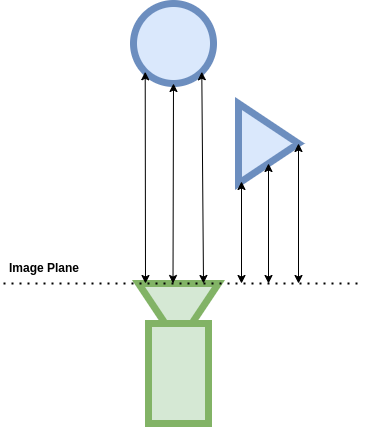
Distance to Image Plane#
Annotator Name: distance_to_image_plane
Outputs a depth map from objects to image plane of the camera. The distance_to_image_plane annotator produces a 2d array of types np.float32 with 1 channel.
Data Details
The unit for distance to image plane is in meters (For example, if the object is 1000 units from the image plane of the camera, and the meters_per_unit variable of the scene is 100, the distance to camera would be 10).
0 in the 2d array represents infinity (which means there is no object in that pixel).
Motion Vectors#
Annotator Name: motion_vectors
Outputs a 2D array of motion vectors representing the relative motion of a pixel in the camera’s viewport between frames.
The MotionVectors annotator returns the per-pixel motion vectors in in image space.
Output Format
array((height, width, 4), dtype=<np.float32>)
The components of each entry in the 2D array represent four different values encoded as floating point values:
x: motion distance in the horizontal axis (image width) with movement to the left of the image being positive and movement to the right being negative.
y: motion distance in the vertical axis (image height) with movement towards the top of the image being positive and movement to the bottom being negative.
z: unused
w: unused
Example
import asyncio
import omni.replicator.core as rep

async def test_motion_vectors():
    # Add an object to look at
    cone = rep.create.cone()

    # Add motion to object
    cone_prim = cone.get_output_prims()["prims"][0]
    cone_prim.GetAttribute("xformOp:translate").Set((-100, 0, 0), time=0.0)
    cone_prim.GetAttribute("xformOp:translate").Set((100, 50, 0), time=10.0)

    camera = rep.create.camera()
    render_product = rep.create.render_product(camera, (512, 512))

    motion_vectors_anno = rep.annotators.get("MotionVectors")
    motion_vectors_anno.attach(render_product)

    # Take a step to render the initial state (no movement yet)
    await rep.orchestrator.step_async()

    # Capture second frame (now the timeline is playing)
    await rep.orchestrator.step_async()
    data = motion_vectors_anno.get_data()
    print(data.shape, data.dtype, data.reshape(-1, 4).min(axis=0), data.reshape(-1, 4).max(axis=0))
    # (1024, 512, 4), float32,  [-93.80073  -1.       -1.       -1.     ] [ 0.       23.450201  1.        1.      ]

asyncio.ensure_future(test_motion_vectors())
Note
The values represent motion relative to camera space.
CrossCorrespondence#
The cross correspondence annotator outputs a 2D array representing the camera optical flow map of the camera’s viewport against a reference viewport.
To enable the cross correspondance annotation, the camera attached to the render product annotated with cross correspondance must have the attribute crossCameraReferenceName set to the (unique) name (not path) of a second camera (itself attached to a second render product). The Projection Type of the two cameras needs to be of type fisheyePolynomial (Camera –> Fisheye Lens –> Projection Type –> fisheyePolynomial).
Output Format
The Cross Correspondence annotator produces the cross correspondence between pixels seen from two cameras.
The components of each entry in the 2D array represent for different values encoded as floating point values:
x: dx - difference to the x value of of the corresponding pixel in the reference viewport. This value is normalized to
[-1.0, 1.0]y: dy - difference to the y value of of the corresponding pixel in the reference viewport. This value is normalized to
[-1.0, 1.0]z: occlusion mask - boolean signifying that the pixel is occluded or truncated in one of the cross referenced viewports. Floating point value represents a boolean
(1.0 = True, 0.0 = False)w: geometric occlusion calculated - boolean signifying that the pixel can or cannot be tested as having occluded geometry (e.g. no occlusion testing is performed on missed rays)
(1.0 = True, 0.0 = False)array((height, width, 4), dtype=<np.float32>)Example
import asyncio
import omni.replicator.core as rep
from pxr import Sdf

async def test_cross_correspondence():
    # Add an object to look at
    rep.create.cone()

    # Add stereo camera pair
    stereo = rep.create.stereo_camera(
        position=(20, 0, 300), projection_type="fisheye_polynomial", stereo_baseline=20
    )

    # Add cross correspondence attribute
    stereo_L_prim = stereo.get_output_prims()["prims"][0].GetChildren()[0].GetChildren()[0]
    stereo_L_prim.CreateAttribute("crossCameraReferenceName", Sdf.ValueTypeNames.String)

    # Set attribute to refer to second camera name - beware of scenes with multiple cameras that share names!
    stereo_L_prim.GetAttribute("crossCameraReferenceName").Set("StereoCam_R")

    render_products = rep.create.render_product(stereo, (512, 512))

    # Add annotator to left render product
    anno = rep.annotators.get("cross_correspondence")
    anno.attach(render_products[0])

    await rep.orchestrator.step_async()
    data = anno.get_data()
    print(data.shape, data.dtype)
    # (512, 512, 4), float32

asyncio.ensure_future(test_cross_correspondence())
Note
Both cameras must have the cameraProjectionType attribute set to fisheyePolynomial
The annotated camera must have the crossCameraReferenceName attribute set to the name of the second camera
To avoid unexpected results, ensure that the referenced camera has a unique name
MotionVectors#
Outputs a 2D array of motion vectors representing the relative motion of a pixel in the camera’s viewport between frames.
The MotionVectors annotator returns the per-pixel motion vectors in in image space.
Output Format
array((height, width, 4), dtype=<np.float32>)The components of each entry in the 2D array represent for different values encoded as floating point values:
x: motion distance in the horizontal axis (image width) with movement to the left of the image being positive and movement to the right being negative.
y: motion distance in the vertical axis (image height) with movement towards the top of the image being positive and movement to the bottom being negative.
z: unused
w: unused
Example
import asyncio
import omni.replicator.core as rep

async def test_motion_vectors():
    # Add an object to look at
    cone = rep.create.cone()

    # Add motion to object
    cone_prim = cone.get_output_prims()["prims"][0]
    cone_prim.GetAttribute("xformOp:translate").Set((-100, 0, 0), time=0.0)
    cone_prim.GetAttribute("xformOp:translate").Set((100, 50, 0), time=10.0)

    camera = rep.create.camera()
    render_product = rep.create.render_product(camera, (512, 512))

    motion_vectors_anno = rep.annotators.get("MotionVectors")
    motion_vectors_anno.attach(render_product)

    # Take a step to render the initial state (no movement yet)
    await rep.orchestrator.step_async()

    # Capture second frame (now the timeline is playing)
    await rep.orchestrator.step_async()
    data = motion_vectors_anno.get_data()
    print(data.shape, data.dtype, data.reshape(-1, 4).min(axis=0), data.reshape(-1, 4).max(axis=0))
    # (1024, 512, 4), float32,  [-93.80073 -1.      -1.      -1.     ] [ 0.      23.450201  1.       1.      ]

asyncio.ensure_future(test_motion_vectors())
Note
The values represent motion relative to camera space.
bounding_box_2d_tight_fast#
- Outputs tight 2d bounding box of each entity with semantics in the camera’s viewport. Tight
bounding boxes bound only the visible pixels of entities. Completely occluded entities are ommited.
Initialization Parameters
semanticTypes: List of allowed semantic types the types. For example, if semantic_types is
["class"], only the bounding boxes for prims with semantics of type"class"will be retrieved.semanticFilter: String expressing semantif filter predicate. For example, filter
"class:car|pedestrian"will return only the bounding boxes with the semantic type"class"and with a value of either"car"or"pedestrian".
Output Format
The bounding box annotator returns a dictionary with the bounds and semantic id found under the “data” key, while other information is under the “info” key: “idToLabels”, “bboxIds” and “primPaths”.
{
    "data": np.dtype(
        [
            ("semanticId", "<u4"),
            ("x_min", "<i4"),
            ("y_min", "<i4"),
            ("x_max", "<i4"),
            ("y_max", "<i4"),
        ],
    "info": {
        "idToLabels": {<semanticId>: <semantic_labels>},    # mapping from integer semantic ID to a comma
                                                            # delimited list of associated semantics
        "bboxIds": [<bbox_id_0>, ..., <bbox_id_n>],         # ID specific to bounding box annotators allowing
                                                            # easy mapping between different bounding box
                                                            # annotators.
        "primPaths": [<prim_path_0>, ... <prim_path_n>],    # prim path tied to each bounding box
    }
}
Note
bounding_box_2d_tight_fast bounds only visible pixels.
Example
import omni.replicator.core as rep

async def test_bbox_2d_tight_fast():
    cone = rep.create.cone(semantics=[("prim", "cone")], position=(100, 0, 0))
    sphere = rep.create.sphere(semantics=[("prim", "sphere")], position=(-100, 0, 0))
    invalid_type = rep.create.cube(semantics=[("shape", "boxy")], position=(0, 100, 0))

    cam = rep.create.camera(position=(500,500,500), look_at=cone)
    rp = rep.create.render_product(cam, (1024, 512))

    bbox_2d_tight_fast = rep.AnnotatorRegistry.get_annotator(
        "bounding_box_2d_tight_fast", init_params={"semanticFilter": "*:cone|boxy"}
    )
    bbox_2d_tight_fast.attach(rp)

    await rep.orchestrator.step_async()
    data = bbox_2d_tight_fast.get_data()
    print(data)
    # {
    #     'data': array([
    #         (0, 442, 198, 581, 357, 0.),
    #         (1, 284,   0, 500, 203, 0.)],
    #         dtype=[('semanticId', '<u4'),
    #                ('x_min', '<i4'),
    #                ('y_min', '<i4'),
    #                ('x_max', '<i4'),
    #                ('y_max', '<i4'),
    #                ('occlusionRatio', '<f4')]),
    #     'info': {
    #         'bboxIds': array([0, 2], dtype=uint32),
    #         'idToLabels': {0: {'prim': 'cone'}, 1: {'shape': 'boxy'}},
    #         'primPaths': ['/Replicator/Cone_Xform', '/Replicator/Cube_Xform']
    #     }
    # }

import asyncio
asyncio.ensure_future(test_bbox_2d_tight_fast())
bounding_box_2d_tight#
- Outputs tight 2d bounding box of each entity with semantics in the camera’s viewport. Tight
bounding boxes bound only the visible pixels of entities. Completely occluded entities are ommited.
Initialization Parameters
semanticTypes: List of allowed semantic types the types. For example, if semantic_types is
["class"], only the bounding boxes for prims with semantics of type"class"will be retrieved.semanticFilter: String expressing semantif filter predicate. For example, filter
"class:car|pedestrian"will return only the bounding boxes with the semantic type"class"and with a value of either"car"or"pedestrian".
Output Format
The bounding box annotator returns a dictionary with the bounds and semantic id found under the “data” key, while other information is under the “info” key: “idToLabels”, “bboxIds” and “primPaths”.
{
    "data": np.dtype(
        [
            ("semanticId", "<u4"),
            ("x_min", "<i4"),
            ("y_min", "<i4"),
            ("x_max", "<i4"),
            ("y_max", "<i4"),
            ("occlusionRatio", "<f4"),
        ],
    "info": {
        "idToLabels": {<semanticId>: <semantic_labels>},    # mapping from integer semantic ID to a comma
                                                            # delimited list of associated semantics
        "bboxIds": [<bbox_id_0>, ..., <bbox_id_n>],         # ID specific to bounding box annotators allowing
                                                            # easy mapping between different bounding box
                                                            # annotators.
        "primPaths": [<prim_path_0>, ... <prim_path_n>],    # prim path tied to each bounding box
    }
}
Note
bounding_box_2d_tight bounds only visible pixels.
Example
import omni.replicator.core as rep

async def test_bbox_2d_tight():
    cone = rep.create.cone(semantics=[("prim", "cone")], position=(100, 0, 0))
    sphere = rep.create.sphere(semantics=[("prim", "sphere")], position=(-100, 0, 0))
    invalid_type = rep.create.cube(semantics=[("shape", "boxy")], position=(0, 100, 0))

    cam = rep.create.camera(position=(500,500,500), look_at=cone)
    rp = rep.create.render_product(cam, (1024, 512))

    bbox_2d_tight = rep.AnnotatorRegistry.get_annotator(
        "bounding_box_2d_tight", init_params={"semanticFilter": "*:cone|boxy"}
    )
    bbox_2d_tight.attach(rp)

    await rep.orchestrator.step_async()
    data = bbox_2d_tight.get_data()
    print(data)
    # {
    #     'data': array([
    #         (0, 442, 198, 581, 357, 0.),
    #         (1, 284,   0, 500, 203, 0.)],
    #         dtype=[('semanticId', '<u4'),
    #                ('x_min', '<i4'),
    #                ('y_min', '<i4'),
    #                ('x_max', '<i4'),
    #                ('y_max', '<i4'),
    #                ('occlusionRatio', '<f4')]),
    #     'info': {
    #         'bboxIds': array([0, 2], dtype=uint32),
    #         'idToLabels': {0: {'prim': 'cone'}, 1: {'shape': 'boxy'}},
    #         'primPaths': ['/Replicator/Cone_Xform', '/Replicator/Cube_Xform']
    #     }
    # }

import asyncio
asyncio.ensure_future(test_bbox_2d_tight())
bounding_box_2d_loose_fast#
- Outputs loose 2d bounding box of each entity with semantics in the camera’s field of view.
Loose bounding boxes bound the entire entity regardless of occlusions.
Initialization Parameters
semanticTypes: List of allowed semantic types the types. For example, if semantic_types is
["class"], only the bounding boxes for prims with semantics of type"class"will be retrieved.semanticFilter: String expressing semantif filter predicate. For example, filter
"class:car|pedestrian"will return only the bounding boxes with the semantic type"class"and with a value of either"car"or"pedestrian".
Output Format
The bounding box annotator returns a dictionary with the bounds and semantic id found under the “data” key, while other information is under the “info” key: “idToLabels”, “bboxIds” and “primPaths”.
{
    "data": np.dtype(
        [
            ("semanticId", "<u4"),
            ("x_min", "<i4"),
            ("y_min", "<i4"),
            ("x_max", "<i4"),
            ("y_max", "<i4"),
            ("occlusionRatio", "<f4"),
        ],
    "info": {
        "idToLabels": {<semanticId>: <semantic_labels>},    # mapping from integer semantic ID to a comma
                                                            # delimited list of associated semantics
        "bboxIds": [<bbox_id_0>, ..., <bbox_id_n>],         # ID specific to bounding box annotators allowing
                                                            # easy mapping between different bounding box
                                                            # annotators.
        "primPaths": [<prim_path_0>, ... <prim_path_n>],    # prim path tied to each bounding box
    }
}
Note
bounding_box_2d_loose will produce the loose 2d bounding box of any prim in the viewport, no matter if is partially occluded or fully occluded.
Example
import omni.replicator.core as rep

async def test_bbox_2d_loose_fast():
    cone = rep.create.cone(semantics=[("prim", "cone")], position=(100, 0, 0))
    sphere = rep.create.sphere(semantics=[("prim", "sphere")], position=(-100, 0, 0))
    invalid_type = rep.create.cube(semantics=[("shape", "boxy")], position=(0, 100, 0))

    cam = rep.create.camera(position=(500,500,500), look_at=cone)
    rp = rep.create.render_product(cam, (1024, 512))

    bbox_2d_loose_fast = rep.AnnotatorRegistry.get_annotator(
        "bounding_box_2d_loose_fast",
        init_params={"semanticFilter": "prim:*"},
    )
    bbox_2d_loose_fast.attach(rp)

    await rep.orchestrator.step_async()
    data = bbox_2d_loose_fast.get_data()
    print(data)
    # {
    #     'data': array([
    #         (0, 442, 198, 581, 357, 0.),
    #         (1, 245,  92, 375, 220, 0.3823)],
    #         dtype=[('semanticId', '<u4'),
    #                ('x_min', '<i4'),
    #                ('y_min', '<i4'),
    #                ('x_max', '<i4'),
    #                ('y_max', '<i4'),
    #                ('occlusionRatio', '<f4')]),
    #     'info': {
    #         'bboxIds': array([0, 2], dtype=uint32),
    #         'idToLabels': {0: {'prim': 'cone'}, 1: {'shape': 'boxy'}},
    #         'primPaths': ['/Replicator/Cone_Xform', '/Replicator/Cube_Xform']
    #     }
    # }

import asyncio
asyncio.ensure_future(test_bbox_2d_loose_fast())
bounding_box_2d_loose#
- Outputs loose 2d bounding box of each entity with semantics in the camera’s field of view.
Loose bounding boxes bound the entire entity regardless of occlusions.
Initialization Parameters
semanticTypes: List of allowed semantic types the types. For example, if semantic_types is
["class"], only the bounding boxes for prims with semantics of type"class"will be retrieved.semanticFilter: String expressing semantif filter predicate. For example, filter
"class:car|pedestrian"will return only the bounding boxes with the semantic type"class"and with a value of either"car"or"pedestrian".
Output Format
The bounding box annotator returns a dictionary with the bounds and semantic id found under the “data” key, while other information is under the “info” key: “idToLabels”, “bboxIds” and “primPaths”.
{
    "data": np.dtype(
        [
            ("semanticId", "<u4"),
            ("x_min", "<i4"),
            ("y_min", "<i4"),
            ("x_max", "<i4"),
            ("y_max", "<i4"),
            ("occlusionRatio", "<f4"),
        ],
    "info": {
        "idToLabels": {<semanticId>: <semantic_labels>},    # mapping from integer semantic ID to a comma
                                                            # delimited list of associated semantics
        "bboxIds": [<bbox_id_0>, ..., <bbox_id_n>],         # ID specific to bounding box annotators allowing
                                                            # easy mapping between different bounding box
                                                            # annotators.
        "primPaths": [<prim_path_0>, ... <prim_path_n>],    # prim path tied to each bounding box
    }
}
Note
bounding_box_2d_loose will produce the loose 2d bounding box of any prim in the viewport, no matter if is partially occluded or fully occluded.
Example
import omni.replicator.core as rep

async def test_bbox_2d_loose():
    cone = rep.create.cone(semantics=[("prim", "cone")], position=(100, 0, 0))
    sphere = rep.create.sphere(semantics=[("prim", "sphere")], position=(-100, 0, 0))
    invalid_type = rep.create.cube(semantics=[("shape", "boxy")], position=(0, 100, 0))

    cam = rep.create.camera(position=(500,500,500), look_at=cone)
    rp = rep.create.render_product(cam, (1024, 512))

    bbox_2d_loose = rep.AnnotatorRegistry.get_annotator(
        "bounding_box_2d_loose", init_params={"semanticFilter": "prim:*"},
    )
    bbox_2d_loose.attach(rp)

    await rep.orchestrator.step_async()
    data = bbox_2d_loose.get_data()
    print(data)
    # {
    #   'data': array([
    #       (0, 442, 198, 581, 357, 0.),
    #       (1, 245,  92, 375, 220, 0.38),
    #       dtype=[('semanticId', '<u4'),
    #              ('x_min', '<i4'),
    #              ('y_min', '<i4'),
    #              ('x_max', '<i4'),
    #              ('y_max', '<i4')]),
    #              ("occlusionRatio", "<f4"),
    #   'info': {
    #       'bboxIds': array([0, 1], dtype=uint32),
    #       'idToLabels': {'0': {'prim': 'cone'}, '1': {'prim': 'sphere'}},
    #       'primPaths': ['/Replicator/Cone_Xform', '/Replicator/Sphere_Xform']}
    #   }
    # }

import asyncio
asyncio.ensure_future(test_bbox_2d_loose())
bounding_box_3d_360#
- Outputs 3D bounding box of each entity with semantics for the entire world including outside
the sensor’s field of view
Initialization Parameters
semanticFilter: String expressing semantif filter predicate. For example, filter
"class:car|pedestrian"will return only the bounding boxes with the semantic type"class"and with a value of either"car"or"pedestrian".
Output Format
The bounding box annotator returns a dictionary with the bounds and semantic id found under the “data” key, while other information is under the “info” key: “idToLabels”, “bboxIds” and “primPaths”.
{
    "data": np.dtype(
        [
            ('x_min', '<f4'),               # Min bound in x axis in local ref frame (in world units)
            ('y_min', '<f4'),               # Min bound in y axis in local ref frame (in world units)
            ('z_min', '<f4'),               # Min bound in z axis in local ref frame (in world units)
            ('x_max', '<f4'),               # Max bound in x axis in local ref frame (in world units)
            ('y_max', '<f4'),               # Max bound in y axis in local ref frame (in world units)
            ('z_max', '<f4'),               # Max bound in z axis in local ref frame (in world units)
            ('transform', '<f4', (4, 4)),   # World to local transformation matrix (transforms the
                                            # bounds from world frame to local frame)
            ('occlusionRatio', '<f4')]),    # Occlusion (visible pixels / total pixels), where `0.0` is
                                            # fully visible and `1.0` is fully occluded. See additional
                                            # notes below.
        ],
    "info": {
        "idToLabels": {<semanticId>: <semantic_labels>},    # mapping from integer semantic ID to a comma
                                                            # delimited list of associated semantics
        "bboxIds": [<bbox_id_0>, ..., <bbox_id_n>],         # ID specific to bounding box annotators allowing
                                                            # easy mapping between different bounding box
                                                            # annotators.
        "primPaths": [<prim_path_0>, ... <prim_path_n>],    # prim path tied to each bounding box
    }
}
Note
bounding boxes are retrieved regardless of occlusion.
bounding box dimensions (<axis>_min, <axis>_max) are expressed in stage units.
occlusionRatiocan only provide valid values for prims composed of a single mesh. Multi-mesh labelled prims will return a value of -1 indicating that no occlusion value is available.
Example
import omni.replicator.core as rep

async def test_bbox_3d_360():
    cone = rep.create.cone(semantics=[("prim", "cone")], position=(100, 0, 0))
    sphere = rep.create.sphere(semantics=[("prim", "sphere")], position=(-100, 0, 0))
    cube = rep.create.cube(semantics=[("prim", "cube")], position=(1000, 1000, 1000))

    cam = rep.create.camera(position=(500,500,500), look_at=cone)
    rp = rep.create.render_product(cam, (1024, 512))

    bbox_3d_360 = rep.AnnotatorRegistry.get_annotator("bounding_box_3d_360")
    bbox_3d_360.attach(rp)

    await rep.orchestrator.step_async()
    data = bbox_3d_360.get_data()
    print(data)
    #   {
    #       'data': array([
    #           (
    #               0,
    #               -50.,
    #               -50.,
    #               50.,
    #               50.,
    #               50.,
    #               [
    #                   [   1.,    0.,    0.,    0.],
    #                   [   0.,    1.,    0.,    0.],
    #                   [   0.,    0.,    1.,    0.],
    #                   [ 100.,    0.,    0.,    1.]
    #               ],
    #               0.
    #           ),
    #           (
    #               1,
    #               -50.,
    #               -50.,
    #               -50.,
    #               50.,
    #               50.,
    #               50.,
    #               [
    #                  [   1.,    0.,    0.,    0.],
    #                  [   0.,    1.,    0.,    0.],
    #                  [   0.,    0.,    1.,    0.],
    #                  [-100.,    0.,    0.,    1.]
    #               ],
    #               0.38
    #           ),
    #           (
    #               2,
    #               -50.,
    #               -50.,
    #               -50.,
    #               50.,
    #               50.,
    #               50.,
    #               [
    #                  [   1.,    0.,    0.,    0.],
    #                  [   0.,    1.,    0.,    0.],
    #                  [   0.,    0.,    1.,    0.],
    #                  [1000., 1000., 1000.,    1.]
    #               ],
    #               nan
    #           ),
    #               ],
    #           dtype=[
    #               ('semanticId', '<u4'),
    #               ('x_min', '<f4'),
    #               ('y_min', '<f4'),
    #               ('z_min', '<f4'),
    #               ('x_max', '<f4'),
    #               ('y_max', '<f4'),
    #               ('z_max', '<f4'),
    #               ('transform', '<f4', (4, 4)),
    #               ('occlusionRatio', '<f4')]),
    #       'info': {
    #           'bboxIds': array([0, 1, 2], dtype=uint32),
    #           'idToLabels': {0: {'prim': 'cone'}, 1: {'prim': 'sphere'}, 2: {'prim': 'cube'}},
    #           'primPaths': ['/Replicator/Cone_Xform', '/Replicator/Sphere_Xform', '/Replicator/Cube_Xform']
    #       }
    #   }

import asyncio
asyncio.ensure_future(test_bbox_3d_360())
bounding_box_3d_fast#
- Outputs 3D bounding box of each entity with semantics for entities within the sensor’s field
of view.
Initialization Parameters
semanticFilter: String expressing semantif filter predicate. For example, filter
"class:car|pedestrian"will return only the bounding boxes with the semantic type"class"and with a value of either"car"or"pedestrian".
Output Format
The bounding box annotator returns a dictionary with the bounds and semantic id found under the “data” key, while other information is under the “info” key: “idToLabels”, “bboxIds” and “primPaths”.
{
    "data": np.dtype(
        [
            ("semanticId", "<u4"),
            ("x_min", "<i4"),
            ("y_min", "<i4"),
            ("x_max", "<i4"),
            ("y_max", "<i4"),
            ("z_min", "<i4"),
            ("z_max", "<i4"),
            ("transform", "<i4"),
        ],
    "info": {
        "idToLabels": {<semanticId>: <semantic_labels>},    # mapping from integer semantic ID to a comma
                                                            # delimited list of associated semantics
        "bboxIds": [<bbox_id_0>, ..., <bbox_id_n>],         # ID specific to bounding box annotators allowing
                                                            # easy mapping between different bounding box
                                                            # annotators.
        "primPaths": [<prim_path_0>, ... <prim_path_n>],    # prim path tied to each bounding box
    }
}
Note
bounding boxes are retrieved regardless of occlusion.
bounding box dimensions (<axis>_min, <axis>_max) are expressed in stage units.
Example
import omni.replicator.core as rep

async def test_bbox_3d_fast():
    cone = rep.create.cone(semantics=[("prim", "cone")], position=(100, 0, 0))
    sphere = rep.create.sphere(semantics=[("prim", "sphere")], position=(-100, 0, 0))
    cube = rep.create.cube(semantics=[("prim", "cube")], position=(1000, 1000, 1000))

    cam = rep.create.camera(position=(500,500,500), look_at=cone)
    rp = rep.create.render_product(cam, (1024, 512))

    bbox_3d_fast = rep.AnnotatorRegistry.get_annotator("bounding_box_3d_fast")
    bbox_3d_fast.attach(rp)

    await rep.orchestrator.step_async()
    data = bbox_3d_fast.get_data()
    print(data)
    #   {
    #       'data': array([
    #           (
    #               0,
    #               -50.,
    #               -50.,
    #               -50.,
    #               50.,
    #               50.,
    #               50.,
    #               [
    #                   [   1.,    0.,    0.,    0.],
    #                   [   0.,    1.,    0.,    0.],
    #                   [   0.,    0.,    1.,    0.],
    #                   [ 100.,    0.,    0.,    1.]
    #               ],
    #               0.
    #           ),
    #           (
    #               1,
    #               -50.,
    #               -50.,
    #               -50.,
    #               50.,
    #               50.,
    #               50.,
    #               [
    #                   [   1.,    0.,    0.,    0.],
    #                   [   0.,    1.,    0.,    0.],
    #                   [   0.,    0.,    1.,    0.],
    #                   [-100.,    0.,    0.,    1.]
    #               ],
    #               0.38
    #           ),
    #           dtype=[
    #               ('semanticId', '<u4'),
    #               ('x_min', '<f4'),
    #               ('y_min', '<f4'),
    #               ('z_min', '<f4'),
    #               ('x_max', '<f4'),
    #               ('y_max', '<f4'),
    #               ('z_max', '<f4'),
    #               ('transform', '<f4', (4, 4)),
    #               ('occlusionRatio', '<f4')]),
    #       'info': {
    #           'bboxIds': array([0, 1, 2], dtype=uint32),
    #           'idToLabels': {0: {'prim': 'cone'}, 1: {'prim': 'sphere'}}},
    #           'primPaths': ['/Replicator/Cone_Xform', '/Replicator/Sphere_Xform']
    #       }
    #   }

import asyncio
asyncio.ensure_future(test_bbox_3d_fast())
bounding_box_3d#
- Outputs 3D bounding box of each entity with semantics for entities within the sensor’s field
of view.
Initialization Parameters
semanticFilter: String expressing semantif filter predicate. For example, filter
"class:car|pedestrian"will return only the bounding boxes with the semantic type"class"and with a value of either"car"or"pedestrian".
Output Format
The bounding box annotator returns a dictionary with the bounds and semantic id found under the “data” key, while other information is under the “info” key: “idToLabels”, “bboxIds” and “primPaths”.
{
    "data": np.dtype(
        [
            ("semanticId", "<u4"),
            ("x_min", "<i4"),
            ("y_min", "<i4"),
            ("x_max", "<i4"),
            ("y_max", "<i4"),
            ("z_min", "<i4"),
            ("z_max", "<i4"),
            ("transform", "<i4"),
        ],
    "info": {
        "idToLabels": {<semanticId>: <semantic_labels>},    # mapping from integer semantic ID to a comma
                                                            # delimited list of associated semantics
        "bboxIds": [<bbox_id_0>, ..., <bbox_id_n>],         # ID specific to bounding box annotators allowing
                                                            # easy mapping between different bounding box
                                                            # annotators.
        "primPaths": [<prim_path_0>, ... <prim_path_n>],    # prim path tied to each bounding box
    }
}
Note
bounding boxes are retrieved regardless of occlusion.
bounding box dimensions (<axis>_min, <axis>_max) are expressed in stage units.
Example
import omni.replicator.core as rep

async def test_bbox_3d():
    cone = rep.create.cone(semantics=[("prim", "cone")], position=(100, 0, 0))
    sphere = rep.create.sphere(semantics=[("prim", "sphere")], position=(-100, 0, 0))
    cube = rep.create.cube(semantics=[("prim", "cube")], position=(1000, 1000, 1000))

    cam = rep.create.camera(position=(500,500,500), look_at=cone)
    rp = rep.create.render_product(cam, (1024, 512))

    bbox_3d = rep.AnnotatorRegistry.get_annotator("bounding_box_3d")
    bbox_3d.attach(rp)

    await rep.orchestrator.step_async()
    data = bbox_3d.get_data()
    print(data)
    #   {
    #       'data': array([
    #           (
    #               0,
    #               -50.,
    #               -50.,
    #               -50.,
    #               50.,
    #               50.,
    #               50.,
    #               [
    #                   [   1.,    0.,    0.,    0.],
    #                   [   0.,    1.,    0.,    0.],
    #                   [   0.,    0.,    1.,    0.],
    #                   [ 100.,    0.,    0.,    1.]
    #               ],
    #               0.
    #           ),
    #           (
    #               1,
    #               -50.,
    #               -50.,
    #               -50.,
    #               50.,
    #               50.,
    #               [
    #                   [   1.,    0.,    0.,    0.],
    #                   [   0.,    1.,    0.,    0.],
    #                   [   0.,    0.,    1.,    0.],
    #                   [-100.,    0.,    0.,    1.]
    #               ],
    #               0.38
    #           ),
    #           dtype=[
    #               ('semanticId', '<u4'),
    #               ('x_min', '<f4'),
    #               ('y_min', '<f4'),
    #               ('z_min', '<f4'),
    #               ('x_max', '<f4'),
    #               ('y_max', '<f4'),
    #               ('z_max', '<f4'),
    #               ('transform', '<f4', (4, 4)),
    #               ('occlusionRatio', '<f4')]),
    #       'info': {
    #           'bboxIds': array([0, 1, 2], dtype=uint32),
    #           'idToLabels': {0: {'prim': 'cone'}, 1: {'prim': 'sphere'}}},
    #           'primPaths': ['/Replicator/Cone_Xform', '/Replicator/Sphere_Xform']
    #       }
    #   }

import asyncio
asyncio.ensure_future(test_bbox_3d())
instance_id_segmentation_fast#
- Development segmentation node
Instance segmentation that returns the renderer instance ID - used for debugging
instance_id_segmentation#
- Development segmentation node
Instance segmentation that returns the renderer instance ID - used for debugging
instance_segmentation_fast#
- Outputs instance segmentation of each entity in the camera’s viewport. Only semantically
labelled entities are returned.
Initialization Parameters
Colorize (bool): whether to output colorized instance segmentation or non-colorized one.
Output Format
{
    "data": array((height, width), dtype=<np.uint32>),

    "info": {
        "idToLabels": {<semanticId>: <prim_path>},    # mapping from instance ID to the instance's prim path
        "idToSemantic":{<instanceId>: <semantic_labels>},    # mapping from instance ID to a comma delimited
                                                             # list of associated semantics
    }
}
Note
Two prims with same semantic labels but live in different USD path will have different ids.
If two prims have no semantic labels, and they have a same parent which has semantic labels, they will be classified as the same instance.
The semantic labels of an entity will be the semantic labels of itself, plus all the semantic labels it inherit from its parent and semantic labels with same type will be concatenated, separated by comma. For example, if an entity has a semantic label of [{“class”: “cube”}], and its parent has [{“class”: “rectangle”}]. Then the final semantic labels of that entity will be [{“class”: “rectangle, cube”}].
import omni.replicator.core as rep

async def test_instance_segmentation_fast():
    cone = rep.create.cone(semantics=[("prim", "cone")], position=(100, 0, 0))
    sphere = rep.create.sphere(semantics=[("prim", "sphere")], position=(-100, 0, 0))
    invalid_type = rep.create.cube(semantics=[("shape", "boxy")], position=(0, 100, 0))

    cam = rep.create.camera(position=(500,500,500), look_at=cone)
    rp = rep.create.render_product(cam, (1024, 512))

    instance_seg = rep.AnnotatorRegistry.get_annotator("instance_segmentation_fast")
    instance_seg.attach(rp)

    await rep.orchestrator.step_async()
    data = instance_seg.get_data()
    print(data)
    # {
    #   'data': array([[0, 0, 0, ..., 0, 0, 0],
    #       [0, 0, 0, ..., 0, 0, 0],
    #       [0, 0, 0, ..., 0, 0, 0],
    #       ...,
    #       [0, 0, 0, ..., 0, 0, 0],
    #       [0, 0, 0, ..., 0, 0, 0],
    #       [0, 0, 0, ..., 0, 0, 0]],
    #   'info': {
    #       'idToLabels': {
    #           0: 'BACKGROUND',
    #           1: 'UNLABELLED',
    #           3: '/Replicator/Sphere_Xform',
    #           2: '/Replicator/Cone_Xform',
    #           4: '/Replicator/Cube_Xform'
    #       },
    #       'idToSemantics': {
    #           0: {'class': 'BACKGROUND'},
    #           1: {'class': 'UNLABELLED'},
    #           3: {'prim': 'sphere'},
    #           2: {'prim': 'cone'},
    #           4: {'shape': 'boxy'}
    #       },
    #   }
    # }

import asyncio
asyncio.ensure_future(test_instance_segmentation_fast())
instance_segmentation#
- Outputs instance segmentation of each entity in the camera’s viewport. Only semantically
labelled entities are returned.
Initialization Parameters
Colorize (bool): whether to output colorized instance segmentation or non-colorized one.
Output Format
{
    "data": array((height, width), dtype=<np.uint32>),

    "info": {
        "idToLabels": {<semanticId>: <prim_path>},    # mapping from instance ID to the instance's prim path
        "idToSemantic":{<instanceId>: <semantic_labels>},    # mapping from instance ID to a comma delimited
                                                             # list of associated semantics
    }
}
Note
Two prims with same semantic labels but live in different USD path will have different ids.
If two prims have no semantic labels, and they have a same parent which has semantic labels, they will be classified as the same instance.
The semantic labels of an entity will be the semantic labels of itself, plus all the semantic labels it inherit from its parent and semantic labels with same type will be concatenated, separated by comma. For example, if an entity has a semantic label of [{“class”: “cube”}], and its parent has [{“class”: “rectangle”}]. Then the final semantic labels of that entity will be [{“class”: “rectangle, cube”}].
import omni.replicator.core as rep

async def test_instance_segmentation():
    cone = rep.create.cone(semantics=[("prim", "cone")], position=(100, 0, 0))
    sphere = rep.create.sphere(semantics=[("prim", "sphere")], position=(-100, 0, 0))
    invalid_type = rep.create.cube(semantics=[("shape", "boxy")], position=(0, 100, 0))

    cam = rep.create.camera(position=(500,500,500), look_at=cone)
    rp = rep.create.render_product(cam, (1024, 512))

    instance_seg = rep.AnnotatorRegistry.get_annotator("instance_segmentation")
    instance_seg.attach(rp)

    await rep.orchestrator.step_async()
    data = instance_seg.get_data()
    print(data)
    # {
    #   'data': array([[0, 0, 0, ..., 0, 0, 0],
    #       [0, 0, 0, ..., 0, 0, 0],
    #       [0, 0, 0, ..., 0, 0, 0],
    #       ...,
    #       [0, 0, 0, ..., 0, 0, 0],
    #       [0, 0, 0, ..., 0, 0, 0],
    #       [0, 0, 0, ..., 0, 0, 0]],
    #   'info': {
    #       'idToLabels': {
    #           0: 'BACKGROUND',
    #           1: 'UNLABELLED',
    #           3: '/Replicator/Sphere_Xform',
    #           2: '/Replicator/Cone_Xform',
    #           4: '/Replicator/Cube_Xform'
    #       },
    #       'idToSemantics': {
    #           0: {'class': 'BACKGROUND'},
    #           1: {'class': 'UNLABELLED'},
    #           3: {'prim': 'sphere'},
    #           2: {'prim': 'cone'},
    #           4: {'shape': 'boxy'}
    #       },
    #   }
    # }

import asyncio
asyncio.ensure_future(test_instance_segmentation())
semantic_segmentation#
- Outputs semantic segmentation of each entity in the camera’s field of view that has semantic
labels.
Initialization Parameters
Colorize (bool): whether to output colorized semantic segmentation or non-colorized one.
Output Format
{
    "data": array((height, width), dtype=<np.uint32>),

    "info": {
        "idToLabels": {<semanticId>: <semantic_labels>},    # mapping from semantic ID to a comma delimited list
                                                            # of associated semantics
    }
}
- data (semantic segmentation array):
If
colorizeis set toTrue, the image will be a 2d array of typesnp.uint8with 4 channels. The uint32 array can be converted using semantic_seg_data[“data”].view(np.uint8).reshape(height, width, -1)Different colors represent different semantic labels.
If
colorizeis set toFalse, the image will be a 2d array of typesnp.uint32with 1 channel, which is the semantic id of the entities.
- info:
idToLabelsIf
colorizeis set toTrue, it will be the mapping from color to semantic labels.If
colorizeis set toFalse, it will be the mapping from semantic id to semantic labels.
Note
The semantic labels of an entity will be the semantic labels of itself, plus all the semantic labels it inherit from its parent and semantic labels with same type will be concatenated, separated by comma. For example, if an entity has a semantic label of
[{class": "cube"}], and its parent has[{class": "rectangle"}]. Then the final semantic labels of that entity will be[{class": "rectangle, cube"}].import omni.replicator.core as rep async def test_semantic_segmentation(): cone = rep.create.cone(semantics=[("prim", "cone")], position=(100, 0, 0)) sphere = rep.create.sphere(semantics=[("prim", "sphere")], position=(-100, 0, 0)) invalid_type = rep.create.cube(semantics=[("shape", "boxy")], position=(0, 100, 0)) cam = rep.create.camera(position=(500,500,500), look_at=cone) rp = rep.create.render_product(cam, (1024, 512)) semantic_seg = rep.AnnotatorRegistry.get_annotator("semantic_segmentation") semantic_seg.attach(rp) await rep.orchestrator.step_async() data = semantic_seg.get_data() print(data) # { # 'data': array([[0, 0, 0, ..., 0, 0, 0], # [0, 0, 0, ..., 0, 0, 0], # [0, 0, 0, ..., 0, 0, 0], # ..., # [0, 0, 0, ..., 0, 0, 0], # [0, 0, 0, ..., 0, 0, 0], # [0, 0, 0, ..., 0, 0, 0]], # 'info': { # 'idToLabels': { # 0: {'class': 'BACKGROUND'}, # 2: {'prim': 'cone'}, # 3: {'shape': 'boxy'}, # 4: {'prim': 'sphere'} # }, # } # } import asyncio asyncio.ensure_future(test_semantic_segmentation())
CameraParams#
- The Camera Parameters annotator returns the camera details for the camera corresponding to
the render product to which the annotator is attached.
Data Details
cameraFocalLength: Camera focal length
cameraFocusDistance: Camera focus distance
cameraFStop: Camera fStop value
cameraAperture: Camera horizontal and vertical aperture
cameraApertureOffset: Camera horizontal and vertical aperture offset
renderProductResolution: RenderProduct resolution
cameraModel: Camera model name
cameraViewTransform: Camera to world transformation matrix
cameraProjection: Camera projection matrix
cameraFisheyeNominalWidth: Camera fisheye nominal width
cameraFisheyeNominalHeight: Camera fisheye nominal height
cameraFisheyeOpticalCentre: Camera fisheye optical centre
cameraFisheyeMaxFOV: Camera fisheye maximum field of view
cameraFisheyePolynomial: Camera fisheye polynomial
cameraNearFar: Camera near/far clipping range
Example
import asyncio
import omni.replicator.core as rep

async def test_camera_params():
    camera_1 = rep.create.camera()
    camera_2 = rep.create.camera(
        position=(100, 0, 0),
        projection_type="fisheye_polynomial"
    )

    render_product_1 = rep.create.render_product(camera_1, (1024, 512))
    render_product_2 = rep.create.render_product(camera_2, (800, 600))


    anno_1 = rep.annotators.get("CameraParams").attach(render_product_1)
    anno_2 = rep.annotators.get("CameraParams").attach(render_product_2)

    await rep.orchestrator.step_async()

    print(anno_1.get_data())
    # {'cameraAperture': array([20.95 , 15.29], dtype=float32),
    #     'cameraApertureOffset': array([0., 0.], dtype=float32),
    #     'cameraFisheyeLensP': array([], dtype=float32),
    #     'cameraFisheyeLensS': array([], dtype=float32),
    #     'cameraFisheyeMaxFOV': 0.0,
    #     'cameraFisheyeNominalHeight': 0,
    #     'cameraFisheyeNominalWidth': 0,
    #     'cameraFisheyeOpticalCentre': array([0., 0.], dtype=float32),
    #     'cameraFisheyePolynomial': array([0., 0., 0., 0., 0.], dtype=float32),
    #     'cameraFocalLength': 24.0,
    #     'cameraFocusDistance': 400.0,
    #     'cameraFStop': 0.0,
    #     'cameraModel': 'pinhole',
    #     'cameraNearFar': array([1., 1000000.], dtype=float32),
    #     'cameraProjection': array([ 2.29,  0.  ,  0.  ,  0.  ,
    #                                 0.  ,  4.58,  0.  ,  0.  ,
    #                                 0.  ,  0.  ,  0.  , -1.  ,
    #                                 0.  ,  0.  ,  1.  ,  0.  ]),
    #     'cameraViewTransform': array([1., 0., 0., 0., 0., 1., 0., 0., 0., 0., 1., 0., 0., 0., 0., 1.]),
    #     'metersPerSceneUnit': 0.009999999776482582,
    #     'renderProductResolution': array([1024, 512], dtype=int32)
    # }

    print(anno_2.get_data())
    # {
    #     'cameraAperture': array([20.955 , 15.291], dtype=float32),
    #     'cameraApertureOffset': array([0., 0.], dtype=float32),
    #     'cameraFisheyeLensP': array([-0., -0.], dtype=float32),
    #     'cameraFisheyeLensS': array([-0., -0.,  0., -0.], dtype=float32),
    #     'cameraFisheyeMaxFOV': 200.0,
    #     'cameraFisheyeNominalHeight': 1216,
    #     'cameraFisheyeNominalWidth': 1936,
    #     'cameraFisheyeOpticalCentre': array([970.9424, 600.375 ], dtype=float32),
    #     'cameraFisheyePolynomial': array([0.     , 0.002, 0.     , 0.     , 0.     ], dtype=float32),
    #     'cameraFocalLength': 24.0,
    #     'cameraFocusDistance': 400.0,
    #     'cameraFStop': 0.0,
    #     'cameraModel': 'fisheyePolynomial',
    #     'cameraNearFar': array([1., 1000000.], dtype=float32),
    #     'cameraProjection': array([ 2.29,  0.  ,  0.  ,  0.  ,
    #                                 0.  ,  3.05,  0.  ,  0.  ,
    #                                 0.  ,  0.  ,  0.  , -1.  ,
    #                                 0.  ,  0.  ,  1.  ,  0.  ]),
    #     'cameraViewTransform': array([1., 0., 0., 0., 0., 1., 0., 0., 0., 0., 1., 0., -100., 0., 0., 1.]),
    #   'metersPerSceneUnit': 0.009999999776482582,
    #   'renderProductResolution': array([800, 600], dtype=int32)
    #  }

asyncio.ensure_future(test_camera_params())
skeleton_data#
The skeleton data annotator outputs pose information about the skeletons in the scene view.
Output Format
Parameter
Data Type
Description
animationVariant
list(<num_skeletons>, dtype=str)
Animation variant name for each skeleton
assetPath
list(<num_skeletons>, dtype=str)
Asset path for each skeleton
globalTranslations
array((<num_joints>, 3), dtype=float32)
Global translation of each joint
globalTranslationsSizes
array(<num_skeletons>, dtype=int32)
Size of each set of joints per skeleton
inView
array(<num_skeletons>, dtype=bool)
If the skeleton is in view of the camera
jointOcclusions
array(<num_joints>, dtype=bool)
For each joint, True if joint is occluded, otherwise False
jointOcclusionsSizes
array(<num_skeletons>, dtype=int32)
Size of each set of joints per skeleton
localRotations
array((<num_joints>, 4), dtype=float32)
Local rotation of each joint
localRotationsSizes
array(<num_skeletons>, dtype=int32)
Size of each set of joints per skeleton
numSkeletons
<num_skeletons>
Number of skeletons in scene
occlusionTypes
list(str)
For each joint, the type of occlusion
occlusionTypesSizes
array([<num_skeletons>], dtype=int32)
Size of each set of joints per skeleton
restGlobalTranslations
array((<num_joints>, 3), dtype=float32)
Global translation for each joint at rest
restGlobalTranslationsSizes
array([<num_skeletons>], dtype=int32)
Size of each set of joints per skeleton
restLocalRotations
array((<num_joints>, 4), dtype=float32)
Local rotation of each join at rest
restLocalRotationsSizes
array(<num_skeletons>, dtype=int32)
Size of each set of joints per skeleton
restLocalTranslations
array((<num_joints>, 3), dtype=float32)
Local translation of each join at rest
restLocalTranslationsSizes
array(<num_skeletons>, dtype=int32)
Size of each set of joints per skeleton
skeletonJoints
list(str)
List of skeleton joints, encoded as a string
skeletonParents
array(<num_joints>, dtype=int32)
Which joint is the parent of the index, -1 is root
skeletonParentsSizes
array(<num_skeletons>, dtype=int32)
Size of each set of joints per skeleton
skelName
list(<num_skeletons>, dtype=str)
Name of each skeleton
skelPath
list(<num_skeletons>, dtype=str)
Path of each skeleton prim
translations2d
array((<num_joints>, 2), dtype=float32)
Screen space joint position in pixels
translations2dSizes
array(<num_skeletons>, dtype=int32)
Size of each set of joints per skeleton
This annotator returns additional data as a single string held in a dictionary with the key
skeleton_datafor backwards compatibility with the original implementation of this annotator. Useeval(data["skeleton_data"])to extract the attributes from this string.Example
Below is an example script that outputs 10 images with skeleton pose annotation.
import asyncio
import omni.replicator.core as rep

# Define paths for the character
PERSON_SRC = 'omniverse://localhost/NVIDIA/Assets/Characters/Reallusion/Worker/Worker.usd'

async def test_skeleton_data():
    # Human Model
    person = rep.create.from_usd(PERSON_SRC, semantics=[('class', 'person')])
    # Area to scatter cubes in
    area = rep.create.cube(scale=2, position=(0.0, 0.0, 100.0), visible=False)

    # Create the camera and render product
    camera = rep.create.camera(position=(25, -421.0, 182.0), rotation=(77.0, 0.0, 3.5))
    render_product = rep.create.render_product(camera, (1024, 1024))

    def randomize_spheres():
        spheres = rep.create.sphere(scale=0.1, count=100)
        with spheres:
            rep.randomizer.scatter_3d(area)
        return spheres.node

    rep.randomizer.register(randomize_spheres)

    with rep.trigger.on_frame(interval=10, max_execs=5):
        rep.randomizer.randomize_spheres()

    # Attach annotator
    skeleton_anno = rep.annotators.get("skeleton_data")
    skeleton_anno.attach(render_product)

    await rep.orchestrator.step_async()

    data = skeleton_anno.get_data()
    print(data)
    # {
    #     'animationVariant': ['None'],
    #     'assetPath': ['Bones/Worker.StandingDiscussion_LookingDown_M.usd'],
    #     'globalTranslations': array([[  0.  ,   0.  ,   0.  ], ..., [-21.64,   2.58, 129.8 ]], dtype=float32),
    #     'globalTranslationsSizes': array([101], dtype=int32),
    #     'inView': array([ True]),
    #     'jointOcclusions': array([ True, False, ..., False, False]),
    #     'jointOcclusionsSizes': array([101], dtype=int32),
    #     'localRotations': array([[ 1. , 0. , 0. , 0.  ], ..., [ 1. , 0. , -0.09 , -0. ]], dtype=float32),
    #     'localRotationsSizes': array([101], dtype=int32),
    #     'numSkeletons': 1,
    #     'occlusionTypes': ["['BACKGROUND', 'None', ..., 'None', 'None']"],
    #     'occlusionTypesSizes': array([101], dtype=int32),
    #     'restGlobalTranslations': array([[ 0. ,  0. ,  0.  ], ..., [-31.86,  8.96, 147.72]], dtype=float32),
    #     'restGlobalTranslationsSizes': array([101], dtype=int32),
    #     'restLocalRotations': array([[ 1. , 0. , 0. , 0.  ], ..., [ 1. , 0. , 0. , -0.  ]], dtype=float32),
    #     'restLocalRotationsSizes': array([101], dtype=int32),
    #     'restLocalTranslations': array([[ 0. ,  0. ,  0.  ], ..., [ -0. ,  12.92,  0.01]], dtype=float32),
    #     'restLocalTranslationsSizes': array([101], dtype=int32),
    #     'skeletonJoints': [
    #         'RL_BoneRoot',
    #         'RL_BoneRoot/Hip',
    #         ...,
    #         'RL_BoneRoot/Hip/Waist/Spine01/Spine02/R_Clavicle/R_Upperarm/R_UpperarmTwist01/R_UpperarmTwist02'
    #     ],
    #     'skeletonParents': array([-1,  0,  1, ..., 97, 78, 99], dtype=int32),
    #     'skeletonParentsSizes': array([101], dtype=int32),
    #     'skelName': ['Worker'],
    #     'skelPath': ['/Replicator/Ref_Xform/Ref/ManRoot/Worker/Worker'],
    #     'translations2d': array([[513.94, 726.03],
    #                              [514.42, 480.42],
    #                              [514.42, 480.42],
    #                              ...,
    #                              [499.45, 450.9 ],
    #                              [466.3 , 354.6 ],
    #                              [455.09, 388.56]], dtype=float32),
    #    'translations2dSizes': array([101], dtype=int32),
    #    'skeletonData': ...   # string data representation for backward compatibility
    # }

asyncio.ensure_future(test_skeleton_data())
pointcloud#
Outputs a 2D array of shape (N, 3) representing the points sampled on the surface of the prims in the viewport, where N is the number of point.
Output Format
The pointcloud annotator returns positions of the points found under the “data” key, while other information is under the “info” key: “pointRgb”, “pointNormals”, “pointSemantic” and “pointInstance”.
{
    'data': array([...], shape=(<num_points>, 3), dtype=float32),
    'info': {
        'pointNormals': array([...], shape=(<num_points> * 4), dtype=float32),
        'pointRgb': array([...], shape=(<num_points> * 4), dtype=uint8),
        'pointSemantic': array([...], shape=(<num_points>), dtype=uint8),
        'pointInstance': array([...], shape=(<num_points>), dtype=uint8),
    }
}
Data Details
Point positions are in the world space.
Sample resolution is determined by the resolution of the render product.
Note
To get the mapping from semantic id to semantic labels, pointcloud annotator is better used with semantic segmentation annotator, and users can extract the
idToLabelsdata from the semantic segmentation annotator.Example 1
Pointcloud annotator captures prims seen in the camera, and sampled the points on the surface of the prims, based on the resolution of the render product attached to the camera. Additional to the points sampled, it also outputs rgb, normals and semantic id values associated to the prim where that point belongs to. For prims without any valid semantic labels, pointcloud annotator will ignore it.
import asyncio
import omni.replicator.core as rep

async def test_pointcloud():
    # Pointcloud only capture prims with valid semantics
    W, H = (1024, 512)
    cube = rep.create.cube(position=(0, 0, 0), semantics=[("class", "cube")])
    camera = rep.create.camera(position=(200., 200., 200.), look_at=cube)
    render_product = rep.create.render_product(camera, (W, H))

    pointcloud_anno = rep.annotators.get("pointcloud")
    pointcloud_anno.attach(render_product)

    await rep.orchestrator.step_async()

    pc_data = pointcloud_anno.get_data()
    print(pc_data)
    # {
    #   'data': array([[-49.96,  50.  , -49.28],
    #                  [-49.74,  50.  , -49.51],
    #                  [-49.51,  50.  , -49.74],
    #                  ...,
    #                  [ 50.  , -49.33,  27.51],
    #                  [ 50.  , -49.67,  27.08],
    #                  [ 50.  , -50.  ,  26.65]], dtype=float32),
    #   'info': {
    #       'pointNormals': array([ 0.,  1., -0., ...,  0., -0.,  1.], dtype=float32),
    #       'pointRgb': array([154, 154, 154, ...,  24,  24, 255], dtype=uint8),
    #       'pointSemantic': array([2, 2, 2, ..., 2, 2, 2], dtype=uint8)},
    #       'pointInstance': array([1, 1, 1, ..., 1, 1, 1], dtype=uint8)}
    # }

asyncio.ensure_future(test_pointcloud())
Example 2
In this example, we demonstrate a scenario where multiple camera captures are taken to produce a more complete pointcloud, utilizing the excellent
open3dlibrary to export a colouredplyfile.import os import asyncio import omni.replicator.core as rep import open3d as o3d import numpy as np async def test_pointcloud(): # Pointcloud only capture prims with valid semantics cube = rep.create.cube(semantics=[("class", "cube")]) camera = rep.create.camera() render_product = rep.create.render_product(camera, (1024, 512)) pointcloud_anno = rep.annotators.get("pointcloud") pointcloud_anno.attach(render_product) # Camera positions to capture the cube camera_positions = [(500, 500, 0), (-500, -500, 0), (500, 0, 500), (-500, 0, -500)] with rep.trigger.on_frame(max_execs=len(camera_positions)): with camera: rep.modify.pose( position=rep.distribution.sequence(camera_positions), look_at=cube, ) # make the camera look at the cube # Accumulate points points = [] points_rgb = [] for _ in range(len(camera_positions)): await rep.orchestrator.step_async() pc_data = pointcloud_anno.get_data() points.append(pc_data["data"]) points_rgb.append(pc_data["info"]["pointRgb"].reshape(-1, 4)[:, :3]) # Output pointcloud as .ply file ply_out_dir = os.path.join(os.path.dirname(os.path.realpath(__file__)), "out") os.makedirs(ply_out_dir, exist_ok=True) pc_data = np.concatenate(points) pc_rgb = np.concatenate(points_rgb) pcd = o3d.geometry.PointCloud() pcd.points = o3d.utility.Vector3dVector(pc_data) pcd.colors = o3d.utility.Vector3dVector(pc_rgb) o3d.io.write_point_cloud(os.path.join(ply_out_dir, "pointcloud.ply"), pcd) asyncio.ensure_future(test_pointcloud())
ReferenceTime#
Outputs the reference time corresponding to the render and associated annotations.
Output Format
The reference time annotator returns a numerator and denominator representing the time corresponding to the render and associated annotations.
{
    'referenceTimeNumerator': int,
    'referenceTimeDenominator': int,
}
Example
import asyncio
import omni.replicator.core as rep

async def test_reference_time():
    W, H = (1024, 512)
    camera = rep.create.camera()
    render_product = rep.create.render_product(camera, (W, H))

    ref_time_anno = rep.annotators.get("ReferenceTime")
    ref_time_anno.attach(render_product)

    await rep.orchestrator.step_async()

    ref_time_data = ref_time_anno.get_data()
    print(ref_time_data)
    # {
    #   'referenceTimeNumerator': <numerator>,
    #   'referenceTimeDenominator': <denominator>,
    # }

asyncio.ensure_future(test_reference_time())
Attribute#
Outputs the value of an attribute attached to one of more prims.
The Attribute annotator retrieves the attribute value(s) of one or more prims at the time of render. On attach, the attribute specified will be automatically pushed to Fabric to ensure it can be retrieved. Note that the output type of the attribute must be identical in all specified prims.
Output Format
array((attribute_size x number_of_prims, 1))The Attribute annotator retrieves the data from the attribute and flattens them, creating a 1D array of shape (attribute_size x number_of_prims, 1).
Currently it can retrieve the attribute with following Sdf data types:
Int, IntArray, Int2, Int2Array, Int3, Int3Array
Float, FloatArray, Float2, Float2Array, Float3, Float3Array
Double, DoubleArray, Double2, Double2Array, Double3, Double3Array
Example
import asyncio
import omni.replicator.core as rep
from pxr import Sdf

async def test_attribute_anno():
    cube1 = rep.create.cube(as_mesh=False)
    cube2 = rep.create.cube(as_mesh=False)
    cube_prim_path = "/Replicator/Cube_Xform/Cube"
    cube_prim_path_2 = "/Replicator/Cube_Xform_01/Cube"

    for path in [cube_prim_path, cube_prim_path_2]:
        stage = omni.usd.get_context().get_stage()
        cube_prim = stage.GetPrimAtPath(path)
        cube_prim.CreateAttribute(
            "float2Arr",
            Sdf.ValueTypeNames.Float2Array,
        ).Set([(12.34, 56.78), (56.78, 12.34)])

    await omni.kit.app.get_app().next_update_async()

    rp = rep.create.render_product("/OmniverseKit_Persp", (1024, 1024))

    fabric_reader_anno = rep.annotators.get(
        "Attribute",
        init_params={
            "prims": [cube_prim_path, cube_prim_path_2],
            "attribute": "float2Arr",
        },
    )
    fabric_reader_anno.attach(rp)

    await rep.orchestrator.step_async()

    data = fabric_reader_anno.get_data()
    print(data, data.shape, data.dtype)
    # [12.34 56.78 56.78 12.34 12.34 56.78 56.78 12.34] (8,) float32

asyncio.ensure_future(test_attribute_anno())
shaded_instance_id_segmentation#
Apply shading to instance id segmentation using surface normals.
Output Format
shaded_segmentation: Shaded instance id segmentation image (H,W,3)
Example
import asyncio
import omni.replicator.core as rep

async def test_shaded_segmentation():
    # Add an object to look at
    cone = rep.create.cone(semantics=[("prim", "cone")])
    sphere = rep.create.sphere(semantics=[("prim", "sphere")])

    cam = rep.create.camera(position=(500,500,500), look_at=cone)
    rp = rep.create.render_product(cam, (1024, 512))

    shaded_segmentation = rep.annotators.get("shaded_instance_id_segmentation")
    shaded_segmentation.attach(rp)

    await rep.orchestrator.step_async()
    data = shaded_segmentation.get_data()
    print(data.shape, data.dtype)
    # (512, 1024, 3), uint8

asyncio.ensure_future(test_shaded_segmentation())
shaded_instance_segmentation#
Apply shading to instance segmentation using surface normals.
Output Format
shaded_segmentation: Shaded instance segmentation image (H,W,3)
Example
import asyncio
import omni.replicator.core as rep

async def test_shaded_segmentation():
    # Add an object to look at
    cone = rep.create.cone(semantics=[("prim", "cone")])
    sphere = rep.create.sphere(semantics=[("prim", "sphere")])

    cam = rep.create.camera(position=(500,500,500), look_at=cone)
    rp = rep.create.render_product(cam, (1024, 512))

    shaded_segmentation = rep.annotators.get("shaded_instance_segmentation")
    shaded_segmentation.attach(rp)

    await rep.orchestrator.step_async()
    data = shaded_segmentation.get_data()
    print(data.shape, data.dtype)
    # (512, 1024, 3), uint8

asyncio.ensure_future(test_shaded_segmentation())
shaded_semantic_segmentation#
Apply shading to semantic segmentation using surface normals.
Output Format
shaded_segmentation: Shaded semantic segmentation image (H,W,3)
Example
import asyncio
import omni.replicator.core as rep

async def test_shaded_segmentation():
    # Add an object to look at
    cone = rep.create.cone(semantics=[("prim", "cone")])
    sphere = rep.create.sphere(semantics=[("prim", "sphere")])

    cam = rep.create.camera(position=(500,500,500), look_at=cone)
    rp = rep.create.render_product(cam, (1024, 512))

    shaded_segmentation = rep.annotators.get("shaded_semantic_segmentation")
    shaded_segmentation.attach(rp)

    await rep.orchestrator.step_async()
    data = shaded_segmentation.get_data()
    print(data.shape, data.dtype)
    # (512, 1024, 3), uint8

asyncio.ensure_future(test_shaded_segmentation())
RT Annotators#
RT Annotators are only available in RayTracedLighting rendering mode (RTX - Real-Time)
Example
import asyncio
import omni.replicator.core as rep

async def test_pt_anno():
    # Set rendermode to PathTracing
    rep.settings.set_render_rtx_realtime()

    # Create an interesting scene
    red_diffuse = rep.create.material_omnipbr(diffuse=(1, 0, 0.2), roughness=1.0)
    metallic_reflective = rep.create.material_omnipbr(roughness=0.01, metallic=1.0)
    glow = rep.create.material_omnipbr(emissive_color=(1.0, 0.5, 0.4), emissive_intensity=100000.0)
    rep.create.cone(material=metallic_reflective)
    rep.create.cube(position=(100, 50, -100), material=red_diffuse)
    rep.create.sphere(position=(-100, 50, 100), material=glow)
    ground = rep.create.plane(scale=(100, 1, 100), position=(0, -50, 0))

    # Attach render product
    W, H = (1024, 512)
    camera = rep.create.camera(position=(400., 400., 400.), look_at=ground)
    render_product = rep.create.render_product(camera, (W, H))

    anno = rep.annotators.get("SmoothNormal")
    anno.attach(render_product)

    await rep.orchestrator.step_async()

    data = anno.get_data()
    print(data.shape, data.dtype)
    # (512, 1024, 4), float32

asyncio.ensure_future(test_pt_anno())
SmoothNormal#
Output Format
np.ndtype(np.float32) # shape: (H, W, 4)
BumpNormal#
Output Format
np.ndtype(np.float32) # shape: (H, W, 4)
AmbientOcclusion#
Output Format
np.ndtype(np.float16) # shape: (H, W, 4)
Motion2d#
Output Format
np.ndtype(np.float32) # shape: (H, W, 4)
DiffuseAlbedo#
Output Format
np.ndtype(np.uint8) # shape: (H, W, 4)
SpecularAlbedo#
Output Format
np.ndtype(np.float16) # shape: (H, W, 4)
Roughness#
Output Format
np.ndtype(np.uint8) # shape: (H, W, 4)
DirectDiffuse#
Output Format
np.ndtype(np.float16) # shape: (H, W, 4)
DirectSpecular#
Output Format
np.ndtype(np.float16) # shape: (H, W, 4)
Reflections#
Output Format
np.ndtype(np.float32) # shape: (H, W, 4)
IndirectDiffuse#
Output Format
np.ndtype(np.float16) # shape: (H, W, 4)
DepthLinearized#
Output Format
np.ndtype(np.float32) # shape: (H, W, 1)
EmissionAndForegroundMask#
Output Format
np.ndtype(np.float16) # shape: (H, W, 1)
PathTracing Annotators#
PathTracing Annotators are only available in PathTracing rendering mode (RTX - Interactive). In addition, the following carb settings must be set on app launch:
rtx-transient.aov.enableRtxAovs = true
rtx-transient.aov.enableRtxAovsSecondary = true
Example
import asyncio
import omni.replicator.core as rep

async def test_pt_anno():
    # Set rendermode to PathTracing
    rep.settings.set_render_pathtraced()

    # Create an interesting scene
    red_diffuse = rep.create.material_omnipbr(diffuse=(1, 0, 0.2), roughness=1.0)
    metallic_reflective = rep.create.material_omnipbr(roughness=0.01, metallic=1.0)
    glow = rep.create.material_omnipbr(emissive_color=(1.0, 0.5, 0.4), emissive_intensity=100000.0)
    rep.create.cone(material=metallic_reflective)
    rep.create.cube(position=(100, 50, -100), material=red_diffuse)
    rep.create.sphere(position=(-100, 50, 100), material=glow)
    ground = rep.create.plane(scale=(100, 1, 100), position=(0, -50, 0))

    # Attach render product
    W, H = (1024, 512)
    camera = rep.create.camera(position=(400., 400., 400.), look_at=ground)
    render_product = rep.create.render_product(camera, (W, H))

    anno = rep.annotators.get("PtGlobalIllumination")
    anno.attach(render_product)

    await rep.orchestrator.step_async()

    data = anno.get_data()
    print(data.shape, data.dtype)
    # (512, 1024, 4), float16

asyncio.ensure_future(test_pt_anno())
PtDirectIllumation#
Output Format
np.ndtype(np.float16) # Shape: (Height, Width, 4)
PtGlobalIllumination#
Output Format
np.ndtype(np.float16) # Shape: (Height, Width, 4)
PtReflections#
Output Format
np.ndtype(np.float16) # Shape: (Height, Width, 4)
PtRefractions#
Output Format
np.ndtype(np.float16) # Shape: (Height, Width, 4)
PtSelfIllumination#
Output Format
np.ndtype(np.float16) # Shape: (Height, Width, 4)
PtBackground#
Output Format
np.ndtype(np.float16) # Shape: (Height, Width, 4)
PtWorldNormal#
Output Format
np.ndtype(np.float16) # Shape: (Height, Width, 4)
PtWorldPos#
Output Format
np.ndtype(np.float16) # Shape: (Height, Width, 4)
PtZDepth#
Output Format
np.ndtype(np.float16) # Shape: (Height, Width, 4)
PtVolumes#
Output Format
np.ndtype(np.float16) # Shape: (Height, Width, 4)
PtDiffuseFilter#
Output Format
np.ndtype(np.float16) # Shape: (Height, Width, 4)
PtReflectionFilter#
Output Format
np.ndtype(np.float16) # Shape: (Height, Width, 4)
PtRefractionFilter#
Output Format
np.ndtype(np.float16) # Shape: (Height, Width, 4)
PtMultiMatte0#
Output Format
np.ndtype(np.float16) # Shape: (Height, Width, 4)
PtMultiMatte1#
Output Format
np.ndtype(np.float16) # Shape: (Height, Width, 4)
PtMultiMatte2#
Output Format
np.ndtype(np.float16) # Shape: (Height, Width, 4)
PtMultiMatte3#
Output Format
np.ndtype(np.float16) # Shape: (Height, Width, 4)
PtMultiMatte4#
Output Format
np.ndtype(np.float16) # Shape: (Height, Width, 4)
PtMultiMatte5#
Output Format
np.ndtype(np.float16) # Shape: (Height, Width, 4)
PtMultiMatte6#
Output Format
np.ndtype(np.float16) # Shape: (Height, Width, 4)
PtMultiMatte7#
Output Format
np.ndtype(np.float16) # Shape: (Height, Width, 4)