

LLS Deployment#
This guide provides instructions for deploying Low Latency Streaming (LLS) components for self-hosted NVCF deployments. LLS enables real-time streaming capabilities for simulation workloads.
Note
LLS supports self-hosted Kubernetes deployments on AWS, Azure, and on-premises Kubernetes clusters. AWS-specific commands and resources in this guide are illustrative examples; the load balancer section states the requirements any environment must meet.
This guide covers manual installation of LLS resources, image mirroring, and load balancer resources. The recommended way to deploy LLS is with the Agentic AI Skills, which automate these steps. Use this guide for a manual deployment or to understand what the skills do.
Overview#
Low Latency Streaming (LLS) provides real-time streaming capabilities for self-hosted NVCF deployments. LLS consists of:
Streaming Proxy (RP Container) - Handle WebRTC UDP streaming connections
TURN Server - Optional TCP or TLS fallback when client networks cannot use the direct UDP media path
Self-hosted mode uses your container registry for container images and customer-managed infrastructure.
Architecture#
Request and Streaming Flow#
The following diagram illustrates the request and streaming flow for self-hosted NVCF LLS. It shows how a browser application invokes a function, receives stream metadata through signaling, and uses either the default UDP media path or optional TURN TCP or TLS fallback.

The architecture demonstrates these steps:
Start stream - Customer End User starts a stream from the Browser application
Invoke through customer proxy - Browser application sends the function invocation to Customer Proxy Service, which invokes NVCF with an API key
Validate request - NVCF Services validate the request
Queue request and start app - NVCF Services add the validated request to the message queue, and Worker Container starts the streaming application
Signaling channel - Browser application, Customer Proxy Service, NVCF Services, and Worker Container exchange stream metadata. When TURN is enabled, signaling includes TURN credentials
Default UDP media path - Browser application establishes WebRTC media over UDP through the customer Network Load Balancer, Streaming Proxy, and Worker Container
Optional TURN fallback path - If direct UDP cannot be used, browser application sends media over TCP or TLS through the customer TURN NLB and TURN Server
TURN authentication lookup - The TURN service fetches JWKS through KNS when validating TURN session setup
Supported client integrations consume STUN and TURN credentials from signaling automatically. Application developers do not call a separate TURN allocation API.
Self-Hosted Deployment Architecture#
The following diagram shows the detailed architecture of a self-hosted NVCF LLS deployment in AWS VPC with EKS:
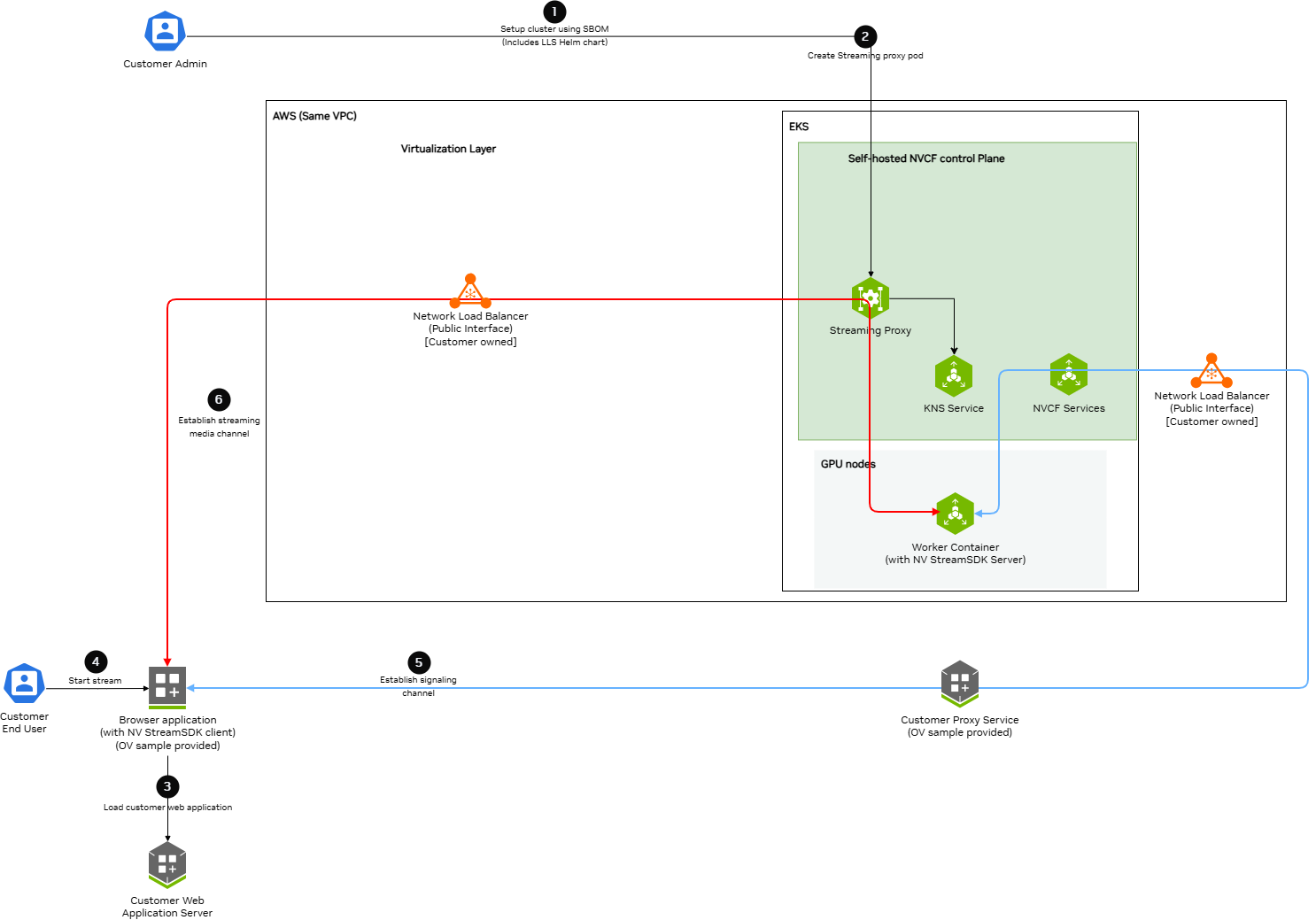
Key components and data flows:
Control Plane Components (EKS):
Streaming Proxy Container - Handles WebRTC streaming connections and opens routes to Worker Nodes
TURN Server - Handles optional TCP or TLS fallback media traffic
Kubernetes Services - Creates ClusterIP and NodePort services
KNS Service - Fetches JWKS for authentication
NVCF Services - Connects to customer-owned load balancers via signaling channels
GPU Nodes (EKS):
Worker Container - Runs streaming applications (StreamSDK packaged) and receives streaming data
AWS VPC:
Network Load Balancer (Public Interface) - Customer-owned, receives UDP streaming traffic and optional TCP or TLS TURN traffic from browser applications
Data Flow Channels:
Red Lines (Streaming Channel) - WebRTC streaming data path from Browser application through load balancers and Streaming Proxy to Worker Containers
Blue Lines (Signaling Channel) - WebSocket signaling data path connecting Browser application, Customer services, Load Balancers, NVCF Services, and Worker Containers
TURN Path - Optional TCP or TLS fallback media path through the TURN Server
Prerequisites#
Before installing LLS, ensure:
Self-hosted NVCF control plane installed and running on a Kubernetes cluster (see helmfile-installation)
NVCF compute plane (NVCA) installed on the cluster where you install LLS, so that the
nvcf-backendnamespace exists. Thegdn-streamingchart creates thenvcf-sbsService in that namespace and the install fails without it.kubectl configured with access to your cluster
Helm v3.x installed
Registry credentials that can access the required self-hosted NVCF LLS images and Helm chart
For AWS examples, AWS CLI configured with permissions to read EKS cluster metadata, authenticate to ECR, and manage EC2 security groups, Elastic IPs, and ELBv2 load balancer resources
For TCP or TLS TURN fallback, NVCF control plane and streaming application images that support TURN over TCP
For TURN TLS, a DNS name for the TURN NLB and a public CA-signed certificate chain and private key for that DNS name
Warning
TURN fallback in this guide assumes a single-cluster self-hosted NVCF
deployment. The NVCF control plane, OpenBao, vault injector, and
gdn-streaming TURN pods must run in the same Kubernetes cluster. Split
control-plane and compute-cluster TURN topologies are not supported by this
procedure because the TURN pod reads /vault/secrets/turn from in-cluster
OpenBao injection.
Configure AWS Credentials
For AWS examples, LLS installation requires AWS CLI access to create NLB resources, security groups, and manage EC2 networking. Verify your AWS credentials are configured:
aws sts get-caller-identity
If this command fails, configure your AWS credentials before running the AWS examples using your organization’s standard AWS authentication flow.
Set Registry Access Credentials
Before mirroring artifacts from NGC, set your NGC API key as an environment variable:
export NGC_API_KEY="nvapi-xxxxxxxxxxxxx" # Replace with your NGC API key
Configure Control Plane TURN Support
Before installing gdn-streaming with TURN enabled, configure the
self-hosted NVCF control plane to seed TURN HMAC secrets into OpenBao and
deploy the HMAC rotation job. Use the nvcf-openbao-migrations version from
the Artifact Manifest for this documentation version. Do not
copy a tag from another RC or release.
Set these values in your self-hosted stack environment:
openbao:
  migrations:
    image:
      tag: "<nvcf-openbao-migrations version from manifest>"

addons:
  lls:
    enabled: true
    hmacRotation:
      image:
        tag: "<nvcf-openbao-migrations version from manifest>"
Render the SIS release before applying the stack and verify that the LLS migration hook and HMAC rotation CronJob use the expected image tag:
HELMFILE_ENV=<env> helmfile --environment default --selector name=sis template > /tmp/sis-render.yaml

grep -n "nvcf-openbao-migrations" /tmp/sis-render.yaml
grep -n "addons-lls" /tmp/sis-render.yaml
Note
Configurable UDP Streaming Port
The UDP port for WebRTC streaming traffic defaults to 5004 and is exported as
LLS_UDP_PORT in Step 2.1. This variable is used throughout
the guide for the NLB security group rule, NLB listener, and Helm values configuration.
To use a different port, change the export LLS_UDP_PORT= value in Step 2.1 and set
gnatUdp.env.lbPort in your Helm values file (Step 3) to the same value.
Select the TURN mode before creating AWS resources:
Mode |
|
Public TCP port |
Target NodePort |
|---|---|---|---|
TLS (examples below) |
|
5349 ( |
30886 |
Plain TCP |
|
3478 ( |
30885 |
Both modes use health check NodePort 31334 and require tcpTurn.serverDomain.
For plain TCP, set CloudFormation parameters TurnPublicPort=3478 and
TurnTargetPort=30885, or change LLS_TURN_TCP_PORT and LLS_TURN_NODE_PORT
in Step 2.1 to those values. Apply the matching Helm settings in Step 3.
TLS enablement does not disable the plain TCP listener. Register only the
selected NodePort in the TURN target group.
Step 1: Mirror LLS Artifacts#
LLS requires specific container images and Helm charts to be available in your registry.
Required LLS Artifacts#
The following artifacts must be mirrored for LLS deployment:
Container Images:
streaming-proxy- Streaming Proxy Container(RP Container)turn- TURN container for TCP or TLS fallback when TURN is enablednvcf-openbao:2.6.2-nv-1.3.4- Reuse the control-plane OpenBao image fromnvcr.io/nvidia/nvcffor the TLS certificate setup hook
Helm Charts:
gdn-streaming- GDN Streaming Proxy Helm chart
Optional (for streaming workloads):
UDP-only streaming application images (e.g.,
usd-composer)UDP plus TCP streaming application images that support TURN
For detailed instructions on pulling these artifacts from NGC and pushing to your registry, see Self-Hosted Image Mirroring.
Note
When mirroring to ECR, the repository path must match your Helm values configuration. Set LLS_HELM_REPOSITORY in Step 4 to the same repository prefix you used when mirroring the chart.
Step 2: Create Network Load Balancer#
LLS requires a Network Load Balancer (NLB) for streaming traffic.
This section describes the AWS resource state that LLS needs. If you manage AWS resources with your own provisioning tooling, create equivalent resources with the same protocols, ports, health checks, target registrations, and tags.
AWS Resource Contract#
Create the AWS resources in the same region and availability zone as your GPU node pool. Use this table as the required resource state.
Resource |
Required state |
Notes |
|---|---|---|
Network Load Balancer |
Type |
Attach the LLS NLB security group. Use a static Elastic IP only if your environment requires a predictable ingress IP. |
LLS NLB security group |
Inbound UDP 5004 from |
Add inbound TCP 5349 from |
UDP listener |
Protocol UDP, port 5004 |
Forward to the UDP target group. |
TURN listener |
Protocol TCP, port 5349 |
Optional. Forward to the TURN target group when TURN is enabled. |
UDP target group |
Target type |
Health check uses HTTP port 30800 and path |
TURN target group |
Target type |
Optional. Health check uses HTTP port 31334 and path |
UDP targets |
Compute node internal IPs on port 30504 |
Register each compute node that can run the streaming proxy. |
TURN targets |
Compute node internal IPs on port 30886 |
Optional. Register only the NodePort selected for this TURN target group; do not mix TCP and TLS endpoints in one target group. |
Node security group ingress |
Allow TCP 30800 and UDP 30504 from the LLS NLB security group |
TCP 30800 is required for UDP target group health checks. Add TCP 30885-30886 and TCP 31334 from the LLS NLB security group when TURN is enabled. |
The examples use manual IP registration. These registrations do not track
node replacement or autoscaling. For an EKS node pool that changes over time,
use controller-managed target membership
and create instance target groups instead of ip target groups.
Save these values for later steps:
Value |
Used for |
|---|---|
NLB DNS name |
|
UDP target group ARN |
UDP target registration |
TURN target group ARN |
Optional TURN target registration |
LLS NLB security group ID |
Node security group ingress rules |
Note
You must create the NLB in the same region and availability zone as your GPU node pool.
Optional AWS Provisioning References#
The following references create the resource contract above for a single-AZ EKS deployment. Use the format that matches how you manage AWS resources.
CloudFormation
The following CloudFormation template creates the NLB security group, optional static Elastic IP, NLB, target groups, and listeners. It does not register compute node IP targets or add node security group ingress rules. Complete those steps in Step 4 after the LLS pods are deployed.
AWSTemplateFormatVersion: "2010-09-09"
Description: Single-AZ NLB resources for self-hosted NVCF LLS streaming and optional TURN fallback.

Parameters:
  ClusterName:
    Type: String
    Description: EKS cluster name used in LLS resource names and tags.
  VpcId:
    Type: AWS::EC2::VPC::Id
    Description: VPC ID for the EKS cluster.
  PublicSubnetId:
    Type: AWS::EC2::Subnet::Id
    Description: Public subnet in the same availability zone as the GPU node pool.
  UdpPublicPort:
    Type: Number
    Default: 5004
    Description: Public UDP listener port for WebRTC media.
  UdpNodePort:
    Type: Number
    Default: 30504
    Description: NodePort used by the Streaming Proxy UDP service.
  UdpHealthNodePort:
    Type: Number
    Default: 30800
    Description: NodePort used by the Streaming Proxy health check.
  EnableTurn:
    Type: String
    Default: "true"
    AllowedValues:
      - "true"
      - "false"
    Description: Create the optional TURN TCP listener and target group.
  TurnPublicPort:
    Type: Number
    Default: 5349
    Description: Public TCP listener port for TURN fallback.
  TurnTargetPort:
    Type: Number
    Default: 30886
    Description: NodePort used by the TURN TCP service.
  TurnHealthNodePort:
    Type: Number
    Default: 31334
    Description: NodePort used by the TURN health check.
  UseStaticIp:
    Type: String
    Default: "false"
    AllowedValues:
      - "true"
      - "false"
    Description: Allocate and attach a static Elastic IP to the NLB.

Conditions:
  EnableTurnCondition: !Equals [!Ref EnableTurn, "true"]
  UseStaticIpCondition: !Equals [!Ref UseStaticIp, "true"]

Resources:
  LlsNlbSecurityGroup:
    Type: AWS::EC2::SecurityGroup
    Properties:
      GroupName: !Sub "${ClusterName}-rp-sg"
      GroupDescription: !Sub "Security group for LLS streaming NLB UDP ${UdpPublicPort}"
      VpcId: !Ref VpcId
      SecurityGroupEgress:
        - IpProtocol: "-1"
          CidrIp: 0.0.0.0/0
      Tags:
        - Key: Name
          Value: !Sub "${ClusterName}-rp-sg"
        - Key: lls:cluster
          Value: !Ref ClusterName
        - Key: lls:managed-by
          Value: customer
        - Key: lls:purpose
          Value: streaming-nlb
        - Key: Project
          Value: nvcf

  LlsUdpIngress:
    Type: AWS::EC2::SecurityGroupIngress
    Properties:
      GroupId: !Ref LlsNlbSecurityGroup
      IpProtocol: udp
      FromPort: !Ref UdpPublicPort
      ToPort: !Ref UdpPublicPort
      CidrIp: 0.0.0.0/0
      Description: LLS streaming traffic

  LlsTurnIngress:
    Type: AWS::EC2::SecurityGroupIngress
    Condition: EnableTurnCondition
    Properties:
      GroupId: !Ref LlsNlbSecurityGroup
      IpProtocol: tcp
      FromPort: !Ref TurnPublicPort
      ToPort: !Ref TurnPublicPort
      CidrIp: 0.0.0.0/0
      Description: LLS TURN TCP traffic

  LlsStaticEip:
    Type: AWS::EC2::EIP
    Condition: UseStaticIpCondition
    Properties:
      Domain: vpc
      Tags:
        - Key: Name
          Value: !Sub "${ClusterName}-lls-eip"
        - Key: lls:cluster
          Value: !Ref ClusterName

  LlsNetworkLoadBalancer:
    Type: AWS::ElasticLoadBalancingV2::LoadBalancer
    Properties:
      Name: !Sub "rp-public-${ClusterName}"
      Type: network
      Scheme: internet-facing
      SecurityGroups:
        - !Ref LlsNlbSecurityGroup
      Subnets: !If
        - UseStaticIpCondition
        - !Ref AWS::NoValue
        - - !Ref PublicSubnetId
      SubnetMappings: !If
        - UseStaticIpCondition
        - - SubnetId: !Ref PublicSubnetId
            AllocationId: !GetAtt LlsStaticEip.AllocationId
        - !Ref AWS::NoValue
      Tags:
        - Key: Name
          Value: !Sub "rp-public-${ClusterName}"
        - Key: lls:cluster
          Value: !Ref ClusterName
        - Key: lls:managed-by
          Value: customer
        - Key: lls:purpose
          Value: streaming-traffic
        - Key: Project
          Value: nvcf

  UdpTargetGroup:
    Type: AWS::ElasticLoadBalancingV2::TargetGroup
    Properties:
      Name: !Sub "${ClusterName}-rp-tg"
      Protocol: UDP
      Port: !Ref UdpNodePort
      VpcId: !Ref VpcId
      TargetType: ip
      HealthCheckEnabled: true
      HealthCheckProtocol: HTTP
      HealthCheckPort: !Ref UdpHealthNodePort
      HealthCheckPath: /v1/health
      HealthCheckIntervalSeconds: 30
      HealthCheckTimeoutSeconds: 6
      HealthyThresholdCount: 5
      UnhealthyThresholdCount: 2
      Matcher:
        HttpCode: 200-399
      Tags:
        - Key: Name
          Value: !Sub "${ClusterName}-rp-tg"
        - Key: lls:cluster
          Value: !Ref ClusterName
        - Key: lls:managed-by
          Value: customer
        - Key: lls:purpose
          Value: streaming-targets
        - Key: Project
          Value: nvcf

  TurnTargetGroup:
    Type: AWS::ElasticLoadBalancingV2::TargetGroup
    Condition: EnableTurnCondition
    Properties:
      Name: !Sub "${ClusterName}-turn-tg"
      Protocol: TCP
      Port: !Ref TurnTargetPort
      VpcId: !Ref VpcId
      TargetType: ip
      HealthCheckEnabled: true
      HealthCheckProtocol: HTTP
      HealthCheckPort: !Ref TurnHealthNodePort
      HealthCheckPath: /v1/turn/health
      HealthCheckIntervalSeconds: 30
      HealthCheckTimeoutSeconds: 6
      HealthyThresholdCount: 5
      UnhealthyThresholdCount: 2
      Matcher:
        HttpCode: 200-399
      Tags:
        - Key: Name
          Value: !Sub "${ClusterName}-turn-tg"
        - Key: lls:cluster
          Value: !Ref ClusterName
        - Key: lls:managed-by
          Value: customer
        - Key: lls:purpose
          Value: turn-targets
        - Key: Project
          Value: nvcf

  UdpListener:
    Type: AWS::ElasticLoadBalancingV2::Listener
    Properties:
      LoadBalancerArn: !Ref LlsNetworkLoadBalancer
      Protocol: UDP
      Port: !Ref UdpPublicPort
      DefaultActions:
        - Type: forward
          TargetGroupArn: !Ref UdpTargetGroup

  TurnListener:
    Type: AWS::ElasticLoadBalancingV2::Listener
    Condition: EnableTurnCondition
    Properties:
      LoadBalancerArn: !Ref LlsNetworkLoadBalancer
      Protocol: TCP
      Port: !Ref TurnPublicPort
      DefaultActions:
        - Type: forward
          TargetGroupArn: !Ref TurnTargetGroup

Outputs:
  NlbDnsName:
    Description: NLB DNS name for lbDns in the Helm values file.
    Value: !GetAtt LlsNetworkLoadBalancer.DNSName
  LlsNlbSecurityGroupId:
    Description: Security group ID for node security group ingress rules.
    Value: !Ref LlsNlbSecurityGroup
  UdpTargetGroupArn:
    Description: UDP target group ARN for target registration.
    Value: !Ref UdpTargetGroup
  TurnTargetGroupArn:
    Condition: EnableTurnCondition
    Description: TURN target group ARN for target registration.
    Value: !Ref TurnTargetGroup
  StaticEipAllocationId:
    Condition: UseStaticIpCondition
    Description: Elastic IP allocation ID attached to the NLB.
    Value: !GetAtt LlsStaticEip.AllocationId
Set the stack parameters. If you already know the VPC and subnet IDs, set
VPC_ID and SUBNET directly.
export CLUSTER_NAME="<your-cluster-name>"
export REGION="<your-region>"
export LLS_AZ="us-west-2a"  # <-- Update to match your GPU node AZ

export VPC_ID=$(aws eks describe-cluster \
  --name "$CLUSTER_NAME" \
  --region "$REGION" \
  --query 'cluster.resourcesVpcConfig.vpcId' \
  --output text)

export SUBNET=$(aws ec2 describe-subnets \
  --region "$REGION" \
  --filters \
    "Name=vpc-id,Values=${VPC_ID}" \
    "Name=map-public-ip-on-launch,Values=true" \
    "Name=availability-zone,Values=${LLS_AZ}" \
  --query 'Subnets[0].SubnetId' \
  --output text)
Deploy the stack from the same AWS account and region as the EKS cluster:
aws cloudformation deploy \
  --stack-name "lls-nlb-${CLUSTER_NAME}" \
  --template-file lls-nlb.yaml \
  --region "$REGION" \
  --parameter-overrides \
    ClusterName="$CLUSTER_NAME" \
    VpcId="$VPC_ID" \
    PublicSubnetId="$SUBNET" \
    EnableTurn=true \
    UseStaticIp=false
Save the stack outputs for the Helm values file, target registration, and node security group rules:
aws cloudformation describe-stacks \
  --stack-name "lls-nlb-${CLUSTER_NAME}" \
  --region "$REGION" \
  --query 'Stacks[0].Outputs[*].[OutputKey,OutputValue]' \
  --output table
AWS CLI
The following AWS CLI reference creates the same resources directly. Replace the placeholder values at the start.
2.1 Set Environment Variables
# Required: Set your cluster name and region
export CLUSTER_NAME="<your-cluster-name>"
export REGION="<your-region>"

# UDP port for WebRTC streaming traffic (configurable - update if needed)
export LLS_UDP_PORT=5004

# Optional TURN ports: TLS defaults; use 3478 and 30885 for plain TCP.
export LLS_TURN_TCP_PORT=5349
export LLS_TURN_NODE_PORT=30886
export LLS_TURN_HEALTH_NODE_PORT=31334

# Define resource names (based on cluster name)
export NLB_NAME="rp-public-${CLUSTER_NAME}"
export SG_NAME="${CLUSTER_NAME}-rp-sg"
export TG_NAME="${CLUSTER_NAME}-rp-tg"
export TG_TURN_NAME="${CLUSTER_NAME}-turn-tg"
2.2 Get VPC and Public Subnet
# Get VPC ID from your EKS cluster
export VPC_ID=$(aws eks describe-cluster \
  --name "$CLUSTER_NAME" \
  --region "$REGION" \
  --query 'cluster.resourcesVpcConfig.vpcId' \
  --output text)
echo "VPC ID: $VPC_ID"

# Set the availability zone where your GPU nodes are deployed
# This must match the availability zone used by the GPU node pool
export LLS_AZ="us-west-2a"  # <-- Update to match your GPU node AZ

# Get the public subnet in the LLS availability zone
export SUBNET=$(aws ec2 describe-subnets \
  --region "$REGION" \
  --filters \
    "Name=vpc-id,Values=${VPC_ID}" \
    "Name=map-public-ip-on-launch,Values=true" \
    "Name=availability-zone,Values=${LLS_AZ}" \
  --query 'Subnets[0].SubnetId' \
  --output text)
echo "Public Subnet ($LLS_AZ): $SUBNET"
2.3 Create Security Group
# Create security group for NLB
export SG_ID=$(aws ec2 create-security-group \
  --group-name "$SG_NAME" \
  --description "Security group for LLS streaming NLB (UDP ${LLS_UDP_PORT})" \
  --vpc-id "$VPC_ID" \
  --region "$REGION" \
  --tag-specifications "ResourceType=security-group,Tags=[{Key=Name,Value=$SG_NAME},{Key=lls:cluster,Value=$CLUSTER_NAME},{Key=lls:managed-by,Value=customer},{Key=lls:purpose,Value=streaming-nlb},{Key=Project,Value=nvcf}]" \
  --query 'GroupId' \
  --output text)
echo "Security Group ID: $SG_ID"
2.4 Configure Security Group Rules
# Add inbound rule: UDP ${LLS_UDP_PORT} from anywhere (streaming traffic)
aws ec2 authorize-security-group-ingress \
  --group-id "$SG_ID" \
  --ip-permissions "IpProtocol=udp,FromPort=${LLS_UDP_PORT},ToPort=${LLS_UDP_PORT},IpRanges=[{CidrIp=0.0.0.0/0,Description='LLS streaming traffic'}]" \
  --region "$REGION"

# Optional TURN inbound rule: TCP ${LLS_TURN_TCP_PORT} from anywhere
aws ec2 authorize-security-group-ingress \
  --group-id "$SG_ID" \
  --ip-permissions "IpProtocol=tcp,FromPort=${LLS_TURN_TCP_PORT},ToPort=${LLS_TURN_TCP_PORT},IpRanges=[{CidrIp=0.0.0.0/0,Description='LLS TURN TCP traffic'}]" \
  --region "$REGION"

# Remove default egress rule and add explicit outbound rule
aws ec2 revoke-security-group-egress \
  --group-id "$SG_ID" \
  --ip-permissions 'IpProtocol=-1,IpRanges=[{CidrIp=0.0.0.0/0}]' \
  --region "$REGION" 2>/dev/null || true

aws ec2 authorize-security-group-egress \
  --group-id "$SG_ID" \
  --ip-permissions 'IpProtocol=-1,IpRanges=[{CidrIp=0.0.0.0/0}]' \
  --region "$REGION"
2.5 Create Network Load Balancer
Choose one of the following options:
Option A: Dynamic IP (simpler)
# Create NLB with AWS-assigned public IP (single AZ)
export NLB_ARN=$(aws elbv2 create-load-balancer \
  --name "$NLB_NAME" \
  --type network \
  --scheme internet-facing \
  --subnets "$SUBNET" \
  --security-groups "$SG_ID" \
  --region "$REGION" \
  --tags \
    Key=Name,Value="$NLB_NAME" \
    Key=lls:cluster,Value="$CLUSTER_NAME" \
    Key=lls:managed-by,Value="customer" \
    Key=lls:purpose,Value="streaming-traffic" \
    Key=Project,Value="nvcf" \
  --query 'LoadBalancers[0].LoadBalancerArn' \
  --output text)
echo "NLB ARN: $NLB_ARN"
Option B: Static EIP (predictable IP)
Use this if you need a predictable ingress IP for firewall rules:
# Allocate a static EIP
export EIP_ALLOC=$(aws ec2 allocate-address \
  --domain vpc \
  --region "$REGION" \
  --tag-specifications "ResourceType=elastic-ip,Tags=[{Key=Name,Value=${CLUSTER_NAME}-lls-eip},{Key=lls:cluster,Value=$CLUSTER_NAME}]" \
  --query 'AllocationId' \
  --output text)
echo "EIP Allocation ID: $EIP_ALLOC"

# Create NLB with static EIP (single AZ)
export NLB_ARN=$(aws elbv2 create-load-balancer \
  --name "$NLB_NAME" \
  --type network \
  --scheme internet-facing \
  --subnet-mappings SubnetId="$SUBNET",AllocationId="$EIP_ALLOC" \
  --security-groups "$SG_ID" \
  --region "$REGION" \
  --tags \
    Key=Name,Value="$NLB_NAME" \
    Key=lls:cluster,Value="$CLUSTER_NAME" \
    Key=lls:managed-by,Value="customer" \
    Key=lls:purpose,Value="streaming-traffic" \
    Key=Project,Value="nvcf" \
  --query 'LoadBalancers[0].LoadBalancerArn' \
  --output text)
echo "NLB ARN: $NLB_ARN"
2.6 Wait for NLB to Become Active
echo "Waiting for NLB to become active..."
aws elbv2 wait load-balancer-available \
  --load-balancer-arns "$NLB_ARN" \
  --region "$REGION"
echo "NLB is active"
2.7 Create Target Group
export TG_ARN=$(aws elbv2 create-target-group \
  --name "$TG_NAME" \
  --protocol UDP \
  --port 30504 \
  --vpc-id "$VPC_ID" \
  --target-type ip \
  --health-check-enabled \
  --health-check-protocol HTTP \
  --health-check-port 30800 \
  --health-check-path /v1/health \
  --health-check-interval-seconds 30 \
  --health-check-timeout-seconds 6 \
  --healthy-threshold-count 5 \
  --unhealthy-threshold-count 2 \
  --matcher HttpCode=200-399 \
  --region "$REGION" \
  --tags \
    Key=Name,Value="$TG_NAME" \
    Key=lls:cluster,Value="$CLUSTER_NAME" \
    Key=lls:managed-by,Value="customer" \
    Key=lls:purpose,Value="streaming-targets" \
    Key=Project,Value="nvcf" \
  --query 'TargetGroups[0].TargetGroupArn' \
  --output text)
echo "Target Group ARN: $TG_ARN"
2.8 Optional: Create TURN Target Group
Run this step only when enabling TCP or TLS TURN fallback.
export TG_TURN_ARN=$(aws elbv2 create-target-group \
  --name "$TG_TURN_NAME" \
  --protocol TCP \
  --port "$LLS_TURN_NODE_PORT" \
  --vpc-id "$VPC_ID" \
  --target-type ip \
  --health-check-enabled \
  --health-check-protocol HTTP \
  --health-check-port "$LLS_TURN_HEALTH_NODE_PORT" \
  --health-check-path /v1/turn/health \
  --health-check-interval-seconds 30 \
  --health-check-timeout-seconds 6 \
  --healthy-threshold-count 5 \
  --unhealthy-threshold-count 2 \
  --matcher HttpCode=200-399 \
  --region "$REGION" \
  --tags \
    Key=Name,Value="$TG_TURN_NAME" \
    Key=lls:cluster,Value="$CLUSTER_NAME" \
    Key=lls:managed-by,Value="customer" \
    Key=lls:purpose,Value="turn-targets" \
    Key=Project,Value="nvcf" \
  --query 'TargetGroups[0].TargetGroupArn' \
  --output text)
echo "Target Group TURN ARN: $TG_TURN_ARN"
2.9 Create Listener
export LISTENER_ARN=$(aws elbv2 create-listener \
  --load-balancer-arn "$NLB_ARN" \
  --protocol UDP \
  --port ${LLS_UDP_PORT} \
  --default-actions Type=forward,TargetGroupArn="$TG_ARN" \
  --region "$REGION" \
  --query 'Listeners[0].ListenerArn' \
  --output text)
echo "Listener ARN: $LISTENER_ARN"
2.10 Optional: Create TURN Listener
Run this step only when enabling TCP or TLS TURN fallback.
export LISTENER_TURN_ARN=$(aws elbv2 create-listener \
  --load-balancer-arn "$NLB_ARN" \
  --protocol TCP \
  --port "$LLS_TURN_TCP_PORT" \
  --default-actions Type=forward,TargetGroupArn="$TG_TURN_ARN" \
  --region "$REGION" \
  --query 'Listeners[0].ListenerArn' \
  --output text)
echo "Listener TURN ARN: $LISTENER_TURN_ARN"
2.11 Verify and Save Outputs
# Get NLB DNS name
export NLB_DNS=$(aws elbv2 describe-load-balancers \
  --load-balancer-arns "$NLB_ARN" \
  --region "$REGION" \
  --query 'LoadBalancers[0].DNSName' \
  --output text)

# Display summary
echo ""
echo "============================================"
echo "NLB Creation Complete"
echo "============================================"
echo "NLB Name:         $NLB_NAME"
echo "NLB ARN:          $NLB_ARN"
echo "NLB DNS:          $NLB_DNS"
echo "Target Group ARN: $TG_ARN"
echo "Target Group TURN ARN: ${TG_TURN_ARN:-not enabled}"
echo "Security Group:   $SG_ID"
echo "============================================"
echo ""
echo "Save the Target Group ARN for Step 4.2 (target registration):"
echo "  $TG_ARN"
Note
Save the NLB DNS name for the Helm values file in Step 3. Save the target group ARNs and LLS NLB security group ID for target registration and node security group rules in Step 4.
Step 3: Create Helm Values File#
Create a custom-values.yaml file with your configuration.
Use the load balancer DNS name and availability zone from Step 2. The following
example uses the gdn-streaming 3.0.0 values layout:
# Public UDP load balancer DNS name
lbDns: "<nlb-dns-name>.elb.<region>.amazonaws.com"

# Streaming proxy configuration
gnatUdp:
  replicaCount: 1
  image:
    repository: <registry-name>/streaming-proxy
    tag: 4.0.2
    pullPolicy: Always
  resources:
    requests:
      cpu: "5000m"
      memory: "24Gi"
    limits:
      cpu: "5000m"
      memory: "24Gi"
  env:
    lbPort: "5004"  # Must match LLS_UDP_PORT in Step 2.1

# Availability Zone for streaming proxy and TURN pods
availabilityZones:
  enabled: true
  zones:
    - us-west-2a # Change to the actual availability zone of Load Balancer

# Node Selection
nodeSelector:
  node-type: compute

# Optional TURN fallback
tcpTurn:
  enabled: true
  tlsEnabled: true
  port: 3478
  tlsPort: 5349
  serverDomain: "<streaming.example.com>"
  replicaCount: 1
  image:
    repository: <registry-name>/turn
    tag: 4.0.2
  certSetup:
    certBase64: ""
    image:
      repository: <registry-name>/nvcf-openbao
      tag: 2.6.2-nv-1.3.4
Note
Replace all
<placeholder>values with your actual configurationgnatUdp.env.lbPortis the public UDP port for streaming trafficlbDnsis the public load balancer dns nameavailabilityZones.zonesis the availability zone for streaming proxy container which must be the same as the availability zone of the Load BalancernodeSelector.node-typeis the node type where streaming proxy container will be deployedgnatUdp.image.repositoryis the streaming proxy container image repositorygnatUdp.image.tagis the streaming proxy container image tagtcpTurn.enabledenables TCP or TLS TURN fallbacktcpTurn.tlsEnabledenables TLS for TURN; whenfalse, TURN runs over plain TCPtcpTurn.serverDomainis the DNS name that clients use for TURN in both modes; enter a hostname without a scheme or porttcpTurn.replicaCountis the TURN pod replica counttcpTurn.image.repositoryis the TURN container image repositorytcpTurn.image.tagis the TURN container image tagtcpTurn.certSetup.imageselects the mirrored OpenBao image for the TLS certificate hook. The hook requires/bin/shandbao; the TURN image does not contain/bin/sh.gnatUdp.resources.requests.cpuis the streaming proxy pod cpu requestgnatUdp.resources.requests.memoryis the streaming proxy pod memory requestgnatUdp.resources.limits.cpuis the streaming proxy pod cpu limitgnatUdp.resources.limits.memoryis the streaming proxy pod memory limit
If tcpTurn.tlsEnabled is true, create secrets.yaml with the base64 encoded PEM bundle for tcpTurn.serverDomain. The bundle must include the certificate chain and private key that the TURN pod serves. Use a DNS name for the TURN NLB that matches the certificate. The AWS-provided NLB DNS name cannot be used for a public TLS certificate:
tcpTurn:
  certSetup:
    certBase64: "<base64-encoded-pem>"
Install with secrets.yaml so the chart hook writes the TURN certificate bundle
to OpenBao in vault-system for the TURN agent to inject. The hook uses the existing
openbao-server-initialize-cluster service account and
openbao-server-root-token Secret in vault-system. Keep secrets.yaml out of
source control and restrict access to it and the hook logs, which contain the
base64-encoded bundle.
TLS clients must trust the CA that signed the bundle.
Plain TCP TURN or UDP-only#
For plain TCP TURN, change tcpTurn.tlsEnabled to false in
custom-values.yaml. Keep tcpTurn.port: 3478 and set tcpTurn.serverDomain
to the reachable TURN NLB hostname. Use the matching public port 3478 and
NodePort 30885 from Step 2.
Note
TURN 4.0.2 workaround for 26.10.0: A certificate initialization defect causes TURN to read and parse the OpenBao certificate bundle at startup even when TLS is disabled. Plain TCP should not require a TLS certificate, and the chart’s TLS setup hook does not run in this mode.
As a workaround, if the bundle is absent or contains an invalid placeholder,
seed a valid PEM certificate and private key for tcpTurn.serverDomain before
installing TURN. An inactive self-signed bundle is sufficient; this does not
enable TLS. Using an
authenticated OpenBao CLI session
with write access to the TURN path:
umask 077
base64 < turn-bundle.pem | tr -d '\n' > turn-bundle.b64
bao kv put -mount=services/turn/kv keys/public-dns-certificate cert=@turn-bundle.b64
rm turn-bundle.b64
For UDP-only streaming, set tcpTurn.enabled: false and skip the TURN
certificate, listener, target group, registration, and security group rules.
Neither plain TCP nor UDP-only requires secrets.yaml in Step 4.
Step 4: Deploy LLS Operator#
4.1 Deploy the LLS operator using Helm:
# Use the same account and region as Step 2.
: "${REGION:?Set REGION to the EKS cluster region}"
export AWS_ACCOUNT_ID=$(aws sts get-caller-identity --query Account --output text)

# Authenticate with ECR
aws ecr get-login-password --region ${REGION} | helm registry login --username AWS --password-stdin ${AWS_ACCOUNT_ID}.dkr.ecr.${REGION}.amazonaws.com

# Set this to the repository prefix used when mirroring the gdn-streaming chart.
# Examples: nvcf, nvcf-self-hosted, or your cluster-specific prefix.
export LLS_HELM_REPOSITORY="<your-repository-prefix>"

# Select values before installing; include the certificate on the first TLS install.
LLS_VALUES_ARGS=(-f custom-values.yaml -f secrets.yaml)
# For UDP-only or plain TCP TURN, omit -f secrets.yaml.

# Install the chart version selected by the release manifest
helm upgrade --install gdn-streaming \
  oci://${AWS_ACCOUNT_ID}.dkr.ecr.${REGION}.amazonaws.com/$LLS_HELM_REPOSITORY/gdn-streaming \
  --version 3.0.0 \
  --namespace gdn-streaming \
  --create-namespace \
  "${LLS_VALUES_ARGS[@]}"
4.2 Add RP Container Node IP and Port to Load Balancer’s Target Group:
This step is for manual ip target groups only. Skip it when using the
controller procedure below. Set LLS_AZ to the zone selected in Step 2.
# Get the target group ARN from the Load balancer step and export as TG_ARN
for IP in $(kubectl get nodes -l "node-type=compute,topology.kubernetes.io/zone=${LLS_AZ}" -o jsonpath='{.items[*].status.addresses[?(@.type=="InternalIP")].address}'); do
 aws elbv2 register-targets --region "$REGION" --target-group-arn "$TG_ARN" --targets Id="$IP",Port=30504
done
If TURN is enabled, register compute node IPs on the same NodePort used by the TURN target group:
# Read the selected port for either the CloudFormation or CLI provisioning path.
export LLS_TURN_NODE_PORT=$(aws elbv2 describe-target-groups \
  --region "$REGION" --target-group-arns "$TG_TURN_ARN" \
  --query 'TargetGroups[0].Port' --output text)

for IP in $(kubectl get nodes -l "node-type=compute,topology.kubernetes.io/zone=${LLS_AZ}" -o jsonpath='{.items[*].status.addresses[?(@.type=="InternalIP")].address}'); do
  aws elbv2 register-targets --region "$REGION" --target-group-arn "$TG_TURN_ARN" --targets Id="$IP",Port="$LLS_TURN_NODE_PORT"
done
4.3 Add security rules to cluster nodes to accept streaming traffic and health checks on NodePorts:
 # # Get the security group from the Load balancer step and export as SG_ID
 NODE_SG_ID=$(aws ec2 describe-security-groups \
  --region "$REGION" \
  --filters "Name=group-name,Values=$CLUSTER_NAME-node-*" \
  --query 'SecurityGroups[0].GroupId' --output text)

 echo "Node Security Group ID: $NODE_SG_ID"

# Add security rule to cluster nodes to accept UDP streaming traffic on NodePort.
aws ec2 authorize-security-group-ingress \
--region "$REGION" \
--group-id "$NODE_SG_ID" \
--protocol udp \
--port 30504 \
--source-group "$SG_ID" \
--tag-specifications 'ResourceType=security-group-rule,Tags=[{Key=Name,Value=streaming-proxy-udp-30504}]'

# Add security rule to cluster nodes so the NLB UDP target group can run HTTP health checks.
aws ec2 authorize-security-group-ingress \
--region "$REGION" \
--group-id "$NODE_SG_ID" \
--protocol tcp \
--port 30800 \
--source-group "$SG_ID" \
--tag-specifications 'ResourceType=security-group-rule,Tags=[{Key=Name,Value=streaming-proxy-health-30800}]'
If TURN is enabled, add node security group rules for TURN traffic and health checks:
aws ec2 authorize-security-group-ingress \
--region "$REGION" \
--group-id "$NODE_SG_ID" \
--protocol tcp \
--port 30885-30886 \
--source-group "$SG_ID" \
--tag-specifications 'ResourceType=security-group-rule,Tags=[{Key=Name,Value=turn-tcp-30885-30886}]'

aws ec2 authorize-security-group-ingress \
--region "$REGION" \
--group-id "$NODE_SG_ID" \
--protocol tcp \
--port 31334 \
--source-group "$SG_ID" \
--tag-specifications 'ResourceType=security-group-rule,Tags=[{Key=Name,Value=turn-health-31334}]'
Optional: automate target membership on EKS#
This optional procedure applies only to EKS. Manual target registration in Step 4.2 remains the default; the rest of this guide does not require the AWS Load Balancer Controller.
The examples below were tested with AWS Load Balancer Controller version 3.6.0, which reconciles NodePort targets through TargetGroupBinding. Install the controller, IAM permissions, and CRDs using the linked procedure.
For a new deployment, change both TargetType: ip entries in the
CloudFormation template to TargetType: instance, or use
--target-type instance in the CLI target group commands. Retain the protocols,
NodePorts, HTTP health checks, listeners, and security group rules from Step 2.
The controller registers EC2 instance IDs, avoiding registrations that persist
against reusable node IP addresses.
After Step 4.3, save the following as lls-target-bindings.yaml. Replace the
ARN and zone, and match the node selector to your LLS node pool:
apiVersion: elbv2.k8s.aws/v1beta1
kind: TargetGroupBinding
metadata:
  name: lls-udp
  namespace: gdn-streaming
spec:
  targetGroupARN: <udp-instance-target-group-arn>
  targetType: instance
  serviceRef:
    name: streaming-proxy-nodeport
    port: udp-5004
  nodeSelector:
    matchLabels:
      node-type: compute
      topology.kubernetes.io/zone: us-west-2a
If TURN is enabled, add a second binding to that file using the same structure and node selector, with these replacements:
Field |
TURN value |
|---|---|
|
|
|
ARN of the TURN |
|
|
|
|
kubectl apply -f lls-target-bindings.yaml
kubectl get targetgroupbindings -n gdn-streaming
Do not run manual registration commands against controller-managed groups.
Keep the controller running and ensure replacement nodes inherit the labels
and security group rules. The UDP service uses externalTrafficPolicy: Local,
so only nodes with a ready local streaming-proxy pod can pass its health check.
During a controlled node replacement, verify that old instance targets are
deregistered, new targets appear, and streaming resumes through healthy targets
using Step 5. Monitor controller reconciliation errors and target health.
For an existing ip deployment, target type cannot be changed in place.
Create new instance groups with distinct names and the same health checks,
then bind them. Switch the listeners during a maintenance window, verify
target health and streaming, and retire the old IP groups after validation.
Keep the old groups available for rollback until that check passes.
Step 5: Verify Deployment#
Note
The Helm notes printed by gdn-streaming 3.0.0 use an incorrect pod selector
and, with the release name in this guide, a nonexistent Service name. Use the
pod labels in the commands below. Those notes alone do not indicate whether
deployment succeeded.
For the proxy HTTP health endpoint, forward the actual Service:
kubectl port-forward -n gdn-streaming svc/streaming-proxy 8000:8000
# In another terminal:
curl http://localhost:8000/v1/health
This checks proxy health, not streaming media.
Verify pod readiness, the advertised endpoint, load balancer targets, and an actual streaming session:
Check pod readiness. The streaming proxy shows
1/1 Running. With TURN enabled and the OpenBao agent injected, TURN shows2/2 Running:kubectl rollout status deployment/streaming-proxy -n gdn-streaming --timeout=10m kubectl get pods -n gdn-streaming -l app=streaming-proxy # Run only when TURN is enabled: kubectl rollout status deployment/turn-service -n gdn-streaming --timeout=10m kubectl get pods -n gdn-streaming -l app=turn-service
Expected output:
NAME                                                 READY   STATUS    RESTARTS   AGE
streaming-proxy-xxxxx-xxxxx        1/1     Running   0          5m
turn-service-xxxxx-xxxxx           2/2     Running   0          5m
Check recent application logs. Run the TURN command only when TURN is enabled:
# show recent logs
kubectl logs -n gdn-streaming -l app=streaming-proxy --tail=50
kubectl logs -n gdn-streaming -l app=turn-service -c turn --tail=50
Check the advertised UDP endpoint.
LB_DNSmust match the public NLB hostname.LB_PORTandNVCF_LLS_LOAD_BALANCER_PORTmust match its UDP listener:kubectl get deployment streaming-proxy -n gdn-streaming -o jsonpath='{.spec.template.spec.containers[0].env[?(@.name=="LB_DNS")].value}{"\n"}{.spec.template.spec.containers[0].env[?(@.name=="LB_PORT")].value}{"\n"}{.spec.template.spec.containers[0].env[?(@.name=="NVCF_LLS_LOAD_BALANCER_PORT")].value}{"\n"}'
Check AWS target health. Each enabled target group needs healthy targets in the NLB availability zone. Investigate unhealthy targets; spare nodes without a local proxy pod cannot pass the UDP health check:
aws elbv2 describe-target-health --region "$REGION" --target-group-arn "$TG_ARN" \
  --query 'TargetHealthDescriptions[*].[Target.Id,Target.Port,TargetHealth.State,TargetHealth.Reason]' --output table
# Run only when TURN is enabled:
aws elbv2 describe-target-health --region "$REGION" --target-group-arn "$TG_TURN_ARN" \
  --query 'TargetHealthDescriptions[*].[Target.Id,Target.Port,TargetHealth.State,TargetHealth.Reason]' --output table
Test a streaming session. Follow Deploying Kit Applications and Web Streaming Client. Confirm video and interactive input, plus audio if the application provides it. When TURN is enabled, repeat with direct UDP unavailable or the client’s relay-only ICE policy, and confirm a selected relayed ICE candidate pair. For TLS, also verify that the TURN certificate is trusted and matches
tcpTurn.serverDomain. Pod readiness and TCP connectivity alone do not prove that media traverses the selected TURN mode.
LLS Resource Summary#
The following table summarizes all AWS and Kubernetes resources created for LLS, who creates them, and how they are cleaned up:
Resource |
Created By |
Cleaned Up By |
Notes |
|---|---|---|---|
Kubernetes Resources - - - |
|||
Namespace |
Helm install |
|
Contains the streaming proxy and TURN workloads |
Streaming Proxy Pods |
Helm install |
Helm uninstall |
Labeled |
TURN Pods |
Helm install |
Helm uninstall |
Labeled |
TargetGroupBindings (if used) |
Customer ( |
Customer ( |
Delete before uninstalling LLS; the controller deregisters targets |
AWS Resources (Manual - Step 2) - - - |
|||
Network Load Balancer |
Customer (CLI) |
Customer (CLI) |
Must delete before Target Group |
NLB Target Group |
Customer (CLI) |
Customer (CLI) |
Must delete after NLB |
TURN Target Group |
Customer (CLI) |
Customer (CLI) |
Optional, delete after NLB |
NLB Security Group |
Customer (CLI) |
Customer (CLI) |
Must delete after NLB and node SG rule |
Elastic IP (if static) |
Customer (CLI) |
Customer (CLI) |
Optional, delete if created |
AWS Resources (Manual - Step 4) - - - |
|||
Node SG ingress rule (TCP 30800) |
Customer (CLI) |
Customer (CLI) |
Required for UDP target group health checks. Must remove before NLB Security Group |
Node SG ingress rule (UDP 30504) |
Customer (CLI) |
Customer (CLI) |
Must remove before NLB Security Group |
Node SG ingress rules (TCP 30885-30886, TCP 31334) |
Customer (CLI) |
Customer (CLI) |
Optional TURN rules |
Step 1: Uninstall#
If you created lls-target-bindings.yaml, delete those bindings first with
kubectl delete -f lls-target-bindings.yaml. Keep the controller and target
groups available until deletion and target deregistration complete.
helm uninstall gdn-streaming -n gdn-streaming

kubectl delete ns gdn-streaming
Step 2: Delete Manual NLB Resources#
The NLB and associated AWS resources created in Step 2 must be deleted in dependency order. If you used your own provisioning tooling, apply the equivalent delete operations there.
Order |
Delete or update |
Reason |
|---|---|---|
1 |
Remove node security group ingress rules for TCP 30800 and UDP 30504. If TURN was enabled, also remove TCP 30885-30886 and TCP 31334. |
The LLS NLB security group cannot be deleted while node security group rules reference it. |
2 |
Delete the NLB and wait for deletion to complete. |
Target groups and the LLS NLB security group remain referenced while the NLB exists. |
3 |
Delete the UDP target group. If TURN was enabled, also delete the TURN target group. |
Target groups can be deleted after the NLB stops using them. |
4 |
Delete the LLS NLB security group. |
The security group must have no remaining references. |
5 |
Review Elastic IP allocations tagged for the LLS cluster. |
Release any static Elastic IP that was allocated for the NLB if it is no longer needed. |
AWS CLI cleanup reference for single-AZ EKS#
The following AWS CLI reference deletes resources created by the AWS CLI reference in Step 2. Run it from a shell that has AWS CLI access to the cluster account.
export CLUSTER_NAME="<your-cluster-name>"
export REGION="<your-region>"
export NLB_NAME="rp-public-${CLUSTER_NAME}"
export TG_NAME="${CLUSTER_NAME}-rp-tg"
export TG_TURN_NAME="${CLUSTER_NAME}-turn-tg"

export NLB_ARN=$(aws elbv2 describe-load-balancers \
  --names "$NLB_NAME" \
  --region "$REGION" \
  --query 'LoadBalancers[0].LoadBalancerArn' \
  --output text 2>/dev/null || true)

export TG_ARN=$(aws elbv2 describe-target-groups \
  --names "$TG_NAME" \
  --region "$REGION" \
  --query 'TargetGroups[0].TargetGroupArn' \
  --output text 2>/dev/null || true)

export TG_TURN_ARN=$(aws elbv2 describe-target-groups \
  --names "$TG_TURN_NAME" \
  --region "$REGION" \
  --query 'TargetGroups[0].TargetGroupArn' \
  --output text 2>/dev/null || true)

export SG_ID=$(aws ec2 describe-security-groups \
  --region "$REGION" \
  --filters \
    "Name=tag:lls:cluster,Values=${CLUSTER_NAME}" \
    "Name=tag:lls:managed-by,Values=customer" \
    "Name=tag:lls:purpose,Values=streaming-nlb" \
  --query 'SecurityGroups[0].GroupId' \
  --output text)

export NODE_SG_ID=$(aws ec2 describe-security-groups \
  --region "$REGION" \
  --filters "Name=group-name,Values=$CLUSTER_NAME-node-*" \
  --query 'SecurityGroups[0].GroupId' \
  --output text)

if [ -n "$NODE_SG_ID" ] && [ "$NODE_SG_ID" != "None" ] && [ -n "$SG_ID" ] && [ "$SG_ID" != "None" ]; then
  aws ec2 revoke-security-group-ingress \
    --group-id "$NODE_SG_ID" \
    --protocol tcp \
    --port 30800 \
    --source-group "$SG_ID" \
    --region "$REGION" 2>/dev/null || true

  aws ec2 revoke-security-group-ingress \
    --group-id "$NODE_SG_ID" \
    --protocol udp \
    --port 30504 \
    --source-group "$SG_ID" \
    --region "$REGION" 2>/dev/null || true

  aws ec2 revoke-security-group-ingress \
    --group-id "$NODE_SG_ID" \
    --protocol tcp \
    --port 30885-30886 \
    --source-group "$SG_ID" \
    --region "$REGION" 2>/dev/null || true

  aws ec2 revoke-security-group-ingress \
    --group-id "$NODE_SG_ID" \
    --protocol tcp \
    --port 31334 \
    --source-group "$SG_ID" \
    --region "$REGION" 2>/dev/null || true
fi

if [ -n "$NLB_ARN" ] && [ "$NLB_ARN" != "None" ]; then
  aws elbv2 delete-load-balancer \
    --load-balancer-arn "$NLB_ARN" \
    --region "$REGION"

  aws elbv2 wait load-balancers-deleted \
    --load-balancer-arns "$NLB_ARN" \
    --region "$REGION"
fi

if [ -n "$TG_ARN" ] && [ "$TG_ARN" != "None" ]; then
  aws elbv2 delete-target-group \
    --target-group-arn "$TG_ARN" \
    --region "$REGION"
fi

if [ -n "$TG_TURN_ARN" ] && [ "$TG_TURN_ARN" != "None" ]; then
  aws elbv2 delete-target-group \
    --target-group-arn "$TG_TURN_ARN" \
    --region "$REGION"
fi

if [ -n "$SG_ID" ] && [ "$SG_ID" != "None" ]; then
  for ATTEMPT in 1 2 3 4 5; do
    if aws ec2 delete-security-group \
      --group-id "$SG_ID" \
      --region "$REGION"; then
      break
    fi

    echo "Security group delete failed. Waiting before retry ${ATTEMPT}..."
    sleep 30
  done
fi

aws ec2 describe-addresses \
  --region "$REGION" \
  --filters "Name=tag:lls:cluster,Values=${CLUSTER_NAME}" \
  --query 'Addresses[*].[PublicIp,AllocationId]' \
  --output table
Note
The cleanup reference uses the names and tags that were set during Step 2. It targets resources for the selected CLUSTER_NAME and customer-managed LLS tags.
If the NLB security group deletion still fails with DependencyViolation after the commands remove the node SG rules, the NLB may not have fully deleted yet. Wait a few more minutes and rerun the security group delete command.
Step 3: Final Verification#
Verify all LLS resources have been removed:
export CLUSTER_NAME="<your-cluster-name>"
export REGION="<your-region>"

echo "=== Kubernetes Resources ==="
kubectl get namespace gdn-streaming 2>/dev/null || echo "Namespace: deleted"
kubectl get pods -n gdn-streaming -o name 2>/dev/null | grep -q . && echo "Pods exist" || echo "Pods: deleted"

echo ""
echo "=== AWS Resources (Manual NLB) ==="
aws elbv2 describe-load-balancers --region "$REGION" \
  --query "LoadBalancers[?contains(LoadBalancerName, '${CLUSTER_NAME}')].[LoadBalancerName]" \
  --output text | grep -q . && echo "NLB exists" || echo "NLB: deleted"
aws elbv2 describe-target-groups --region "$REGION" \
  --query "TargetGroups[?contains(TargetGroupName, '${CLUSTER_NAME}')].[TargetGroupName]" \
  --output text | grep -q . && echo "Target Groups exist" || echo "Target Groups: deleted"
aws ec2 describe-security-groups --region "$REGION" \
  --filters "Name=tag:lls:cluster,Values=${CLUSTER_NAME}" \
  --query 'SecurityGroups[*].GroupId' \
  --output text | grep -q . && echo "LLS Security Groups exist" || echo "LLS Security Groups: deleted"

echo ""
echo "=== Cleanup verification complete ==="
Resource Requirements#
Streaming Proxy#
CPU: 5000m (limit), 5000m (request)
Memory: 24Gi (limit), 24Gi (request)
Runs as a single pod
Network Load Balancer#
Type: Network
Scheme: Internet-facing
Protocol: UDP
Port: 5004
Optional TURN protocol: TCP
Optional TURN port: 5349
Security Groups#
NLB Security Group:
Direction |
Protocol |
Port |
Source/Destination |
|---|---|---|---|
Inbound |
UDP |
5004 |
0.0.0.0/0 (streaming clients) |
Inbound |
TCP |
5349 |
0.0.0.0/0 (TURN clients, optional) |
Outbound |
All |
All |
0.0.0.0/0 |
Streaming Proxy Security Group:
Direction |
Protocol |
Port |
Source/Destination |
|---|---|---|---|
Inbound |
TCP |
30800 (NodePort) |
NLB security group (health checks) |
Inbound |
UDP |
30504 (NodePort) |
NLB security group (streaming traffic) |
Inbound |
TCP |
30885-30886 (NodePort) |
NLB security group (TURN traffic, optional) |
Inbound |
TCP |
31334 (NodePort) |
NLB security group (TURN health checks, optional) |
Inbound |
UDP |
6004 |
EKS Internal Node (streaming traffic) |
Inbound |
UDP |
3478 |
EKS Internal Node (STUN request) |
Inbound |
TCP |
8000 |
EKS Internal Node (API Request) |
Outbound |
All |
All |
0.0.0.0/0 |
Liveness and Readiness Probes#
The streaming proxy pod has liveness and readiness probes configured to the /v1/health endpoint at port 8000.
{"failureThreshold":3,"httpGet":{"path":"/v1/health","port":8000,"scheme":"HTTP"},"initialDelaySeconds":15,"periodSeconds":10,"successThreshold":1,"timeoutSeconds":5}
Troubleshooting#
Health check#
The health check is used to determine if the streaming proxy pod is healthy. The health check is configured to check the /v1/health endpoint at port 8000 of the streaming proxy pod. The AWS UDP target group reaches that endpoint through NodePort 30800, so the node security group must allow inbound TCP 30800 from the LLS NLB security group.
If TURN is enabled, the TURN NLB target group checks /v1/turn/health on NodePort 31334.
curl -X GET http://<streaming-proxy-pod-ip>:8000/v1/health

Expected output:

   {
     "status": "OK"
   }