OmniGraph Blast Node Documentation
WARNING: Some OmniGraph nodes needed to support Blast fracture are currently broken or unavailable (import_usd_prim_data and particle_system_scatter_points). Please check back later for Blast integration into OmniGraph.
This doc describes the Blast nodes for use in the OmniGraph system. You can find them under “omni.blast” in the “Add node” right click menu or the pop out side bar.
NOTE: The nodes automatically update the USD stage. It is possible for them to get out of sync. If that happens just save and reload the scene. That will cause the Blast data to regenerate and should get things back in sync.
Authoring: Combine
The Combine node takes two mesh or destructible prims and combines them into a single destructible. These can be chained together to create complex destructibles built out of many parts.
The output of this can also be sent to Fracture nodes to break them down. Note that fracturing after combine will apply to all parts that are touched by the point cloud. If you want points to only apply to a specific part, run it through Fracture first, then combine it to simplify the process.
Input |
Description |
|---|---|
prim1 |
Prim to use as input to fracture. Connect to “destructible” output from another Blast node or “output” from an “import USD prim data” node. The import node should be connected to a mesh or xform/scope containing meshes. |
prim2 |
Prim to use as input to fracture. Connect to “destructible” output from another Blast node or “output” from an “import USD prim data” node. The import node should be connected to a mesh or xform/scope containing meshes. |
contactThreshold |
Force from impact must be larger than this value to be used to apply damage. Set higher to prevent small movements from breaking bonds. |
bondStrength |
Base value to use for bond strength. How it is applied depends on the mode used. Bond strength is automatically recalculated when this changes. |
bondStrengthMode |
Controls how the Default Bond Strength is used. Bond strength is automatically recalculated when this changes. “areaInstance”: (Default) Multiply the default value by the area of the bond using destructible instance scale.
“areaBase”: Multiply the default value by the area of the bond using destructible base scale.
“absolute”: Use the default value directly.
|
maxContactImpulse |
Force that PhysX can use to prevent objects from penetrating. It is only used for kinematic destructibles that are attached to the world. This can approximate brittle materials by setting the value low, giving the bonds a chance to break before the objects are pushed apart. |
damageMinRadius |
Full damage from user generated fracture event is applied inside this radius. |
damageMaxRadius |
No damage from user generated fracture event is applied outside this radius. |
impactDamageScale |
Scale physical impacts by this amount when applying damage from collisions. |
impactClusterRadius |
If positive, contact reports will be aggregated into clusters of approximately the given radius, and damage accumulated for that cluster. The cluster will be reported as one damage event. |
allowSelfDamage |
If on, chunks from a destructible actor may cause damage to sibling actors. Default behavior for legacy assets is to disable self-damage, which changes the legacy behavior. |
Output |
Description |
|---|---|
destructible |
Result of the combine operation. Can be used as the input prim to another Blast authoring node. |
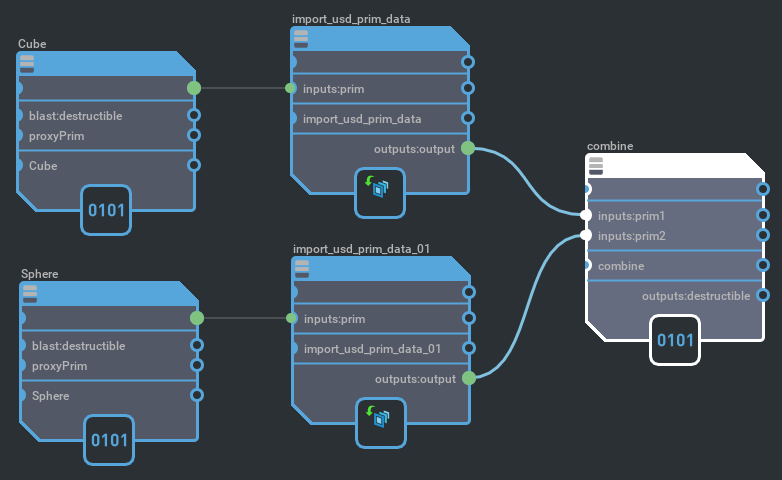
Example usage of a Combine node.
Authoring: Fracture
The Fracture node takes a mesh or destructible and fractures it based on a point cloud input. For best results, the mesh should be closed and not contain degenerate triangles. Input points that are inside of the mesh will be used to generate Voronoi sites, points outside of the mesh are ignored.
Sending in an already fractured mesh to another fracture node will create layers of fracture. The newly generated chunks from the first fracture will be fractured again using another set of points. This allows you to sculpt the detail and density in areas that you want it without requiring the entire mesh to be broken up at that fidelity.
During simulation if all children of a given parent chunk are still intact, then the parent will be rendered instead.
Input |
Description |
|---|---|
prim |
Prim to use as input to fracture. Connect to “destructible” output from another Blast node or “output” from an “import USD prim data” node. The import node should be connected to a mesh prim. |
points |
Point cloud to use for fracture. Points inside will be used as Voronoi sites, points outside will be ignored. |
contactThreshold |
Force from impact must be larger than this value to be used to apply damage. Set higher to prevent small movements from breaking bonds. |
bondStrength |
Base value to use for bond strength. How it is applied depends on the mode used. Bond strength is automatically recalculated when this changes. |
bondStrengthMode |
Controls how the Default Bond Strength is used. Bond strength is automatically recalculated when this changes. “areaInstance”: (Default) Multiply the default value by the area of the bond using destructible instance scale.
“areaBase”: Multiply the default value by the area of the bond using destructible base scale.
“absolute”: Use the default value directly.
|
interiorMaterial |
Path to material to use for interior faces created through fracture. |
maxContactImpulse |
Force that PhysX can use to prevent objects from penetrating. It is only used for kinematic destructibles that are attached to the world. This can approximate brittle materials by setting the value low, giving the bonds a chance to break before the objects are pushed apart. |
interiorUvScale |
UV scale to use on interior faces generated through fracture. |
damageMinRadius |
Full damage from user generated fracture event is applied inside this radius. |
damageMaxRadius |
No damage from user generated fracture event is applied outside this radius. |
impactDamageScale |
Scale physical impacts by this amount when applying damage from collisions. |
impactClusterRadius |
If positive, contact reports will be aggregated into clusters of approximately the given radius, and damage accumulated for that cluster. The cluster will be reported as one damage event. |
allowSelfDamage |
If on, chunks from a destructible actor may cause damage to sibling actors. Default behavior for legacy assets is to disable self-damage, which changes the legacy behavior. |
Output |
Description |
|---|---|
destructible |
Result of the fracture operation. Can be used as the input prim to another Blast authoring node. |
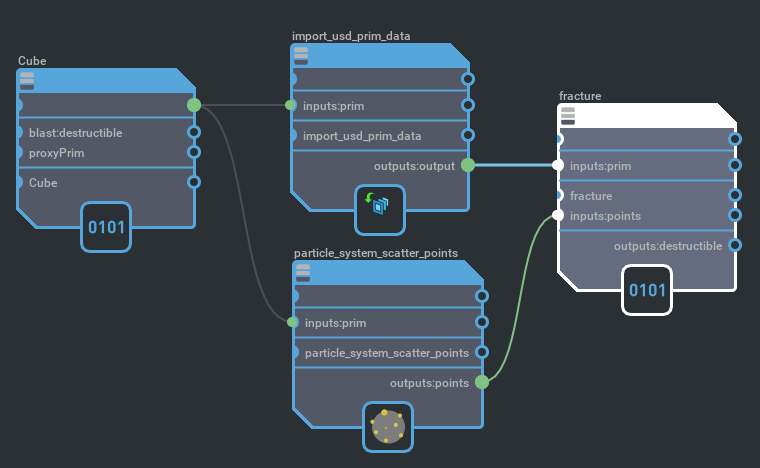
Example usage of a Fracture node.
Events: Flow Adapter
The Events Flow Adapter node takes a bundle of active events and translates it into outputs that can drive Flow emitter prim attributes.
Currently only one layer is supported for all events. Work is ongoing to support visible materials mapping to Flow data via a new schema, and for Flow emitters to be able to emit on multiple layers from a single input stream of data. Then events will use material data to drive emission specific to that material.
Input |
Description |
|---|---|
events |
Bundle of events that can be processed by adapter nodes. |
Output |
Description |
|---|---|
positions |
Unique world space vectors. |
faceVertexIndices |
Indices into “positions” used to build faces. |
faceVertexCounts |
Defines how many indices make up each face. |
velocities |
Per vertex velocity. |
coupleRateSmokes |
Per vertex emission rate. |
NOTE: The outputs prefixed with “subset” are not intended to be used yet. They will support multiple layers in the event bundle being passed to Flow when materials can be mapped to Flow layer IDs and Flow emitters support multiple layers.
Experimental Output |
Description |
|---|---|
subsetLayers |
Flow layer IDs referenced by faces. It is possible for their to be duplicates. |
subsetFaceCounts |
Number of faces each layer ID slot represents. Faces are grouped by layer ID. |
subsetEnabledStatus |
Tells Flow emitter if each block of faces is enabled. Allows other data to be cached. |
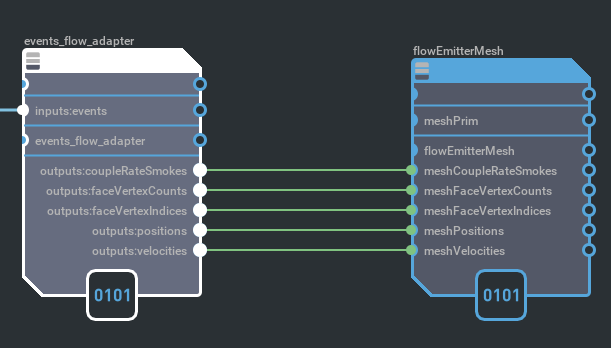
Example usage of a Flow apater node.
Events: Gather
The Events Gather node takes no inputs and produces a bundle of active events. These can come from bonds breaking and contacts between objects.
Destruction events are generated for all Blast based prims when bonds break.
Collision events are reported for all prims that have the rigid body and report contacts APIs applied.
The output of this can be sent to adapter nodes to generate responses to the events.
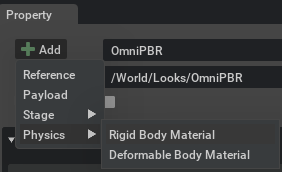
Visual materials should have the Rigid Body Material applied. This can be added by selecting the material and doing Add -> Physics -> Rigid Body Material. It is needed to report the correct materials for collision events. This is not strictly required yet, but will be when multiple materials are fully supported by this system.
Input |
Description |
|---|---|
None |
Output |
Description |
|---|---|
events |
Bundle of events that can be processed by adapter nodes. |
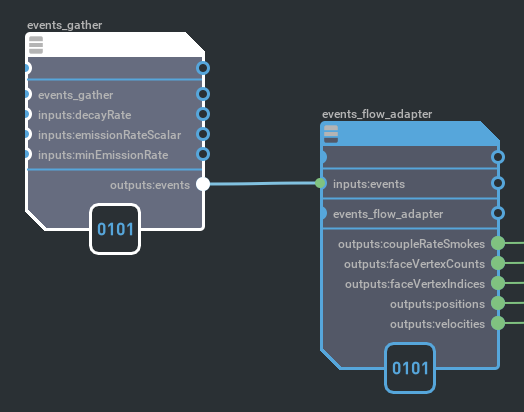
Example usage of a gather node.