

Extension: omni.kit.window.layer_stack-1.0.2 |
Documentation Generated: Jul 30, 2025 |
Overview#
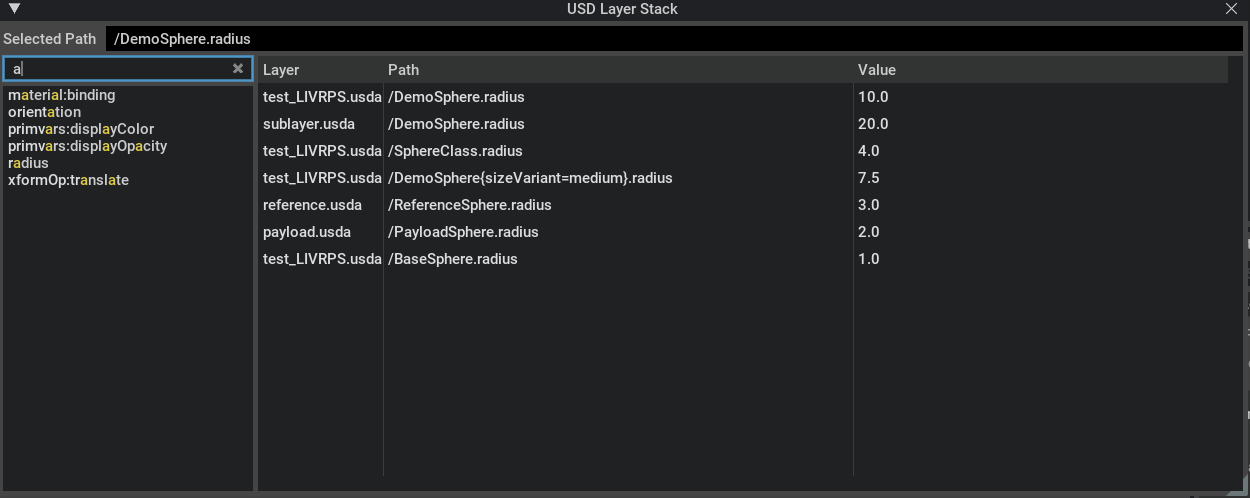
The omni.kit.window.layer_stack extension provides an interface for inspecting and understanding the property specs that contribute to a USD prim or property’s final value resolution. It enables users to visualize, select, and manage layer-related information in an intuitive tree view. The extension leverages Omni UI to seamlessly integrate this functionality within the Omniverse Kit SDK environment.
Concepts#
LayerStackModel: This model manages the data structure for the USD layer stack. It handles key operations such as property selections, muting layers, retrieving item details, and clearing the model.
LayerStackWidget: Acting as the visual component, this widget displays the layer stack tree view and synchronizes user interactions with the underlying model. It provides an interface for updating the selected property and refreshing the displayed layer information.
LIVRPS Rule: The Layer Stack Window displays layers in this order of strength, helping you understand which opinions are winning in the composition. USD uses the LIVRPS rule to determine which opinions win during composition:
Local opinions (strongest)
Inherits opinions
Variants opinions
References opinions
Payload opinions
Specializes opinions (weakest)
Usage#
Select a prim in your stage
Open the Layer Stack Window from the Window menu
The window will display the layer stack for the selected prim
Select a property from the property list to view its composition
Understanding the Display#
The Layer Stack Window shows:
Layer: The name of the contributing layer
Offset, Scale: Any time offsets or scales applied to the layer
Path: The path to the prim or property within the layer
Value/Target Paths/Metadata: The value (for attributes) or target paths (for relationships) or metadata (for prims) in that layer
When no prim is selected, the layer stack window displays the root prim’s layer stack. In this display mode, only the Layer column and Offset, Scale columns are visible. When a prim or a property is selected, if any of the layers contributing to the prim or property’s value has layer offset, the Offset, Scale columns will be visible. Otherwise, this column won’t be shown. If a property is selected, and it is an attribute, the Value column will display the attribute’s value. If it is time varying, it will display the number of time samples. If a property is selected, and it is a relationship, the last column header will be Target Paths and it will display the target paths. If a prim is selected, the last column header will be Metadata.
Functionality#
The extension focuses on presenting a comprehensive view of USD layer stacks, making it easier for users to inspect layer hierarchies in relation to specific prims and their properties. Common interactions include selecting and searching for specific properties, and clearing the view to refresh data. The design abstracts the complexity of layer data management behind intuitive UI components while retaining precise control via public APIs.
Relationships#
This extension depends on several key modules:
omni.ui for the user interface framework.
omni.usd and omni.kit.usd.layers for accessing and managing USD stage data.
omni.timeline, omni.kit.widget.highlight_label, omni.kit.widget.searchfield, and omni.kit.menu.utils to support additional UI interactions and integration within the broader Omniverse Kit ecosystem.
Considerations#
The extension is primarily focused on read-only viewing and basic interactions with USD layer stacks. More complex editing operations may require integration with other USD or Kit modules.
The provided public APIs, LayerStackModel and LayerStackWidget, are designed with flexibility in mind, so users can integrate them into custom workflows or extend their functionality further as needed.