

Extension: omni.kit.window.composition-1.0.1 |
Documentation Generated: Jul 30, 2025 |
Overview#
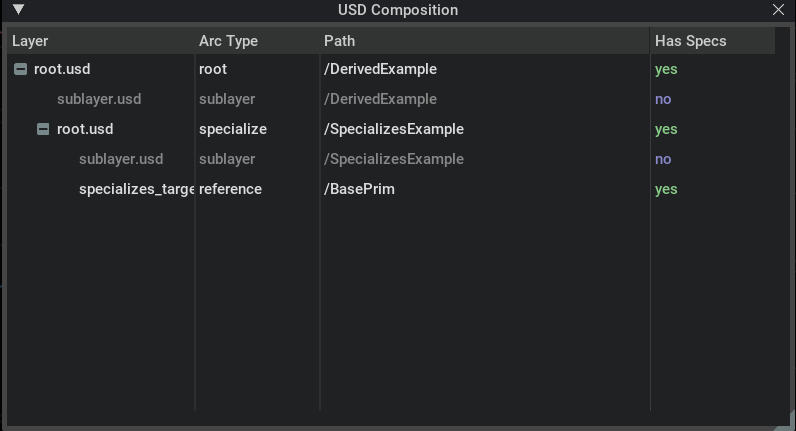
USD Composition Window is an extension designed to display USD composition arcs within Omniverse. It provides a dedicated window where users can inspect the hierarchy and relationships of USD composition arcs through a tree view.
Concepts#
CompositionModel: This model provides the data structure backing the composition tree view, organizing composition arcs into a fixed four-column layout. It handles the retrieval of child items and supports value models for each column.
CompositionWidget: This widget offers a user interface to present the USD composition structure, allowing users to view and navigate through composition arcs in a dedicated window.
Functionality#
The extension creates a window that lists USD composition arcs in a tree view, making it simple to understand the structure of USD stages. Internally, it leverages the CompositionModel to fetch and organize items based on their layer, arc type, and path. The CompositionWidget then renders this model using Omni UI, providing a clear visual interface for exploring USD composition details without delving into lower-level USD API calls.
There are four columns in the composition window:
Layer: The layer path of the composition arc.
Arc Type: The type of the composition arc. It could be either
root,sublayer,inherit,variant,payload,reference, orspecializes.Path: The object path of the composition arc.
Has spec: Whether the composition arc targets a prim spec.
Relationships#
Dependencies: The extension relies on core modules such as omni.ui for the UI components, omni.usd for USD integration, and omni.kit.menu.utils to integrate with the Kit menu system.
Integration: It fits into Omniverse Kit by providing an additional window that complements other USD-based tools, enabling seamless workflow interactions when viewing complex USD stages.
Considerations#
The design assumes a standard four-column view for composition data, which is fixed in the model. The extension is tailored for a read-only inspection of USD composition arcs rather than for editing or modifying USD layers directly. Advanced users looking to customize the presentation may extend or build upon the provided CompositionModel and CompositionWidget classes.