

Omniverse Hoops Converter [omni.kit.converter.hoops_core]#
This extension provides interfaces to convert 3D formats to USD and also supports to convert USD to those assets.
Overview#
omni.kit.converter.hoops_core uses the HOOPS Exchange SDK to convert a variety of CAD data formats to USD.
When this extension loads, it will register itself with the CAD Converter service (omni.services.convert.cad) if it is available.
Note
As of version 201.1.0, omni.kit.converter.cad_core has been deprecated. Its functionality has been divided between two extensions: omni.kit.converter.hoops (UI extension) and omni.kit.converter.hoops_core (headless extension).
Recent Stage Authoring Changes:#
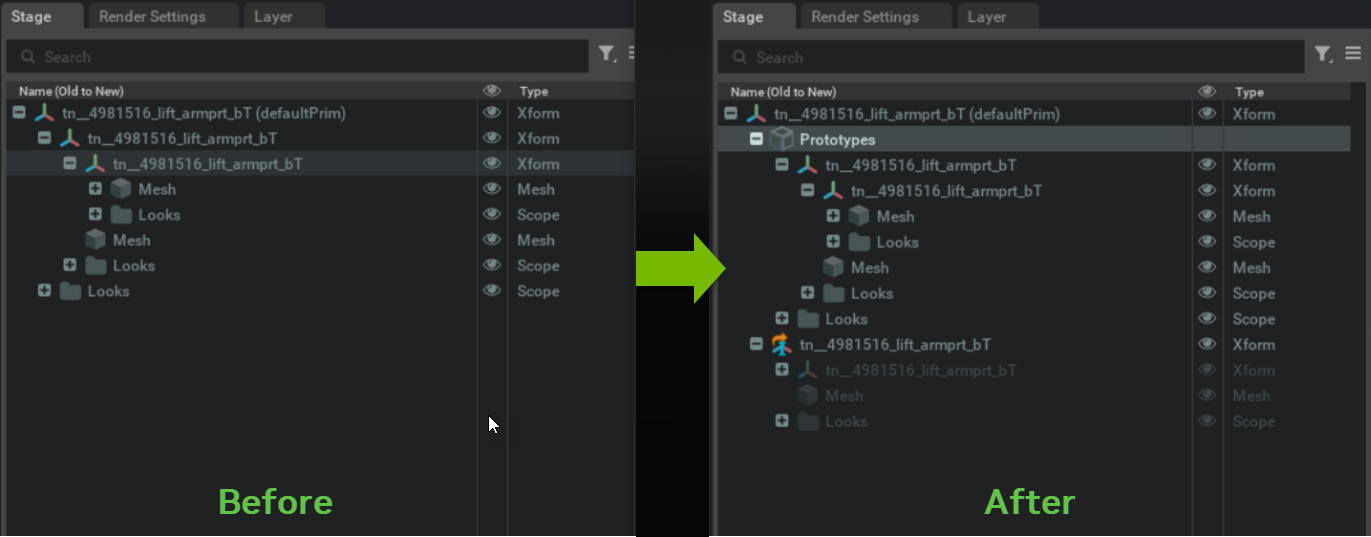
Since version 201.1.0 of omni.kit.converter.cad, the stage authoring for HOOPS extensions has been updated to comply with Scenegraph Instancing guidelines. Each HOOPS model element now generates a prototype. During conversion, instances are created with internal references to their corresponding prototype paths, and the Instanceable flag is set to true. For more information, refer to the Scenegraph Instancing documentation.
CAD CONVERTER CONFIG FILE INPUTS:#
Documentation Changes:#
This section lists changes to this extension’s documentation for this release (202.0.0).
What Was Added#
Rhino .3dm support.
bConvertMetadata - If true, then metadata, including PMI, are imported as USD Attributes
iUpAxis - override the up-axis of the converted USD’s stage to Y-up, Z-up, or default to the converter’s up-axis setting.
dMetersPerUnit - set the meters per unit converted USD’s stage metric. If set to 0.0, the converted USD will retain the meters per unit from conversion.
sOptimizeConfig - (Experimental feature) Provide a path to a saved Scene Optimizer JSON configuration file or a JSON formatted string for executing a predefined optimization process stack.
Instructions on how to run core extensions via CLI:
Please refer to omni.services.convert.cad for more information.
Conversion options are configured by supplying a JSON file. Below are the available configuration options.
JSON Converter Settings:#
Format: “setting name” : default value
Converter Option: Instancing#
Description: If true the USD model uses instancing by creating USD References. If false, then there is no instancing at all.
Default Value: true Value Ranges: true, false Data Format: bool
Config File Example:
"bInstancing" : true
Converter Option: Global Xforms#
Description: When bInstancing is set to false, this flag controls whether globalXforms are composited. If false local transforms are applied.
Default Value: false Value Ranges: true, false Data Format: bool
"bGlobalXforms" : false
Converter Option: Tessellation Level of Detail (LOD)#
Description: Tessellation levels of detail presets provide values to define ChordHeightRatio and AngleToleranceDeg; 0 is the lowest level (ExtraLow) while 4 is the highest level (ExtraHigh)
Default Value: 2 Value Ranges: [0, 4]
0,
iTessLOD0= ExtraLow, ChordHeightRatio=50, AngleToleranceDeg=40,1,
iTessLOD1= Low, ChordHeightRatio=600, AngleToleranceDeg=40,2,
iTessLOD2= Medium, ChordHeightRatio=2000, AngleToleranceDeg=40,3,
iTessLOD3= High, ChordHeightRatio=5000, AngleToleranceDeg=30,4,
iTessLOD4= ExtraHigh, ChordHeightRatio=10000, AngleToleranceDeg=20. Data Format: integer
"iTessLOD" : 2
Converter Option: Accurate Surface Curvatures#
Description: If true, respect surface curvature to control triangles elongation directions.
Default Value: true Value Ranges: true, false Data Format: bool
"bAccurateSurfaceCurvatures" : true
Converter Option: Generate UVs#
Description: If true, calls Scene Optimizer Service Kit extension to generate UVs if missing in source data.
See Scene Optimizer Service documentation for details.
Default Value: true Value Ranges: true, false Data Format: bool
Config File Example:
"bOptimize" : true
Converter Option: Dedup Mesh Vertices#
Description: If true, weld mesh elements in appropriate groups.
Default Value: true Value Ranges: true, false Data Format: bool
Config File Example:
"bDedup" : true
Converter Option: Use Materials#
Description: If true converter creates OmniPBR materials with the color set as an attribute. If false converter will convert colors to USD displayColor primvars.
Default Value: true Value Ranges: true, false Data Format: bool
Config File Example:
"bUseMaterials" : true
Converter Option: Use Normals#
Description: If true then we pass normals to USD. if false, then we do not.
Default Value: true Value Ranges: true, false Data Format: bool
Config File Example:
"bUseNormals" : true
Converter Option: Report Progress#
Description: If true then we report import/export progress.
Default Value: true Value Ranges: true, false Data Format: bool
Config File Example:
"bReportProgress" : true
Converter Option: Use Current Stage#
Description: If true use currently opened USD.
Default Value: true Value Ranges: true, false Data Format: bool
"bUseCurrentStage" : false
Converter Option: Convert Curves#
Description: If true, convert curve elements into USD Basis Curves; else, ignore these elements.
Default Value: false Value Ranges: true, false Data Format: bool
"bConvertCurves" : false,
Converter Option: Convert Metadata#
Description: If true then metadata, including PMI, are imported as USD Attributes; else, metadata are ignored.
Default Value: false Value Ranges: true, false Data Format: bool
"bConvertMetadata" : false,
Converter Option: Override Up-Axis#
Description: Override the up-axis of the converted USD’s stage to Y-up, Z-up, or default to the converter’s up-axis setting.
Default Value: 0 Value Ranges: [0, 2]
0 to default to converter’s up-axis
1 to override to Y-up
2 to override to Z-up Data Format: integer
Config File Example:
"iUpAxis" : 0
Converter Option: Meters Per Unit#
Description: Set the meters per unit converted USD’s stage metric. If set to 0.0, the converted USD will retain the meters per unit from conversion.
Default Value: 1.0 Value Ranges: Positive numbers Data Format: double
Config File Example:
"dMetersPerUnit" : 1.0
Converter Option: Scene Optimizer Config#
Description: (Experimental feature) Provide a path to a saved Scene Optimizer JSON configuration file or a JSON formatted string for executing a predefined optimization process stack.
See Scene Optimizer Service documentation for details.
Default Value: “” Data Format: string
Config File Example:
"sOptimizeConfig" : "optimize_sample_config.json"
Full sample_config.json:#
{
  "bInstancing" : true,
  "bGlobalXforms" : false,
  "bConvertHidden" : true,
  "bOptimize" : true,
  "bDedup" : true,
  "iTessLOD" : 2,
  "bAccurateSurfaceCurvatures" : true,
  "bUseNormals" : true,
  "bUseMaterials" : true,
  "bReportProgress" : true,
  "bUseCurrentStage" : false,
  "bConvertCurves" : false,
  "bConvertMetadata" : false,
  "iUpAxis": 0,
  "dMetersPerUnit": 1.0,
  "sOptimizeConfig": "optimize_sample_config.json"
}
Licensing Terms of Use and Third-Party Notices#
The omni.kit.converter.hoops_core and related CAD converter Extensions are Omniverse Core Extensions.
Do not redistribute or sublicense without express permission or agreement.
Please read the Omniverse License Agreements and the Third_Party_Notices.md for detailed license information.