

Extension: omni.kit.window.section-107.1.4 |
Documentation Generated: Apr 24, 2026 |
Overview#
omni.kit.window.section provides an interactive tool window for managing and manipulating sectional views within the viewport. The extension enables users to create, adjust, and save sectional configurations with intuitive visual controls and custom manipulators. It streamlines section editing by presenting clearly organized panels and interaction tools directly within the Omniverse Kit environment.
UI Components#
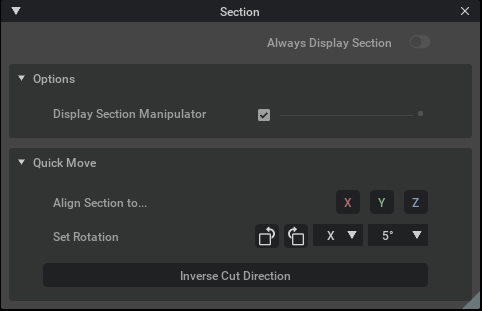
The Section Tool Window serves as the main container, offering a dedicated interface where users can access all section-related features.
Embedded panels, such as the Options Panel and Quick Move Panel, provide controls for adjusting section settings like alignment, movement, and rotation.
An interactive Section Manipulator supports drag gestures and gizmo-based transformations, offering real-time visual feedback on section orientation and positioning.
A menu integration component ensures that the tool can be conveniently accessed through a designated menu entry (Tools/Section).
User Workflows#
Users launch the tool window via the Tools/Section menu and are presented with a clear UI for managing sectional views.
Within the window, interactive panels allow users to toggle section visibility, adjust transform properties, and align sections relative to the viewport.
The interface supports common operations such as resetting section parameters, saving section configurations, and quickly switching between different sectional modes.
Real-time updates and visual cues from the Section Manipulator help users fine-tune the section settings efficiently.
Configuration#
A key setting, “alwaysDisplay”, controls whether the section remains visible at all times or only when the tool window is open.
The “useSessionLayer” option dictates if section modifications are recorded in the session layer, allowing seamless state management.
Configuration options are accessible through the extension’s settings and integrated menu, enabling users to customize the tool’s behavior to match their workflow preferences.