

Extension: omni.kit.window.material-1.8.0 |
Documentation Generated: Jul 23, 2026 |
Overview#
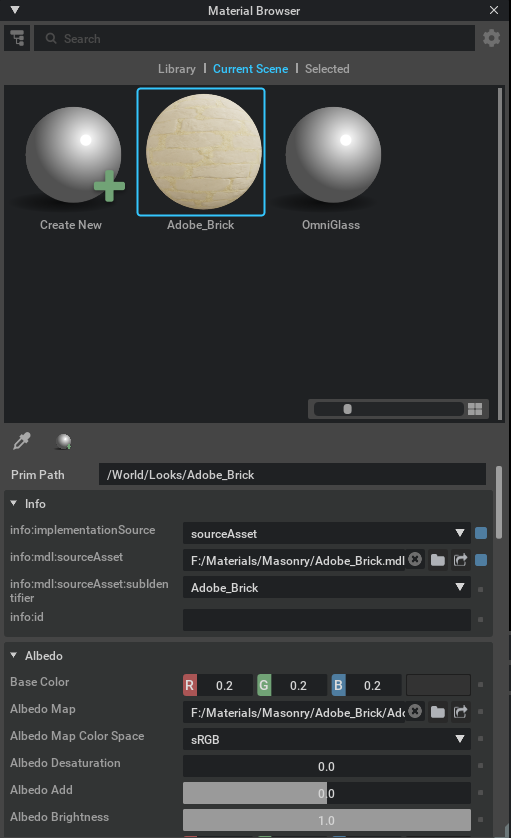
The omni.kit.window.material extension provides a dedicated window interface for browsing and editing materials within Omniverse applications. It offers an interactive material browser that integrates with system menus and supports toggling material-related options directly from the user interface. This extension is designed to simplify material management by providing clear separation between material libraries and stage material settings.
Concepts#
The extension leverages menu actions to open the material browser window, enabling quick access to material libraries and stage material settings.
It distinguishes between library mode and stage mode, allowing users to manage material assets or stage materials efficiently.
Users can interact with material options through dedicated options menus for both material libraries and stage-related materials.
Functionality#
Displays an interactive material browser window with intuitive controls and easy-to-use menu integration.
Provides separate options menus to manage material libraries and stage-specific material settings.
Supports material preview toggling, allowing users to turn on or off the material preview for selected items.
Integrates with a predefined browser menu root, ensuring that material browsing features are readily accessible from the main application menu.
Key Components#
MaterialBrowserWidget This widget forms the core of the material browser window, managing the display of material previews, options menus, and interactive controls for browsing materials.
get_instance This function returns the current instance of the extension, providing access to the material browser interface and its associated functionalities.