

Extension: omni.kit.window.environment-1.8.1 |
Documentation Generated: May 22, 2026 |
Overview#
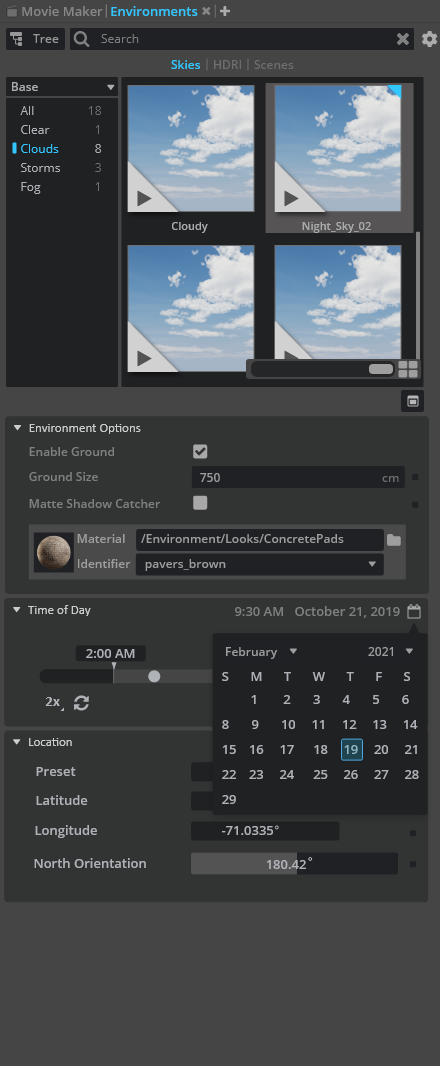
omni.kit.window.environment provides a dedicated window for browsing, managing, and editing environment assets within Omniverse Kit. It offers an intuitive user interface to display, filter, and interact with various environment files and stage templates. Users can conveniently explore environment categories, preview asset details, and apply these environments to their stages.
UI Components#
The main window serves as the primary container, offering a comprehensive view to display environment assets.
The browser widget presents a folder-based layout with thumbnail previews, filtering options, and drag-and-drop functionality to load environment files.
The options menu supplies contextual actions and settings to customize the environment display.
The toolbar includes quick-access buttons for operations like toggling property panels, enhancing the ease of navigation and interaction.
Additional delegates and property widgets enrich the user interface by managing environment details and providing visual feedback for actions like drag-and-drop.
Functionality#
The extension displays environment assets from preconfigured sources, allowing users to browse through various categories and sub-folders.
It supports intuitive drag-and-drop actions; for example, users can drag environment items and drop to viewport or stage window to load or update scene environment settings.
Stage template features enable seamless application of environment configurations, helping align scene properties with selected environment assets.
Action registration mechanisms facilitate operations that appply envorinment item to the scene.
Configuration#
Specific folders and collections of environment assets are defined through extension settings. These settings include lists of folder URLs, categories to hide, and custom folder paths.
Options such as load timing, visibility after startup, and data timeout are configurable, allowing tailored behavior based on user requirements.
These configuration options ensure that the environment browser displays relevant assets, while also managing performance through timeout and load control settings.
Relationships#
This extension integrates with related modules like omni.kit.environment.core, omni.kit.window.property, omni.kit.stage_templates, and omni.kit.browser.folder.core. These dependencies collaborate to deliver functionality ranging from property management to template-based stage setups.
Actions and asynchronous processing from the Omniverse Kit ecosystem are utilized to maintain a smooth and responsive user experience when interacting with environment assets.