
Extension: omni.kit.viewport.menubar.display-110.0.0 |
Documentation Generated: Oct 07, 2026 |
Usage Examples#
Add Custom Display Settings#
from omni.kit.viewport.menubar.display import get_instance

# Register a custom display setting
instance = get_instance()
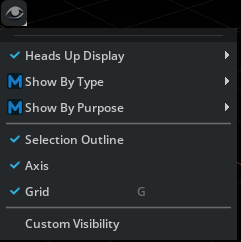
instance.register_custom_setting("Custom Visibility", "/exts/my_extension/custom_visibility")
Add a Per-Viewport Custom Display Setting#
Instead of a static setting_path, register_custom_setting can take a get_setting_path_fn
callback. It receives the viewport_api and returns the setting path to bind for that viewport,
so the toggle is resolved per-viewport when the menu is built (the same pattern CategoryStateItem
uses for category items). Use a /persistent/ path so the toggle state is saved across sessions.
from omni.kit.viewport.menubar.display import get_instance

def _setting_path(viewport_api) -> str:
    # One setting per viewport; "/persistent/" makes it survive restarts.
    return f"/persistent/app/viewport/{viewport_api.id}/my_extension/custom_visibility/visible"

instance = get_instance()
instance.register_custom_setting("Custom Visibility", get_setting_path_fn=_setting_path)
Provide either setting_path or get_setting_path_fn; if both are omitted, the entry has nothing
to bind to and will not render (a warning is logged).
Add Custom Category Item to Builtin Category in Display Menu#
from omni.kit.viewport.menubar.display import get_instance
from omni.kit.viewport.menubar.core import CategoryCollectionItem, CategoryCustomItem, CategoryStateItem, SelectableMenuItem, ViewportMenuDelegate
import omni.ui as ui

def _build_menu():
  with ui.Menu("Attachments", delegate=ViewportMenuDelegate()):
    ui.MenuItem("None")
    ui.MenuItem("Selected")
    ui.MenuItem("All")

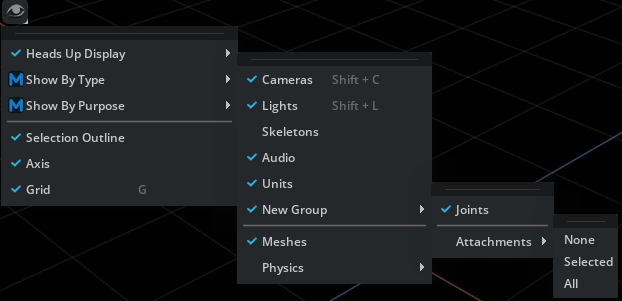
new_item = CategoryCollectionItem(
  "New Group",
  [
    CategoryStateItem("Joints", ui.SimpleBoolModel(True)),
    CategoryCustomItem("Attachments", _build_menu)
  ]
)
instance = get_instance()
instance.register_custom_category_item("Show By Type", new_item)
Add New Category to Display Menu#
from omni.kit.viewport.menubar.display import get_instance
from omni.kit.viewport.menubar.core import CategoryCollectionItem, CategoryCustomItem, SelectableMenuItem
from omni import ui

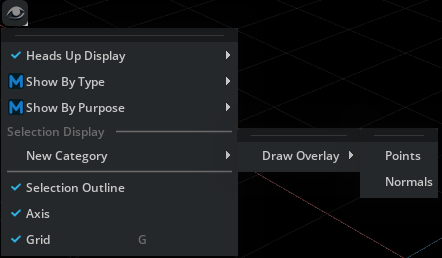
category = "Draw Overlay"
section = "Selection Display"

def on_shown(s):
    print("on_shown: {s}")

overlay_item = CategoryCollectionItem(
  category,
  [
    CategoryCustomItem("Points", lambda: SelectableMenuItem("Points", model=ui.SimpleBoolModel())),
    CategoryCustomItem("Normals", lambda: SelectableMenuItem("Normals", model=ui.SimpleBoolModel()))
  ],
  shown_changed_fn=on_shown
)

instance = get_instance()
instance.register_custom_category_item("New Category", overlay_item, section)