

Extension: omni.kit.property.material-1.15.1 |
Documentation Generated: Oct 07, 2026 |
Overview#
This extension provides editing material properties in Omniverse Kit. It has custom UI for editing material properties, with capabilities to handle materials defined in MDL (Material Definition Language).
User Guide#
Material Purposes in the Material Binding Widget#
USD lets a prim (or collection) bind a different material for each material purpose. There are three purposes:
All Purpose — the default, unnamed purpose (
UsdShade.Tokens.allPurpose, the empty token). Used when a renderer does not ask for a more specific purpose.Preview (
preview) — the material a lightweight/preview renderer should use.Full (
full) — the material a full-fidelity renderer should use.
The names in bold are how the purposes are labelled in the UI; the value in brackets is the USD token the binding is authored with.
The “Materials on selected models” section of the Property window (the material binding widget) lets you view and edit these bindings. Historically it only showed All Purpose bindings, so assets that bind materials to the Preview/Full purposes appeared to have no material assigned. The widget now surfaces every purpose through a Material Purpose dropdown.
The demonstration scene#
The screenshots below use the extension’s test scene,
data/tests/usd/material_purpose.usda. Its prims are named after the material purposes they are
bound for, so a selection’s behaviour is predictable. The postfix of each cube encodes which
purposes have a binding:
Postfix letter |
Material purpose |
Bound material |
|---|---|---|
|
All Purpose |
|
|
Preview |
|
|
Full |
|
A cube’s postfix is the concatenation of the letters for every purpose it binds. There are two
cubes (_01, _02) of each kind so multi-selection can be demonstrated:
Prim |
Bound purposes |
|---|---|
|
All Purpose only |
|
Preview only |
|
Full only |
|
Preview + Full |
|
All Purpose + Preview |
|
All Purpose + Full |
|
All Purpose + Preview + Full |
/World also carries a collection for every purpose combination, using the same postfix
convention, to demonstrate collection-based bindings. Each collection contains two cones
(Cone_<postfix>_01, Cone_<postfix>_02):
Collection |
Bound purposes |
|---|---|
|
All Purpose only |
|
Preview only |
|
Full only |
|
All Purpose + Preview |
|
All Purpose + Full |
|
Preview + Full |
|
All Purpose + Preview + Full |
The materials live under /World/Looks: allPurpose, preview, full (plus the spare
allPurpose2, preview2, full2 used to demonstrate re-binding).
When the purpose dropdown appears#
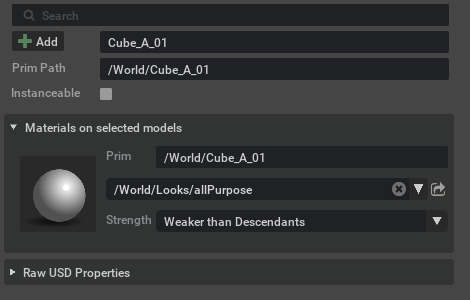
If the selection only has All Purpose bindings (or nothing bound), the widget looks exactly as
before — no dropdown is added. Selecting Cube_A_01:
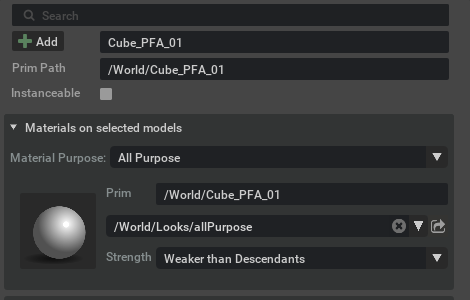
As soon as the selection has a binding for a specific purpose (Preview and/or Full), a
Material Purpose dropdown appears above the material row. It always lists All Purpose
first (its default), followed by the specific purposes present on the selection. Every new
selection starts with All Purpose in focus. Selecting Cube_PFA_01:
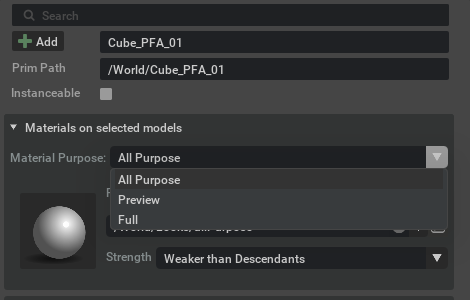
Opening the dropdown shows only the purposes that the selection actually uses:
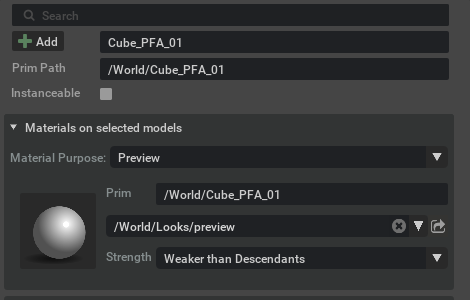
The purpose you pick becomes the purpose in focus: the material row is filtered to the binding of
that purpose. Choosing Preview for Cube_PFA_01 shows its preview material:
The purpose in focus is also what edits target: binding a material through the material combo box (or drag-and-drop) writes the binding for the purpose in focus only, leaving the other purposes untouched. The thumbnail’s Copy / Paste context menu follows the same rule — it copies the binding of the purpose in focus and pastes it back for that purpose. “All Purpose” is always offered even when the selection has no All Purpose binding yet, so you can add one.
Only purposes the selection is already bound for are offered. There is no way to add a first Preview or Full binding from this widget: the dropdown lists a specific purpose once something has authored a binding for it, and All Purpose is the only purpose you can always bind.
Selecting multiple prims#
Behaviour change — one summary row replaces the per-material rows. A selection whose prims use several different materials used to render one row per material, each with its own thumbnail, Copy/Paste menu, Select Material button, strength control and drag-and-drop target. It now renders a single summary row standing for the whole selection. This applies to every purpose, All Purpose included — it is not limited to the new Preview/Full paths.
What moved, rather than disappeared: Select Material now selects every material the summary represents; binding a material (from the combo box or by drag-and-drop) applies to every represented prim, including prims that inherit their binding; Copy/Paste and the binding strength act on the selection as a whole. The individual material names are no longer separate rows — they are listed in the summary row’s material field tooltip.
With several prims selected, the material row summarizes them for the purpose in focus:
A prim that has no binding for the purpose in focus is shown as
None.If the represented prims share one material (or all show
None), the row shows that value.If they differ, the material combo box shows Mixed, and a single summary widget represents the whole selection. Its material field tooltip lists the distinct material values (one per line, at most 10, then
...).Whenever the widget represents more than one prim, the prim field shows Mixed and its tooltip lists the prim paths (one per line, at most 10, then
...).
Selecting Cube_PF_01 and Cube_PA_01 with All Purpose in focus: only Cube_PA_01 has an
All Purpose binding, so the material is Mixed (/World/Looks/allPurpose and None). Hovering
the fields reveals the prim and material lists:
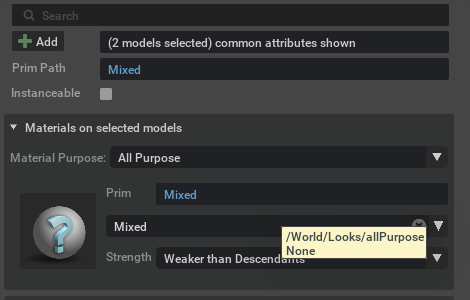
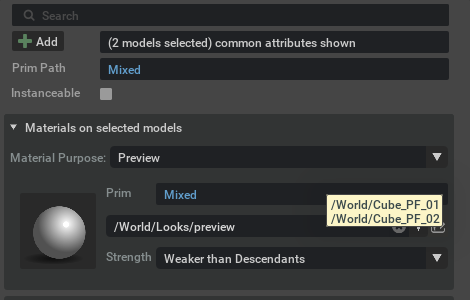
Selecting Cube_PF_01 and Cube_PF_02 (identical bindings) with Preview in focus: both share
/World/Looks/preview, so the material row shows it while the prim field is Mixed; its tooltip
lists both prims:
Collections and inheritance#
The purpose dropdown works the same way for collection-based bindings. Selecting the
World.collection:cones_APF collection (bound for All Purpose + Preview + Full) shows the dropdown;
picking Preview shows the collection’s preview material, and the prim row reads the collection
path (labelled Collection).
A collection bound only for specific purposes shows the dropdown too — World.collection:cones_PF
offers All Purpose, Preview and Full, and its default All Purpose view reads None because
that collection has no All Purpose binding. A collection with no binding for the purpose in focus
(e.g. World.collection:cones_A, which only has an All Purpose binding) is shown as None,
exactly like a prim.
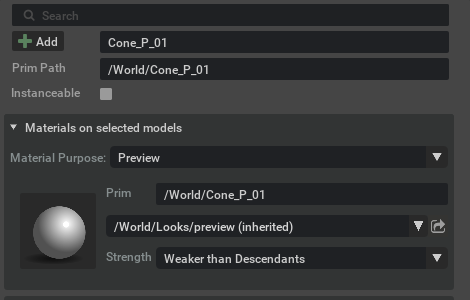
Selecting a collection member. The purposes offered for a prim come from USD’s binding
resolution, not only from the bindings authored on the prim itself. Selecting Cone_P_01 — a
member of cones_P, with no binding of its own — therefore offers All Purpose and Preview:
the default All Purpose view reads None, and switching to Preview shows the material bound
through the collection (marked (inherited), since the binding is authored on /World).
Inheritance: the same applies to a prim that inherits a binding from an ancestor — the
ancestor’s purposes are offered and its material is shown rather than None.
Because a shown material may come from a collection or an ancestor, binding a new material through the widget authors a direct binding for the purpose in focus on the selected prim, which overrides the inherited/collection binding for that prim.