

Extension: omni.kit.browser.material-1.6.5 |
Documentation Generated: Dec 13, 2025 |
Overview#
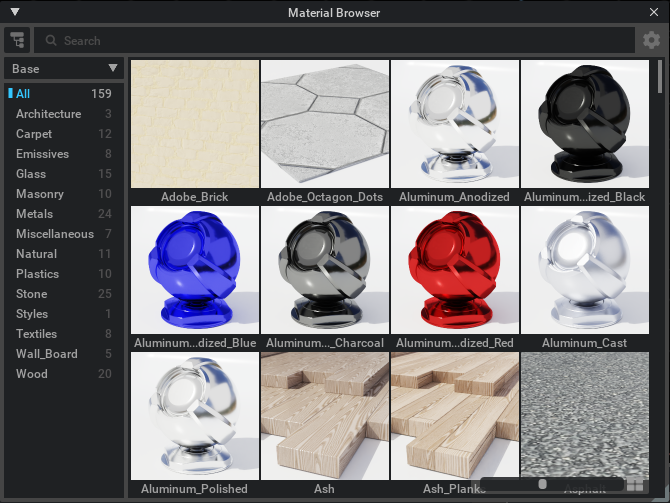
The Material Browser extension provides a dedicated interface to explore and bind materials by organizing material files from specified folders. It offers tools for previewing material details, generating thumbnails, and applying materials to USD prims. The extension focuses on presenting material assets in a structured and intuitive manner while supporting operations such as drag-and-drop and context-specific interactions.
Concepts#
Material Files and Sub-Materials Materials are represented as file objects that can contain one or multiple material definitions. Files are parsed into one or more sub-materials whose properties — such as thumbnail URLs and binding information — are accessible.
Detail Presentation and Delegation Each material is encapsulated in a detail item that aggregates information for display. A delegate is used to compute labels, tooltips, and to manage interactions like right-click context menus and drag operations.
Customization via Options Menu Users can interact with a specialized options menu to trigger material-specific actions, providing a clear interface for users to manage material behavior and settings such as shadow casting preferences.
Functionality#
Browsing and Organization The extension organizes materials in a hierarchical structure based on folder sources. It uses a browser model that creates folder objects and category items, ensuring materials are presented with consistent grouping and counts.
Material Creation and Binding The browser model provides methods for material creation through URLs or detail items. Once materials are created, the extension can bind them to target prims by invoking binding operations with appropriate parameters.
Interactive Detail View By leveraging dedicated delegates, the extension offers interactive detail views that generate labels and thumbnails dynamically. Users can initiate drag-and-drop operations or right-click to access context menus directly from the material detail items.
Key Components#
MaterialBrowserModel Acts as the central interface in the browser, managing the hierarchical organization of material files and folders. It offers functions for creating folder objects and detail items, as well as executing material binding operations.
MaterialDetailItem Represents individual material entries derived from material files, holding key properties such as the material file’s URL and thumbnail information. It also respects configuration flags, like those controlling shadow casting.
MaterialFile Encapsulates material file data and supports operations such as equating two material files based on file URLs and sub-material content. It integrates thumbnail management by verifying and setting thumbnail URLs.
MaterialDetailDelegate Provides the display logic for material detail items. This component manages how labels, thumbnails, and tooltips are generated and customized. It also handles user actions such as right-click context menu invocation and drag payload preparation.
MaterialOptionsMenu A specialized options menu built upon the folder options menu framework, tailored for material-specific actions. It facilitates additional user interface actions related to material management within the browser.
This extension integrates with external modules including folder browsing utilities and viewport tools to provide a comprehensive material management system tailored for binding materials within a USD context.